Electronic Working Arrangements
It is widely recognised within CEPT that Electronic Working Methods have a big potential to increase the efficiency of the working process, broaden participation and at the same time reduce expenses.
The Office evaluated, proposed and aid practical implementation of the MeetingHub software, the proposed ECO solution for hybrid meetings in groups and in workshops.
- Netiquette
- Overview of CEPT/ECC meeting formats
- Access to meetings for ETSI members
- Hosting Hybrid meetings
- Enhancing Clarity and Usability of ECC Deliverables
- Templates
Netiquette
There is a need to establish netiquette to ensure that communications in online tools are efficient:
Hybrid Meetings
Before the meeting:
-
In meetings where decisions are being taken it would be important that participants register by the deadline. It would not be appropriate to allow last minute requests to join the meeting unless the need is justified.
-
Ideally, there should be one spokesperson per delegation on each topic. The delegations consisting of more than one participant are encouraged to discuss/coordinate offline their interventions on each topic.
-
Any details related to voting procedures would need to be communicated to the participants in advance.
-
Log onto the MeetingHub either you are attending the meeting physically or from remote.
-
Each participant who joins virtually would need to be identified and validated against the list of registered participants before the chair formally starts the meeting. Participants are encouraged to use a common format for their identification when updating their names on the GoToMeeting :
a) “A” for administration / “O” for observer
b1) For administration: name of the country or country code
b2) For observer: MoU/LoU-partner / organisation
c) name of the participant
Example: A – SUI – Mario Rossi
O – Prozess Gmbh – Franz Kafka
The chair, vicechair, secretary and ECO expert will put only their role and name, for example:
ECC Vicechair - Name
ECC Technical Secretary - Name
- Any participants not registered should be asked to leave.
- Anonymous users attending virtually will be asked to identify themselves using the features available in the software so that their name appears correctly on the screen. Unidentified users will be removed from the meeting.
- Participants should not forward the connection details to colleagues who are not registered. The details are available to all registered participants.
- If participants from the same organisation need to share a microphone they should communicate this to the other participants so it is clear who is speaking.
During the meeting - GotoMeeting / mHub
- Use a headset to attend the meeting as appropriate.
- Keep your camera switched-off, except when you are invited by the chair to switch it on.
- Activate your microphone only after chair gives you the floor. Keep your microphone muted when you do not have the floor.
- The MeetingHub has to be used to ask for the floor (raise hand) by all the participants.
- The MeetingHub chat should be used only for matters directly relevant to the ongoing discussion (e.g. short comments that do not require verbal interventions, to support the views of the speaker, or to share links to relevant documents). Participants should keep a polite and respectful tone and they should refrain from engaging in incidental or off-topic discussions within the chat.
- Keep your intervention concise and clear. The intervention may be concluded by stating “This concludes my intervention. Thank you, chair.” After your intervention, lower your raised hand via the MeetingHub.
- The chair, vicechair and technical secretary/ECO have the right to mute participants who do not comply with the above rules.
Messenger systems (Signal)
- ECO is managing Signal Messenger chat system in working groups and project teams on request.
- The chat should be used only for matters directly relevant to the ongoing discussion, keeping a polite and respectful tone. Participants should refrain from engaging in incidental or off-topic discussions within the chat.
- Indicate clearly your name in the chat. In Signal Messenger you can also make use of the "Member Label" in the individual chat groups if you require distinct naming or title in specific groups.
- Be sure to connect to the chat groups well in advance of meetings where used. Admission is by application, and some delay may be expected before admission.
Overview of CEPT/ECC meeting formats
Information for external parties
An overview of the typical format/setup of CEPT/ECC meetings is provided below, for particular benefit of external parties – e.g. contractors involved in technical/administrative support for these meetings.
The ECC and its various sub-groups hold multi-day meetings of between around 20-100 physical participants, with a similar number attending remotely. Expected numbers for individual meetings will be confirmed in advance.
The meetings are run with 4 or 5 meeting sessions per day of around 90 minutes each and breaks in between. The timetable is made available in advance, however timings are subject to change during the meeting and sessions can over-run.
The group chair is responsible for the overall running of the meeting. The chairman may be supported by 1 or 2 vice chairs and a secretary, as well as an expert from the ECO.
Individual sessions are chaired by either the group chair or delegated to chairs of sub-working groups or drafting groups. These session chairs will swap their position at the front of the room during the break where necessary.
The session chair needs to share their laptop screen to the in-room participants and those following online. During a typical session Word documents are displayed and interactively edited, with participants introducing documents and making proposals from the floor (in the room or online).
In some cases videos may be played, with audio that needs to be heard by both in-room and online participants.
Parallel sessions in additional rooms are sometimes required – any such requirements will be communicated in advance of the meeting. Additional rooms may not be needed for all sessions and the need for a specific room may change at short notice.
Remote participants have the same participation rights as those in the room and may need to take the floor, or in exceptional circumstances chair a session from remotely. Some may choose to use cameras when taking the floor, however most prefer to use audio only. A camera feed of the room is recommended in the technical setup, so that remote participants can see what is happening in the room. Passive remote participants normally keep their camera disabled and microphone muted. Sometimes microphones are accidentally left open.
Access to meetings for ETSI members
As per the MoU agreement between ECC and ETSI, full ETSI members are entitled to participate in relevant Project teams of the ECC Plenary and of the Working Groups of the ECC.
If the option to represent a Full ETSI Member is not available when registering to a meeting of a group, that group is not open to Full ETSI Members. Registration is however still possible according to the instructions provided here.
The list of Full ETSI members on the CEPT portal is updated regular basis, therefore there can be slight misalignments compared to the actual ETSI Membership. If this latter case is of your concern, please write to helpdesk@eco.cept.org for assistance.
The current list of Full ETSI members on the CEPT portal includes:
Updated 17.09.2026 (see previous list below)
| 2pi-Labs GmbH | GERMANY |
| 450connect GmbH | GERMANY |
| 6GIC | UNITED KINGDOM |
| 7LAYERS GmbH | GERMANY |
| A.S.I. | AUSTRIA |
| A.S.P. | UNITED KINGDOM |
| A.S.T.R.I.D. SA/NV | BELGIUM |
| Aalborg University (AAU) | DENMARK |
| Aalyria | UNITED KINGDOM |
| Abbott | SWEDEN |
| AC6 | FRANCE |
| AccelerComm Ltd | UNITED KINGDOM |
| Accenture | GERMANY |
| Acconeer AB | SWEDEN |
| aconnic | GERMANY |
| adare GmbH | GERMANY |
| Adobe Systems | IRELAND |
| ADSN | FRANCE |
| ADVENICA AB | SWEDEN |
| AER | SPAIN |
| AeroMobile Communications Ltd | UNITED KINGDOM |
| AFNOR | FRANCE |
| AFUTT | FRANCE |
| Agency for Electronic Comm. | REPUBLIC OF NORTH MACEDONIA |
| Agoria ICT | BELGIUM |
| AI - AESTAS INSIGNIS | PORTUGAL |
| AIM EUROPE | BELGIUM |
| Airbus | FRANCE |
| AIT | AUSTRIA |
| Alstom Transport SA | FRANCE |
| Amazon Web Services | LUXEMBOURG |
| Amdocs Software Systems Ltd | IRELAND |
| AMK WFB | GERMANY |
| ANACOM | PORTUGAL |
| Analytek Limited | UNITED KINGDOM |
| ANDORRA TELECOM S.A.U. | ANDORRA |
| ANEC | BELGIUM |
| Anemone Technology | DENMARK |
| ANGA e.V | GERMANY |
| ANITEC-ASSINFORM | ITALY |
| Anritsu EMEA Ltd | UNITED KINGDOM |
| Apple (UK) Limited | UNITED KINGDOM |
| Apple AB Denmark | DENMARK |
| Apple Benelux B.V. | NETHERLANDS |
| Apple Benelux B.V. - Belgium | BELGIUM |
| Apple Distribution Intl Ltd | IRELAND |
| Apple France | FRANCE |
| Apple GmbH | GERMANY |
| Apple Switzerland AG | SWITZERLAND |
| APPLiA | BELGIUM |
| Applus+ Laboratories | SPAIN |
| APWPT | GERMANY |
| AQSACOM S.A.S. | FRANCE |
| AREA Spa | ITALY |
| ARGE | GERMANY |
| ARIA Sensing | ITALY |
| ARTICLE19 | UNITED KINGDOM |
| Aruba PEC | ITALY |
| ASELSAN | TÜRKIYE |
| Association eG4U | FRANCE |
| AST SpaceMobile | GERMANY |
| asut | SWITZERLAND |
| ATEME | FRANCE |
| ATIS Systems GmbH | GERMANY |
| Audi | GERMANY |
| AUMOVIO | GERMANY |
| Aviat Networks | UNITED KINGDOM |
| Awedco | SWEDEN |
| BAE Systems AI Ltd | UNITED KINGDOM |
| Balluff GmbH | GERMANY |
| BARADINE | SPAIN |
| Barkhausen Institut | GERMANY |
| Bayerisches Landeskriminalamt | GERMANY |
| BBC | UNITED KINGDOM |
| B-Com | FRANCE |
| BDBOS | GERMANY |
| BeammWave AB | SWEDEN |
| Belgian Mobile ID SA/NV | BELGIUM |
| BfV | GERMANY |
| BH Telecom | BOSNIA AND HERZEGOVINA |
| BIOTRONIK SE & Co. KG | GERMANY |
| BIPT | BELGIUM |
| Bishop Communications Ltd | UNITED KINGDOM |
| Bittium Wireless Ltd. | FINLAND |
| BK Services | SWEDEN |
| BKA | GERMANY |
| Blekinge Tekniska Högskola | SWEDEN |
| Bluetest AB | SWEDEN |
| BMW AG | GERMANY |
| BMWE | GERMANY |
| BMWKMS | AUSTRIA |
| BNAE | FRANCE |
| BNE | BELGIUM |
| Bolagsverket | SWEDEN |
| Bolt & Yurdal Consulting ApS | DENMARK |
| Boston Scientific Corp. | BELGIUM |
| BOUYGUES Telecom | FRANCE |
| Broadcom (EU) | UNITED KINGDOM |
| Brose Fahrzeugteile | GERMANY |
| BSI | UNITED KINGDOM |
| BSI (DE) | GERMANY |
| BT Ltd | UNITED KINGDOM |
| Bundesdruckerei GmbH | GERMANY |
| Cadzow Communications | UNITED KINGDOM |
| CAMBRIDGE CONSULTANTS LTD | UNITED KINGDOM |
| CANON Research Centre France | FRANCE |
| Canonical Group Limited | UNITED KINGDOM |
| Capabilities Limited | UNITED KINGDOM |
| Catapult | UNITED KINGDOM |
| Cavero Quantum | UNITED KINGDOM |
| CCB | BELGIUM |
| CEA | FRANCE |
| CEI | ITALY |
| Centralny Osrodek Informatyki | POLAND |
| Ceragon Networks AS | NORWAY |
| CERTH | GREECE |
| Certicar S.L. | SPAIN |
| certSIGN | ROMANIA |
| CESTEL | SPAIN |
| cetecom advanced GmbH | GERMANY |
| CHALMERS | SWEDEN |
| Cinderella ApS | DENMARK |
| Cisco Systems Belgium | BELGIUM |
| Cisco Systems France | FRANCE |
| CKH IOD UK LIMITED | UNITED KINGDOM |
| Cleverbase ID B.V. | NETHERLANDS |
| Club PSCo | FRANCE |
| CML Microcircuits | UNITED KINGDOM |
| CNES | FRANCE |
| CNIT | ITALY |
| CNRS | FRANCE |
| Cobelty | FRANCE |
| Cobham SatCom A/S | DENMARK |
| Commcisive | UNITED KINGDOM |
| Commsignia Kft. | HUNGARY |
| Commsquare NV | BELGIUM |
| Comprion GmbH | GERMANY |
| CONNECT Centre | IRELAND |
| Connected | PORTUGAL |
| Cosmian | FRANCE |
| CPTRA | ESTONIA |
| CrabNebula Ltd. | MALTA |
| CRC | BULGARIA |
| Creotech Quantum | POLAND |
| Cryptolog International | FRANCE |
| CSTB | FRANCE |
| CTAG | SPAIN |
| CTC | BELGIUM |
| CTTC | SPAIN |
| Cybernetica AS | ESTONIA |
| CYS | CYPRUS |
| Czech Telecommunication Office | CZECH REPUBLIC |
| DAC-SSR-UPC | SPAIN |
| Dansk Standard | DENMARK |
| DARS TELECOM S.L. | SPAIN |
| Dashlane | FRANCE |
| DCCS | IRELAND |
| DECT Forum | SWITZERLAND |
| Deep Cyber | UNITED KINGDOM |
| DEKRA | SPAIN |
| DENSO AUTOMOTIVE | GERMANY |
| dephensiva Europa | SPAIN |
| Deutsche Bahn AG | GERMANY |
| Deutsche Telekom AG | GERMANY |
| Devise Futures | PORTUGAL |
| DFKI | GERMANY |
| DiaLOGIKa GmbH | GERMANY |
| Diehl Metering GmbH | GERMANY |
| DIGG | SWEDEN |
| DigiCert | IRELAND |
| Digitaal Vlaanderen | BELGIUM |
| DIGITAL CATAPULT | UNITED KINGDOM |
| DIGITAL SME | BELGIUM |
| Digital TV Group | UNITED KINGDOM |
| DKE | GERMANY |
| DLR | GERMANY |
| DOCOMO Communications Lab. | GERMANY |
| DocuSign | UNITED KINGDOM |
| Dolby France SAS | FRANCE |
| Dolby Germany GmbH | GERMANY |
| Dolby Laboratories Inc. | UNITED KINGDOM |
| DPS | ALBANIA |
| Dr Ray Forbes Ltd | UNITED KINGDOM |
| DSIT | UNITED KINGDOM |
| DTS Licensing Limited | IRELAND |
| DTU | DENMARK |
| DVV | FINLAND |
| EA Consult Services Ltd | UNITED KINGDOM |
| EBU | SWITZERLAND |
| ECBF | FRANCE |
| EchoStar | UNITED KINGDOM |
| Eclipse Foundation | BELGIUM |
| ECO | DENMARK |
| ECOS | BELGIUM |
| EDF Recherche et Développement | FRANCE |
| EENA | BELGIUM |
| EFORT | FRANCE |
| eFutura | FRANCE |
| EGM | FRANCE |
| EigenQ | ESTONIA |
| Eindhoven University | NETHERLANDS |
| EIP | UNITED KINGDOM |
| EKIP | MONTENEGRO |
| ELA | BELGIUM |
| ELDIS Pardubice, s.r.o. | CZECH REPUBLIC |
| ElectronicCommunicationsOffice | LATVIA |
| Element Materials Technology | UNITED KINGDOM |
| Embotech AG | SWITZERLAND |
| Emerson Process Mgt Limited | UNITED KINGDOM |
| EMITE | SPAIN |
| EMUDHRA | NETHERLANDS |
| Endress+Hauser SE+Co.KG | GERMANY |
| ENENSYS | FRANCE |
| Entrust EU | SPAIN |
| ENX | FRANCE |
| ERA | FRANCE |
| Ericsson España S.A. | SPAIN |
| Ericsson France S.A.S | FRANCE |
| Ericsson GmbH, Eurolab | GERMANY |
| Ericsson Hungary Ltd | HUNGARY |
| Ericsson Limited | UNITED KINGDOM |
| Ericsson LM | SWEDEN |
| Ericsson Telecomunicazioni SpA | ITALY |
| Erik Sunell Consulting Oy | FINLAND |
| Erillisverkot | FINLAND |
| ErvoCom | SWITZERLAND |
| ESA | NETHERLANDS |
| ESD | AUSTRIA |
| ETELM | FRANCE |
| Etherstack Wireless Limited | UNITED KINGDOM |
| ETS-Lindgren Europe | FINLAND |
| ETUC | BELGIUM |
| EURECOM | FRANCE |
| EUROCONTROL | BELGIUM |
| European Disability Forum | BELGIUM |
| European GPR Association | UNITED KINGDOM |
| European Patent Organisation | GERMANY |
| Europol | NETHERLANDS |
| Eurosmart AISBL | BELGIUM |
| EUTC | BELGIUM |
| Eutelsat | FRANCE |
| EVE Compliancy Solutions | NETHERLANDS |
| Evrotrust | BULGARIA |
| Fabasoft AG | AUSTRIA |
| Fastweb S.p.A. | ITALY |
| FAU | GERMANY |
| FBConsulting S.A.R.L. | LUXEMBOURG |
| FBK | ITALY |
| Federated Telecoms Hub | UNITED KINGDOM |
| FEIG ELECTRONIC GmbH | GERMANY |
| FELIS | SWITZERLAND |
| FiberCop | ITALY |
| FOGUS | GREECE |
| FONDAZIONE LINKS | ITALY |
| FORCE Technology | DENMARK |
| Fraunhofer | GERMANY |
| Fraunhofer FHR | GERMANY |
| Fraunhofer FOKUS | GERMANY |
| Fraunhofer HHI | GERMANY |
| Fraunhofer IIS | GERMANY |
| Fraunhofer IKS | GERMANY |
| Fraunhofer IVI | GERMANY |
| Frequentis AG | AUSTRIA |
| FRITZ! | GERMANY |
| FSCOM | FRANCE |
| Fundacio i2CAT | SPAIN |
| Funkwerk Systems GmbH | GERMANY |
| G Data CyberDefense AG | GERMANY |
| G+D MS | GERMANY |
| Gatehouse Satcom A/S | DENMARK |
| GCFD | DENMARK |
| GIE ANEC | LUXEMBOURG |
| Gigaset Technologies | GERMANY |
| GLEIF | SWITZERLAND |
| GMV | SPAIN |
| Google Ireland Limited | IRELAND |
| Governikus GmbH & Co. KG | GERMANY |
| GovStrat | BELGIUM |
| Great Circle Design | UNITED KINGDOM |
| Group 2000 | NETHERLANDS |
| GS1 | BELGIUM |
| GSE | UNITED KINGDOM |
| GUnet | GREECE |
| GW | FRANCE |
| HAGER GROUP | FRANCE |
| Halmstad University | SWEDEN |
| Harman GmbH | GERMANY |
| HAW St. Poelten | AUSTRIA |
| HbbTV | SWITZERLAND |
| HCW | AUSTRIA |
| HEAD acoustics GmbH | GERMANY |
| Hella | GERMANY |
| Hewlett-Packard Enterprise | FRANCE |
| HI2 | SPAIN |
| Hillebrand GmbH | GERMANY |
| HISPASAT SA | SPAIN |
| HOME OFFICE | UNITED KINGDOM |
| Honeywell Enraf BV | NETHERLANDS |
| HTW Dresden | GERMANY |
| HTW Saarland | GERMANY |
| HUAWEI TECH. GmbH | GERMANY |
| Huawei Tech.(UK) Co.. Ltd | UNITED KINGDOM |
| Huawei Technologies France | FRANCE |
| Huawei Technologies Italia | ITALY |
| Huawei Technologies R&D UK | UNITED KINGDOM |
| Huawei Technologies Sweden AB | SWEDEN |
| Husqvarna AB | SWEDEN |
| HZN | CROATIA |
| IAV GmbH | GERMANY |
| IBM Europe | GERMANY |
| ICOM (C.E.P.) FRANCE | FRANCE |
| ICS | UNITED KINGDOM |
| ID Quantique | SWITZERLAND |
| iDAKTO | FRANCE |
| IDEMIA | FRANCE |
| IDnow | GERMANY |
| IDSGeo | ITALY |
| IEE | LUXEMBOURG |
| ILNAS | LUXEMBOURG |
| IMDEA Networks | SPAIN |
| IMEC | BELGIUM |
| Imperial College London | UNITED KINGDOM |
| Impinj | UNITED KINGDOM |
| IMU | TÜRKIYE |
| IN GROUPE | FRANCE |
| Industrial System Institute | GREECE |
| INESC TEC | PORTUGAL |
| INFINEON TECHNOLOGIES | GERMANY |
| InfoCert s.p.a. | ITALY |
| Infovista SAS | FRANCE |
| Infrabel - ICT | BELGIUM |
| Inmarsat | UNITED KINGDOM |
| INRIA | FRANCE |
| INRIM | ITALY |
| Insta Elektro GmbH | GERMANY |
| Institut für Informatik | GERMANY |
| Institut Mines-Telecom | FRANCE |
| Institute VEDECOM | FRANCE |
| Instituto de Telecomunicacoes | PORTUGAL |
| Intel Corporation (UK) Ltd | UNITED KINGDOM |
| Intel Corporation SAS | FRANCE |
| Intel Deutschland GmbH | GERMANY |
| Intel Ireland | IRELAND |
| Intel Sweden AB | SWEDEN |
| InterDigital Belgium. LLC | BELGIUM |
| InterDigital Finland Oy | FINLAND |
| InterDigital SAS | FRANCE |
| InterDigital, Europe, Ltd. | UNITED KINGDOM |
| International Amateur Radio | SWITZERLAND |
| Internet of Trust | FRANCE |
| Intersec | FRANCE |
| Intertek | UNITED KINGDOM |
| Intesi Group S.p.A. | ITALY |
| Intracom Telecom | GREECE |
| IOTECC GmbH | GERMANY |
| IPCom GmbH & Co.KG | GERMANY |
| iProov | UNITED KINGDOM |
| IPS S.p.A | ITALY |
| IRT Saint Exupery | FRANCE |
| IRT SystemX | FRANCE |
| IS Laboratory | FRANCE |
| ISAD e.V | GERMANY |
| ISBIH | BOSNIA AND HERZEGOVINA |
| ISEE SSU | UKRAINE |
| ista | GERMANY |
| ITRON SAS | FRANCE |
| iTrust | IRELAND |
| ITS | SWEDEN |
| Jio Platforms | ESTONIA |
| JK Consulting and Projects | GERMANY |
| John Deere GmbH & Co. KG | GERMANY |
| JOTRON a.s. | NORWAY |
| JRC Dublin | IRELAND |
| JSI GmbH | GERMANY |
| Kapsch TrafficCom AG | AUSTRIA |
| KEEQuant | GERMANY |
| Kepler | GERMANY |
| Keysight Technologies UK Ltd | UNITED KINGDOM |
| Kimeggi | FRANCE |
| King's College London (KCL) | UNITED KINGDOM |
| Kontron Transportation France | FRANCE |
| Kontur AS | NORWAY |
| KPN N.V. | NETHERLANDS |
| KROHNE Messtechnik GmbH | GERMANY |
| L.M. Ericsson Limited | IRELAND |
| LASA | LITHUANIA |
| LEA Networks | FRANCE |
| LEGRAND FRANCE | FRANCE |
| Leonardo SpA | ITALY |
| LG Electronics Deutschland | GERMANY |
| LG Electronics Finland | FINLAND |
| LG Electronics France | FRANCE |
| LG Electronics Polska | POLAND |
| LG Electronics UK | UNITED KINGDOM |
| Linux Foundation Europe | BELGIUM |
| LKA Niedersachsen | GERMANY |
| LKA NRW | GERMANY |
| LMS | GERMANY |
| Logalty | SPAIN |
| Logius | NETHERLANDS |
| Low Power Radio Association | UNITED KINGDOM |
| LSTI SAS | FRANCE |
| LUH-IKT | GERMANY |
| LuxQuanta | SPAIN |
| Luxtrust SA | LUXEMBOURG |
| Magister Solutions Ltd | FINLAND |
| Maketh Secure Limited | UNITED KINGDOM |
| Malta Communications Authority | MALTA |
| Marben Products | FRANCE |
| Marine Rescue Technologies ltd | UNITED KINGDOM |
| MARITIME AND COASTGUARD AGENCY | UNITED KINGDOM |
| Matison | CROATIA |
| MaxLinear | SPAIN |
| MCCAA | MALTA |
| MCF | SWEDEN |
| MediaTek Finland | FINLAND |
| MediaTek Germany GmbH | GERMANY |
| MediaTek Sweden AB | SWEDEN |
| MediaTek UK | UNITED KINGDOM |
| MEDTRONIC BAKKEN RESEARCH BV | NETHERLANDS |
| MEO | PORTUGAL |
| Merqury Cybersecurity Limited | MALTA |
| Mesaqin.com s.r.o (Ltd.) | CZECH REPUBLIC |
| Meta Ireland | IRELAND |
| Meta Platforms, Inc - FR | FRANCE |
| Meta Platforms, Inc - UK | UNITED KINGDOM |
| Methics Oy | FINLAND |
| MICROCHIP TECHNOLOGY SARL | FRANCE |
| Microsec Ltd | HUNGARY |
| Microsoft Ireland | IRELAND |
| MIMIT | ITALY |
| MinEA | NETHERLANDS |
| MINISTERE DE L'INTERIEUR | FRANCE |
| Ministère Economie et Finances | FRANCE |
| Ministry for Digital - Spain | SPAIN |
| Ministry of Digital Governance | GREECE |
| Ministry of Energy | HUNGARY |
| Ministry of Transport SR | SLOVAK REPUBLIC |
| Mitsubishi Electric RCE | FRANCE |
| MMATI | CROATIA |
| Montsecure | GERMANY |
| Motorola Mobility España SA | SPAIN |
| Motorola Mobility France S.A.S | FRANCE |
| Motorola Mobility Germany GmbH | GERMANY |
| Motorola Mobility UK Ltd. | UNITED KINGDOM |
| Motorola Solutions Germany | GERMANY |
| Motorola Solutions UK Ltd. | UNITED KINGDOM |
| Mozilla | GERMANY |
| MUP RH | CROATIA |
| MVG Industries | FRANCE |
| Namirial | ITALY |
| NASK | POLAND |
| National Institute of Telecom. | POLAND |
| National Technical Assistance | UNITED KINGDOM |
| NATS | UNITED KINGDOM |
| NBN | BELGIUM |
| NCI Agency | NETHERLANDS |
| NCIS | NORWAY |
| NCSC | UNITED KINGDOM |
| NCSR Demokritos | GREECE |
| NDRE | SWEDEN |
| NEC Europe Ltd | UNITED KINGDOM |
| NEC Telecom MODUS Ltd. | UNITED KINGDOM |
| Nedap | NETHERLANDS |
| NEMERGENT | SPAIN |
| NET CHECK GmbH | GERMANY |
| NET INSIGHT AB | SWEDEN |
| Netherlands Police | NETHERLANDS |
| Netsense s.r.l. | ITALY |
| Network Rail | UNITED KINGDOM |
| Nexburg | GERMANY |
| Next G Cloud | ITALY |
| Nimbus Technologieberatung | GERMANY |
| Nitro Software Belgium NV | BELGIUM |
| Nkom | NORWAY |
| NMHH | HUNGARY |
| NMi Testlab GmbH | GERMANY |
| Nokia Belgium | BELGIUM |
| Nokia Corporation | FINLAND |
| Nokia Denmark | DENMARK |
| Nokia France | FRANCE |
| Nokia Germany | GERMANY |
| Nokia Hungary | HUNGARY |
| Nokia Poland | POLAND |
| Nokia UK | UNITED KINGDOM |
| Nord Security and Surfshark | NETHERLANDS |
| Nordic Semiconductor ASA | NORWAY |
| NOVAMINT | UNITED KINGDOM |
| Nowina Solutions | LUXEMBOURG |
| NPL | UNITED KINGDOM |
| NSAI | IRELAND |
| NXP Semiconductors Netherlands | NETHERLANDS |
| Obserwatorium.biz | POLAND |
| Ocean Signal Limited | UNITED KINGDOM |
| Odido | NETHERLANDS |
| Ofcom (CH) | SWITZERLAND |
| Ofcom (U.K.) | UNITED KINGDOM |
| Onfido Ltd | UNITED KINGDOM |
| OpenNovations | NETHERLANDS |
| OPLUS COMMUNICATIONS PORTUGAL | PORTUGAL |
| OPLUS COMUNICACIONES SPAIN | SPAIN |
| OQTEC | LUXEMBOURG |
| Orange | FRANCE |
| Orange Belgium | BELGIUM |
| Orange Romania | ROMANIA |
| Orange UK | UNITED KINGDOM |
| ORS | AUSTRIA |
| OSI Europe Foundation | NETHERLANDS |
| Ostfalia HAW | GERMANY |
| OTE S.A | GREECE |
| OTT Hydromet GmbH | GERMANY |
| OU Elvior | ESTONIA |
| OVE | AUSTRIA |
| PA Consulting Services Ltd | UNITED KINGDOM |
| Pairpoint | UNITED KINGDOM |
| Palo Alto Networks | NETHERLANDS |
| PANASONIC R&D Center Germany | GERMANY |
| PARK AIR SYSTEMS LIMITED | UNITED KINGDOM |
| PDF Association | GERMANY |
| PFA | FRANCE |
| Philips International B.V. | NETHERLANDS |
| Phoenix Contact GmbH & Co. KG | GERMANY |
| PIDS | NETHERLANDS |
| Plan-S | TÜRKIYE |
| PNO | GERMANY |
| POLIMI | ITALY |
| Polisen | SWEDEN |
| POLITEHNICA Bucharest | ROMANIA |
| Polizia di Stato | ITALY |
| Post- and Telecom Admin. | ICELAND |
| POST Luxembourg | LUXEMBOURG |
| PQShield | UNITED KINGDOM |
| PreHCM Services GmbH | GERMANY |
| Product Security Guru | SWITZERLAND |
| ProRail | NETHERLANDS |
| PROSPETTIVA DIGITALE | ITALY |
| Proximus Plc | BELGIUM |
| PSCE | BELGIUM |
| PTS | SWEDEN |
| Q*Bird | NETHERLANDS |
| Q-Free ASA | NORWAY |
| QipWorks | UNITED KINGDOM |
| Qorvo Utrecht B.V. | NETHERLANDS |
| Qualcomm Austria RFFE GmbH | AUSTRIA |
| QUALCOMM Europe Inc. - Italy | ITALY |
| QUALCOMM Europe Inc. - Spain | SPAIN |
| Qualcomm Finland RFFE Oy | FINLAND |
| Qualcomm France | FRANCE |
| Qualcomm Germany | GERMANY |
| Qualcomm Sweden | SWEDEN |
| Qualcomm Tech. Netherlands B.V | NETHERLANDS |
| Qualcomm Technologies Int | UNITED KINGDOM |
| Qualcomm Technologies Ireland | IRELAND |
| Queens University Belfast | UNITED KINGDOM |
| Quside | SPAIN |
| QVega | CYPRUS |
| R3 Solutions GmbH | GERMANY |
| RADIODATA GmbH | GERMANY |
| RAIN Alliance | BELGIUM |
| RATEL | SERBIA |
| RATP | FRANCE |
| Raymarine UK Limited | UNITED KINGDOM |
| RCS S.p.A | ITALY |
| Red Alert Labs | FRANCE |
| Red Hat Limited | IRELAND |
| REDCA | UNITED KINGDOM |
| Reflection B.V. | NETHERLANDS |
| Renault SAS | FRANCE |
| Renesas Electronics Europe | GERMANY |
| Resaro | GERMANY |
| RFI SpA | ITALY |
| RideOnTrack | BELGIUM |
| RISE | SWEDEN |
| Rivada Space Networks GmbH | GERMANY |
| ROBERT BOSCH GmbH | GERMANY |
| ROHDE & SCHWARZ | GERMANY |
| Rohill | NETHERLANDS |
| Royal Holloway | UNITED KINGDOM |
| RPTU | GERMANY |
| RTX A/S | DENMARK |
| Rundfunk & Telekom | AUSTRIA |
| RWTH Aachen (ika) | GERMANY |
| SAFRAN DATA SYSTEMS | FRANCE |
| Sagemcom Broadband SAS | FRANCE |
| Samsung Electronics Czech | CZECH REPUBLIC |
| Samsung Electronics France SA | FRANCE |
| Samsung Electronics GmbH | GERMANY |
| Samsung Electronics Iberia SA | SPAIN |
| Samsung Electronics Nordic AB | SWEDEN |
| Samsung Electronics Polska | POLAND |
| Samsung R&D Institute UK | UNITED KINGDOM |
| SandboxAQ | UNITED KINGDOM |
| Sartura | CROATIA |
| Satel Oy | FINLAND |
| Sateliot | SPAIN |
| SBS aisbl | BELGIUM |
| Schindler | SWITZERLAND |
| Schneider Electric Industries | FRANCE |
| Scrive | SWEDEN |
| Sealed sprl | BELGIUM |
| SEAMWARE | SPAIN |
| Sectigo | SPAIN |
| Sectra Communications AB | SWEDEN |
| Security &Standards Associates | UNITED KINGDOM |
| Security Service | SWEDEN |
| Semtech Neuchatel SA | SWITZERLAND |
| Sennheiser electronic SE | GERMANY |
| Sensoriis | UNITED KINGDOM |
| Sensus UK | UNITED KINGDOM |
| Sepura Ltd | UNITED KINGDOM |
| Sequans Communications | FRANCE |
| SES S.A. | LUXEMBOURG |
| Sfera s.r.l. | ITALY |
| SGDSN | FRANCE |
| SGS Brightsight BV | NETHERLANDS |
| SGS Wireless | UNITED KINGDOM |
| SHURE Europe GmbH | GERMANY |
| SIAE Microelettronica SpA | ITALY |
| SICK AG | GERMANY |
| Siemens AG | GERMANY |
| Signicat AS | NORWAY |
| SIKORA GmbH | GERMANY |
| Silicon Laboratories | HUNGARY |
| Simoco | UNITED KINGDOM |
| Sintesio, Foundation | SLOVENIA |
| SIROS Foundation | SWEDEN |
| SIST | SLOVENIA |
| Sisvel | LUXEMBOURG |
| SK | ESTONIA |
| SMARTVISER | FRANCE |
| SNCF RESEAU | FRANCE |
| SNCF Voyageurs | FRANCE |
| SnT - University of Luxembourg | LUXEMBOURG |
| Software602 a.s. | CZECH REPUBLIC |
| Somfy Activités SA | FRANCE |
| Sonova Communications AG | SWITZERLAND |
| Sony Europe Limited | UNITED KINGDOM |
| SOS Alarm | SWEDEN |
| source.dev | UNITED KINGDOM |
| Space Norway | NORWAY |
| SpaceX | NETHERLANDS |
| SPECTRONITE | FRANCE |
| Sprava zeleznic | CZECH REPUBLIC |
| SPRIND | GERMANY |
| SSNS | HUNGARY |
| ST Engineering iDirect | IRELAND |
| Stellantis | FRANCE |
| STIB-MIVB | BELGIUM |
| Stiftelsen Funka | SWEDEN |
| STMicroelectronics | SWITZERLAND |
| Stoe AS | NORWAY |
| StreamWide | FRANCE |
| SUNET | SWEDEN |
| SUSE | FRANCE |
| Swiss Federal Railways Ltd | SWITZERLAND |
| SWISSCOM | SWITZERLAND |
| Swissphone Wireless AG | SWITZERLAND |
| Switch Consult | BELGIUM |
| SWR | GERMANY |
| sysmocom | GERMANY |
| Systemics PAB Sp. z.o.o. | POLAND |
| Tait Europe Limited | AUSTRIA |
| Tampere University | FINLAND |
| TDF | FRANCE |
| Techem Energy Services GmbH | GERMANY |
| TELECOM ITALIA S.p.A. | ITALY |
| Telefonica Germany GmbH | GERMANY |
| TELEFONICA S.A. | SPAIN |
| Telekom Deutschland GmbH | GERMANY |
| TELENOR ASA | NORWAY |
| Telerad | FRANCE |
| Telesat International Limited | UNITED KINGDOM |
| TeleTrusT | GERMANY |
| Telia Company AB | SWEDEN |
| Telit Communications S.p.A. | ITALY |
| Teltronic | SPAIN |
| Tencastle Limited | UNITED KINGDOM |
| Tenfactorial Ltd | UNITED KINGDOM |
| Teradar | GERMANY |
| Terma A/S | DENMARK |
| TEXAS Instruments | FRANCE |
| THALES | FRANCE |
| T-Mobile Austria GmbH | AUSTRIA |
| T-Mobile Polska S.A. | POLAND |
| TNO | NETHERLANDS |
| Torizon | SWITZERLAND |
| Toshiba | UNITED KINGDOM |
| TRAFICOM | FINLAND |
| Trafikverket | SWEDEN |
| Trans Sped S.A. | ROMANIA |
| Triorail | GERMANY |
| Trust Agency | BELGIUM |
| TTÜ | ESTONIA |
| TU Braunschweig IST.hub | GERMANY |
| TU Graz | AUSTRIA |
| Tubitak Uekae | TÜRKIYE |
| Turk Telekomunikasyon A.S. | TÜRKIYE |
| TURKCELL | TÜRKIYE |
| Turofield Ltd | CROATIA |
| TUV SUD BABT | UNITED KINGDOM |
| Ubiik | FRANCE |
| Ubisense Ltd | UNITED KINGDOM |
| UC | SPAIN |
| UC3M | SPAIN |
| UCL | UNITED KINGDOM |
| UDUR | UNITED KINGDOM |
| UK CAA | UNITED KINGDOM |
| UKE | POLAND |
| UL VS Ltd | UNITED KINGDOM |
| Ultra Radio Ltd | UNITED KINGDOM |
| UMA | SPAIN |
| UMH de Elche | SPAIN |
| UNE | SPAIN |
| UNI | ITALY |
| UNIBO | ITALY |
| Uninfo | ITALY |
| Union Inter. Chemins de Fer | FRANCE |
| UNIPI | GREECE |
| Universidad Politecnica Madrid | SPAIN |
| Universität Ulm | GERMANY |
| University College Dublin | IRELAND |
| University of Bristol, SIL | UNITED KINGDOM |
| University of Murcia | SPAIN |
| University of Oslo, IFI | NORWAY |
| University of Oulu | FINLAND |
| University of Sheffield | UNITED KINGDOM |
| University of Twente | NETHERLANDS |
| Unumplus | UNITED KINGDOM |
| UofG | UNITED KINGDOM |
| UPATRAS | GREECE |
| UPV/EHU | SPAIN |
| VAISALA OYJ | FINLAND |
| Valeo | GERMANY |
| VALID SOLUCIONES TECNOLÓGICAS | SPAIN |
| Validated ID | SPAIN |
| VEGA Grieshaber KG | GERMANY |
| VERIDAS | SPAIN |
| Verizon Denmark | DENMARK |
| Verizon Finland | FINLAND |
| Verizon France | FRANCE |
| Verizon Netherlands | NETHERLANDS |
| Verizon Spain | SPAIN |
| Verizon Sweden | SWEDEN |
| Verizon Switzerland AG | SWITZERLAND |
| Verizon UK Ltd | UNITED KINGDOM |
| Vestel | TÜRKIYE |
| ViaSat Satellite Holdings Ltd | UNITED KINGDOM |
| VIAVI Solutions | UNITED KINGDOM |
| VIVO MOBILE COMMUNICATION IBER | SPAIN |
| vivo Tech Research GmbH | GERMANY |
| Vodafone GmbH | GERMANY |
| VODAFONE Group Plc | UNITED KINGDOM |
| Vodafone Ireland Plc | IRELAND |
| Vodafone Romania S.A. | ROMANIA |
| Vodafone Telekomünikasyon A.S. | TÜRKIYE |
| Volkswagen AG | GERMANY |
| Volvo Car Corporation | SWEDEN |
| Volvo Technology Corporation | SWEDEN |
| VTT | FINLAND |
| Vulnir | NETHERLANDS |
| WE Certification Oy | FINLAND |
| Westermo | SWITZERLAND |
| WINGS | GREECE |
| Wireless Partners S.L.L. | SPAIN |
| Wirepas Oy | FINLAND |
| Wi-SUN Alliance | UNITED KINGDOM |
| XGN | IRELAND |
| Xiaomi Technology (Polska) sp. | POLAND |
| Xiaomi Technology France | FRANCE |
| Xiaomi Technology Germany GmbH | GERMANY |
| Xiaomi Technology Italy srl | ITALY |
| Xiaomi Technology Netherlands | NETHERLANDS |
| Xiaomi Technology Spain S.L | SPAIN |
| Xiaomi Technology UK Limited | UNITED KINGDOM |
| Xilinx Ireland | IRELAND |
| Yaesu Musen Co. Ltd. | UNITED KINGDOM |
| Ygreky | FRANCE |
| Yokogawa Europe B.V. | NETHERLANDS |
| Yunex Traffic | GERMANY |
| Zeata Security Ltd | UNITED KINGDOM |
| ZES BVBA | BELGIUM |
| ZITiS | GERMANY |
| Zollkriminalamt (ZKA) | GERMANY |
| ZTE Deutschland | GERMANY |
| ZTE FRANCE SASU | FRANCE |
| ZTE Italia | ITALY |
| ZVEI | GERMANY |
Updated: 09-01-2026
2pi-Labs GmbH GERMANY
450connect GmbH GERMANY
6GIC UNITED KINGDOM
7LAYERS GmbH GERMANY
A.S.I. AUSTRIA
A.S.P. UNITED KINGDOM
A.S.T.R.I.D. SA/NV BELGIUM
Aalyria UNITED KINGDOM
Abbott SWEDEN
AccelerComm Ltd UNITED KINGDOM
Accenture GERMANY
Acconeer AB SWEDEN
aconnic GERMANY
adare GmbH GERMANY
Adobe Systems IRELAND
ADSN FRANCE
ADVENICA AB SWEDEN
AER SPAIN
AeroMobile Communications Ltd UNITED KINGDOM
AFNOR FRANCE
AFUTT FRANCE
Agency for Electronic Comm. REPUBLIC OF NORTH MACEDONIA
Agoria ICT BELGIUM
AI - AESTAS INSIGNIS PORTUGAL
AIM EUROPE BELGIUM
Airbus FRANCE
AIT AUSTRIA
Alstom Transport SA FRANCE
Amazon Web Services LUXEMBOURG
Amdocs Software Systems Ltd IRELAND
AMK WFB GERMANY
ANACOM PORTUGAL
Analytek Limited UNITED KINGDOM
ANDORRA TELECOM S.A.U. ANDORRA
ANEC BELGIUM
Anemone Technology DENMARK
ANGA e.V GERMANY
ANITEC-ASSINFORM ITALY
Anritsu EMEA Ltd UNITED KINGDOM
Apple (UK) Limited UNITED KINGDOM
Apple AB Denmark DENMARK
Apple Benelux B.V. NETHERLANDS
Apple Benelux B.V. - Belgium BELGIUM
Apple Distribution Intl Ltd IRELAND
Apple France FRANCE
Apple GmbH GERMANY
Apple Switzerland AG SWITZERLAND
APPLiA BELGIUM
Applus+ Laboratories SPAIN
APWPT GERMANY
AQSACOM S.A.S. FRANCE
AREA Spa ITALY
ARGE GERMANY
ARTICLE19 UNITED KINGDOM
Aruba PEC ITALY
ASELSAN TURKIYE
Association eG4U FRANCE
AST SpaceMobile GERMANY
asut SWITZERLAND
ATEME FRANCE
ATIS Systems GmbH GERMANY
Audi GERMANY
AUMOVIO GERMANY
Aviat Networks UNITED KINGDOM
Awedco SWEDEN
BAE Systems AI Ltd UNITED KINGDOM
Balluff GmbH GERMANY
BankID BankAxept NORWAY
BARADINE SPAIN
Barkhausen Institut GERMANY
Bayerisches Landeskriminalamt GERMANY
BBC UNITED KINGDOM
B-Com FRANCE
BDBOS GERMANY
BeammWave AB SWEDEN
Belgian Mobile ID SA/NV BELGIUM
BfV GERMANY
BH Telecom BOSNIA AND HERZEGOVINA
BIOTRONIK SE & Co. KG GERMANY
BIPT BELGIUM
Bishop Communications Ltd UNITED KINGDOM
Bittium Wireless Ltd. FINLAND
BK Services SWEDEN
BKA GERMANY
Blekinge Tekniska Hogskola SWEDEN
Bluetest AB SWEDEN
BMW AG GERMANY
BMWE GERMANY
BMWKMS AUSTRIA
BNAE FRANCE
BNE BELGIUM
Bolagsverket SWEDEN
Bolt & Yurdal Consulting ApS DENMARK
Boston Scientific Corp. BELGIUM
BOUYGUES Telecom FRANCE
Broadcom (EU) UNITED KINGDOM
Brose Fahrzeugteile GERMANY
BSI UNITED KINGDOM
BSI (DE) GERMANY
BT plc UNITED KINGDOM
Bundesdruckerei GmbH GERMANY
Cadzow Communications UNITED KINGDOM
CAMBRIDGE CONSULTANTS LTD UNITED KINGDOM
CANON Research Centre France FRANCE
Canonical Group Limited UNITED KINGDOM
Capabilities Limited UNITED KINGDOM
Catapult UNITED KINGDOM
CCB BELGIUM
CEA FRANCE
CEI ITALY
Centralny Osrodek Informatyki POLAND
Ceragon Networks AS NORWAY
CERTH GREECE
Certicar S.L. SPAIN
certSIGN ROMANIA
CESTEL SPAIN
cetecom advanced GmbH GERMANY
CHALMERS SWEDEN
Cinderella ApS DENMARK
Cisco Systems Belgium BELGIUM
Cisco Systems France FRANCE
CKH IOD UK LIMITED UNITED KINGDOM
Cleverbase ID B.V. NETHERLANDS
Club PSCo FRANCE
CML Microcircuits UNITED KINGDOM
CNES FRANCE
CNIT ITALY
CNRS FRANCE
Cobelty FRANCE
Cobham SatCom A/S DENMARK
Commsignia Kft. HUNGARY
Commsquare NV BELGIUM
Comprion GmbH GERMANY
CONNECT Centre IRELAND
Connected PORTUGAL
Cosmian FRANCE
CPTRA ESTONIA
CrabNebula Ltd. MALTA
CRC BULGARIA
Creotech Instruments S.A. POLAND
Cryptolog International FRANCE
CTAG SPAIN
CTC BELGIUM
CTTC SPAIN
Cybernetica AS ESTONIA
CYS CYPRUS
Czech Telecommunication Office CZECH REPUBLIC
DAC-SSR-UPC SPAIN
Dansk Standard DENMARK
DARS TELECOM S.L. SPAIN
DCCS IRELAND
DECT Forum SWITZERLAND
DEKRA SPAIN
DENSO AUTOMOTIVE GERMANY
Deutsche Bahn AG GERMANY
Deutsche Telekom AG GERMANY
Devise Futures PORTUGAL
DFKI GERMANY
DiaLOGIKa GmbH GERMANY
Diehl Metering GmbH GERMANY
DIGG SWEDEN
DigiCert IRELAND
Digitaal Vlaanderen BELGIUM
DIGITAL CATAPULT UNITED KINGDOM
DIGITAL SME BELGIUM
Digital TV Group UNITED KINGDOM
DKE GERMANY
DLR GERMANY
DOCOMO Communications Lab. GERMANY
DocuSign UNITED KINGDOM
Dolby France SAS FRANCE
Dolby Germany GmbH GERMANY
Dolby Laboratories Inc. UNITED KINGDOM
DPS ALBANIA
Dr Ray Forbes Ltd UNITED KINGDOM
DSIT UNITED KINGDOM
DTS Licensing Limited IRELAND
DTU DENMARK
EA Consult Services Ltd UNITED KINGDOM
EBU SWITZERLAND
ECBF FRANCE
EchoStar UNITED KINGDOM
Eclipse Foundation BELGIUM
ECO DENMARK
ECOS BELGIUM
EDF Recherche et Developpement FRANCE
EENA BELGIUM
EFORT FRANCE
eFutura FRANCE
EGM FRANCE
EigenQ ESTONIA
Eindhoven University NETHERLANDS
EIP UNITED KINGDOM
EKIP MONTENEGRO
ELA BELGIUM
ELDIS Pardubice, s.r.o. CZECH REPUBLIC
ElectronicCommunicationsOffice LATVIA
Element Materials Technology UNITED KINGDOM
Embotech AG SWITZERLAND
Emerson Process Mgt Limited UNITED KINGDOM
EMITE SPAIN
EMUDHRA NETHERLANDS
Endress+Hauser SE+Co.KG GERMANY
ENENSYS FRANCE
Entrust EU SPAIN
ENX FRANCE
ERA FRANCE
Ericsson Espana S.A. SPAIN
Ericsson France S.A.S FRANCE
Ericsson GmbH, Eurolab GERMANY
Ericsson Hungary Ltd HUNGARY
Ericsson Limited UNITED KINGDOM
Ericsson LM SWEDEN
Ericsson Telecomunicazioni SpA ITALY
Erik Sunell Consulting Oy FINLAND
Erillisverkot FINLAND
ErvoCom SWITZERLAND
ESA NETHERLANDS
ESD AUSTRIA
ETELM FRANCE
Etherstack Wireless Limited UNITED KINGDOM
ETS-Lindgren Europe FINLAND
ETUC BELGIUM
EURECOM FRANCE
EUROCONTROL BELGIUM
European Disability Forum BELGIUM
European GPR Association UNITED KINGDOM
European Patent Organisation GERMANY
Europol NETHERLANDS
Eurosmart AISBL BELGIUM
EUTC BELGIUM
Eutelsat Group FRANCE
EVE Compliancy Solutions NETHERLANDS
Evrotrust BULGARIA
Fabasoft AG AUSTRIA
Fastweb S.p.A. ITALY
FAU GERMANY
FBConsulting S.A.R.L. LUXEMBOURG
FBK ITALY
Federated Telecoms Hub UNITED KINGDOM
FEIG ELECTRONIC GmbH GERMANY
FELIS SWITZERLAND
FiberCop ITALY
FIWARE Foundation GERMANY
FOGUS GREECE
FONDAZIONE LINKS ITALY
FORCE Technology DENMARK
Fraunhofer GERMANY
Fraunhofer FHR GERMANY
Fraunhofer FOKUS GERMANY
Fraunhofer HHI GERMANY
Fraunhofer IIS GERMANY
Fraunhofer IKS GERMANY
Fraunhofer IVI GERMANY
Frequentis AG AUSTRIA
FRITZ! GERMANY
FSCOM FRANCE
Fundacio i2CAT SPAIN
Funkwerk Systems GmbH GERMANY
G Data CyberDefense AG GERMANY
G+D MS GERMANY
Gatehouse Satcom A/S DENMARK
GCFD DENMARK
GIE ANEC LUXEMBOURG
Gigaset Technologies GERMANY
GLEIF SWITZERLAND
GMV SPAIN
Google Ireland Limited IRELAND
Governikus GmbH & Co. KG GERMANY
GovStrat BELGIUM
Great Circle Design UNITED KINGDOM
Group 2000 NETHERLANDS
GS1 BELGIUM
GSE UNITED KINGDOM
GUnet GREECE
GW FRANCE
HAGER GROUP FRANCE
Halmstad University SWEDEN
Harman GmbH GERMANY
HbbTV SWITZERLAND
HCW AUSTRIA
HEAD acoustics GmbH GERMANY
Hella GERMANY
Hewlett-Packard Enterprise FRANCE
HI2 SPAIN
Hillebrand GmbH GERMANY
HISPASAT SA SPAIN
HOME OFFICE UNITED KINGDOM
Honeywell Enraf BV NETHERLANDS
HTW Dresden GERMANY
HTW Saarland GERMANY
HUAWEI TECH. GmbH GERMANY
Huawei Tech.(UK) Co.. Ltd UNITED KINGDOM
Huawei Technologies France FRANCE
Huawei Technologies Italia ITALY
Huawei Technologies R&D UK UNITED KINGDOM
Huawei Technologies Sweden AB SWEDEN
Husqvarna AB SWEDEN
HZN CROATIA
IAV GmbH GERMANY
IBM Europe GERMANY
ICOM (C.E.P.) FRANCE FRANCE
ICS UNITED KINGDOM
ID Quantique SWITZERLAND
iDAKTO FRANCE
IDEMIA FRANCE
IDnow GERMANY
IDSGeo ITALY
IEE LUXEMBOURG
ILNAS LUXEMBOURG
IMDEA Networks SPAIN
IMEC BELGIUM
Imperial College London UNITED KINGDOM
Impinj UNITED KINGDOM
IMU TURKIYE
IN GROUPE FRANCE
Industrial System Institute GREECE
INESC TEC PORTUGAL
INFINEON TECHNOLOGIES GERMANY
InfoCert s.p.a. ITALY
Infovista SAS FRANCE
Infrabel - ICT BELGIUM
Inmarsat UNITED KINGDOM
INRIA FRANCE
INRIM ITALY
Insta Elektro GmbH GERMANY
Institut fur Informatik GERMANY
Institut Mines-Telecom FRANCE
Institute VEDECOM FRANCE
Instituto de Telecomunicacoes PORTUGAL
Intel Corporation (UK) Ltd UNITED KINGDOM
Intel Corporation SAS FRANCE
Intel Deutschland GmbH GERMANY
Intel Ireland IRELAND
Intel Sweden AB SWEDEN
InterDigital Belgium. LLC BELGIUM
InterDigital Finland Oy FINLAND
InterDigital France R&D, SAS FRANCE
InterDigital, Europe, Ltd. UNITED KINGDOM
International Amateur Radio SWITZERLAND
Internet of Trust FRANCE
Intersec FRANCE
Intertek UNITED KINGDOM
Intesi Group S.p.A. ITALY
Intracom Telecom GREECE
IOTECC GmbH GERMANY
IPCom GmbH & Co.KG GERMANY
IPlytics GERMANY
iProov UNITED KINGDOM
IPS S.p.A ITALY
IRT Saint Exupery FRANCE
IRT SystemX FRANCE
IS Laboratory FRANCE
ISAD e.V GERMANY
ISBIH BOSNIA AND HERZEGOVINA
ISEE SSU UKRAINE
ista GERMANY
ITRON SAS FRANCE
iTrust IRELAND
ITS SWEDEN
Jio Platforms ESTONIA
JK Consulting and Projects GERMANY
John Deere GmbH & Co. KG GERMANY
JOTRON a.s. NORWAY
JRC Dublin IRELAND
JSI GmbH GERMANY
Kapsch TrafficCom AG AUSTRIA
KEEQuant GERMANY
Kepler GERMANY
Keysight Technologies UK Ltd UNITED KINGDOM
Kimeggi FRANCE
Kings College London (KCL) UNITED KINGDOM
Kontron Transportation France FRANCE
KPN N.V. NETHERLANDS
KROHNE Messtechnik GmbH GERMANY
L.M. Ericsson Limited IRELAND
LASA LITHUANIA
LEA Networks FRANCE
LEGRAND FRANCE FRANCE
Leonardo SpA ITALY
LG Electronics Deutschland GERMANY
LG Electronics Finland FINLAND
LG Electronics France FRANCE
LG Electronics Polska POLAND
LG Electronics UK UNITED KINGDOM
Linux Foundation Europe BELGIUM
LKA Niedersachsen GERMANY
LKA NRW GERMANY
LMS GERMANY
Logalty SPAIN
Logius NETHERLANDS
Low Power Radio Association UNITED KINGDOM
LSTI SAS FRANCE
LUH-IKT GERMANY
LuxQuanta SPAIN
Luxtrust LUXEMBOURG
Magister Solutions Ltd FINLAND
Maketh Secure Limited UNITED KINGDOM
Malta Communications Authority MALTA
Marben Products FRANCE
Marine Rescue Technologies ltd UNITED KINGDOM
MARITIME AND COASTGUARD AGENCY UNITED KINGDOM
Matison CROATIA
MaxLinear SPAIN
MCCAA MALTA
MediaTek Finland FINLAND
MediaTek Germany GmbH GERMANY
MediaTek Sweden AB SWEDEN
MediaTek UK UNITED KINGDOM
MEDTRONIC BAKKEN RESEARCH BV NETHERLANDS
MEO PORTUGAL
Merqury Cybersecurity Limited MALTA
Mesaqin.com s.r.o (Ltd.) CZECH REPUBLIC
Meta Ireland IRELAND
Meta Platforms, Inc - FR FRANCE
Meta Platforms, Inc - UK UNITED KINGDOM
Methics Oy FINLAND
MICROCHIP TECHNOLOGY SARL FRANCE
Microsec Ltd HUNGARY
Microsoft Ireland IRELAND
MIMIT ITALY
MinEA NETHERLANDS
MINISTERE DE L'INTERIEUR FRANCE
Ministere Economie et Finances FRANCE
Ministry for Digital - Spain SPAIN
Ministry of Digital Governance GREECE
Ministry of Energy HUNGARY
Ministry of Transport SR SLOVAK REPUBLIC
Mitsubishi Electric RCE FRANCE
MMATI CROATIA
Motorola Mobility Espana SA SPAIN
Motorola Mobility France S.A.S FRANCE
Motorola Mobility Germany GmbH GERMANY
Motorola Mobility UK Ltd. UNITED KINGDOM
Motorola Solutions Germany GERMANY
Motorola Solutions UK Ltd. UNITED KINGDOM
Mozilla GERMANY
MSB SWEDEN
MUP RH CROATIA
MVG Industries FRANCE
Namirial ITALY
NASK POLAND
National Institute of Telecom. POLAND
National Technical Assistance UNITED KINGDOM
NATS UNITED KINGDOM
NBN BELGIUM
NCI Agency NETHERLANDS
NCIS NORWAY
NCSC UNITED KINGDOM
NCSR Demokritos GREECE
NDRE SWEDEN
NEC Europe Ltd UNITED KINGDOM
NEC Telecom MODUS Ltd. UNITED KINGDOM
Nedap NETHERLANDS
NEMERGENT SPAIN
NET CHECK GmbH GERMANY
NET INSIGHT AB SWEDEN
Netherlands Police NETHERLANDS
Network Rail UNITED KINGDOM
Nexburg GERMANY
Next G Cloud ITALY
Nimbus Technologieberatung GERMANY
Nitro Software Belgium NV BELGIUM
Nkom NORWAY
NMHH HUNGARY
Nokia Belgium BELGIUM
Nokia Corporation FINLAND
Nokia Denmark DENMARK
Nokia France FRANCE
Nokia Germany GERMANY
Nokia Hungary HUNGARY
Nokia Poland POLAND
Nokia UK UNITED KINGDOM
Nordic Semiconductor ASA NORWAY
NOVAMINT UNITED KINGDOM
Nowina Solutions LUXEMBOURG
NPL UNITED KINGDOM
NSAI IRELAND
NXP Semiconductors Netherlands NETHERLANDS
Obserwatorium.biz POLAND
Ocean Signal Limited UNITED KINGDOM
Odido NETHERLANDS
Ofcom (CH) SWITZERLAND
Ofcom (U.K.) UNITED KINGDOM
Onfido Ltd UNITED KINGDOM
OQTEC LUXEMBOURG
Orange FRANCE
Orange Belgium BELGIUM
Orange Romania ROMANIA
Orange UK UNITED KINGDOM
ORS AUSTRIA
Ostfalia HAW GERMANY
OTE S.A GREECE
OTT Hydromet GmbH GERMANY
OU Elvior ESTONIA
OVE AUSTRIA
PA Consulting Services Ltd UNITED KINGDOM
Pairpoint UNITED KINGDOM
Palo Alto Networks NETHERLANDS
PANASONIC R&D Center Germany GERMANY
PARK AIR SYSTEMS LIMITED UNITED KINGDOM
PDF Association GERMANY
PFA FRANCE
Philips International B.V. NETHERLANDS
Phoenix Contact GmbH & Co. KG GERMANY
Phoenix Testlab GmbH GERMANY
PIDS NETHERLANDS
Plan-S TURKIYE
PNO GERMANY
POLIMI ITALY
Polisen SWEDEN
POLITEHNICA Bucharest ROMANIA
Polizia di Stato ITALY
Post- and Telecom Admin. ICELAND
POST Luxembourg LUXEMBOURG
PQShield UNITED KINGDOM
PreHCM Services GmbH GERMANY
Product Security Guru SWITZERLAND
ProRail NETHERLANDS
Proximus Plc BELGIUM
PSCE BELGIUM
PTS SWEDEN
Q-Free ASA NORWAY
QipWorks UNITED KINGDOM
Qorvo Utrecht B.V. NETHERLANDS
Qualcomm Austria RFFE GmbH AUSTRIA
QUALCOMM Europe Inc. - Italy ITALY
QUALCOMM Europe Inc. - Spain SPAIN
Qualcomm Finland RFFE Oy FINLAND
Qualcomm France FRANCE
Qualcomm Germany GERMANY
Qualcomm Sweden SWEDEN
Qualcomm Tech. Netherlands B.V NETHERLANDS
Qualcomm Technologies Int UNITED KINGDOM
Qualcomm Technologies Ireland IRELAND
Queens University Belfast UNITED KINGDOM
QVega CYPRUS
R3 Solutions GmbH GERMANY
RADIODATA GmbH GERMANY
Radix Security GmbH GERMANY
RAIN Alliance NETHERLANDS
RATEL SERBIA
RATP FRANCE
Raymarine UK Limited UNITED KINGDOM
RCS S.p.A ITALY
Red Alert Labs FRANCE
Red Hat Limited IRELAND
REDCA UNITED KINGDOM
Reflection B.V. NETHERLANDS
Renault SAS FRANCE
Renesas Electronics Europe GERMANY
RFI SpA ITALY
RideOnTrack BELGIUM
RISE SWEDEN
Rivada Space Networks GmbH GERMANY
ROBERT BOSCH GmbH GERMANY
ROHDE & SCHWARZ GERMANY
Rohill NETHERLANDS
Royal Holloway UNITED KINGDOM
RPTU GERMANY
RTX A/S DENMARK
Rundfunk & Telekom AUSTRIA
RWTH Aachen (ika) GERMANY
SAFRAN DATA SYSTEMS FRANCE
Sagemcom Broadband SAS FRANCE
Samsung Electronics Czech CZECH REPUBLIC
Samsung Electronics France SA FRANCE
Samsung Electronics GmbH GERMANY
Samsung Electronics Iberia SA SPAIN
Samsung Electronics Nordic AB SWEDEN
Samsung Electronics Polska POLAND
Samsung R&D Institute UK UNITED KINGDOM
SandboxAQ UNITED KINGDOM
Satel Oy FINLAND
Sateliot SPAIN
SBS aisbl BELGIUM
Schindler SWITZERLAND
Schneider Electric Industries FRANCE
Scrive SWEDEN
Sealed sprl BELGIUM
Sectigo SPAIN
Sectra Communications AB SWEDEN
Security &Standards Associates UNITED KINGDOM
Security Service SWEDEN
Semtech Neuchatel SA SWITZERLAND
Sennheiser electronic SE GERMANY
Sensoriis UNITED KINGDOM
Sensus UK UNITED KINGDOM
Sepura Ltd UNITED KINGDOM
Sequans Communications FRANCE
SES S.A. LUXEMBOURG
Sfera s.r.l. ITALY
SGDSN FRANCE
SGS Brightsight BV NETHERLANDS
SGS Wireless UNITED KINGDOM
SHURE Europe GmbH GERMANY
SIAE Microelettronica SpA ITALY
SICK AG GERMANY
Siemens AG GERMANY
Signicat AS NORWAY
SIKORA GmbH GERMANY
Silicon Laboratories HUNGARY
Simoco UNITED KINGDOM
Sintesio, Foundation SLOVENIA
SIST SLOVENIA
Sisvel LUXEMBOURG
SK ESTONIA
SNCF RESEAU FRANCE
SnT - University of Luxembourg LUXEMBOURG
Software602 a.s. CZECH REPUBLIC
Somfy Activites SA FRANCE
Sonova Communications AG SWITZERLAND
Sony Europe Limited UNITED KINGDOM
SOS Alarm SWEDEN
source.dev UNITED KINGDOM
SpaceX NETHERLANDS
SPECTRONITE FRANCE
Sprava zeleznic CZECH REPUBLIC
SPRIND GERMANY
SSNS HUNGARY
ST Engineering iDirect IRELAND
St. Polten UAS AUSTRIA
Stellantis FRANCE
STIB-MIVB BELGIUM
Stiftelsen Funka SWEDEN
STMicroelectronics SWITZERLAND
StreamWide FRANCE
SUNET SWEDEN
Swiss Federal Railways Ltd SWITZERLAND
SWISSCOM SWITZERLAND
Swissphone Wireless AG SWITZERLAND
Switch Consult BELGIUM
SWR GERMANY
sysmocom GERMANY
Systemics PAB Sp. z.o.o. POLAND
Tait Europe Limited AUSTRIA
Tampere University FINLAND
TDF FRANCE
Techem Energy Services GmbH GERMANY
TELECOM ITALIA S.p.A. ITALY
Telefonica Germany GmbH GERMANY
TELEFONICA S.A. SPAIN
Telekom Deutschland GmbH GERMANY
TELENOR ASA NORWAY
Telerad FRANCE
Telesat International Limited UNITED KINGDOM
TeleTrusT GERMANY
Telia Company AB SWEDEN
Telit Communications S.p.A. ITALY
Teltronic SPAIN
Tencastle Limited UNITED KINGDOM
Tenfactorial Ltd UNITED KINGDOM
Terma A/S DENMARK
TEXAS Instruments FRANCE
THALES FRANCE
T-Mobile Austria GmbH AUSTRIA
T-Mobile Polska S.A. POLAND
TNO NETHERLANDS
Torizon SWITZERLAND
Toshiba UNITED KINGDOM
TRAFICOM FINLAND
Trafikverket SWEDEN
Trans Sped S.A. ROMANIA
Triorail GERMANY
Trust Agency BELGIUM
TTU ESTONIA
TU Braunschweig IST.hub GERMANY
TU Graz AUSTRIA
Tubitak Uekae TURKIYE
Turk Telekomunikasyon A.S. TURKIYE
TURKCELL TURKIYE
TUV SUD BABT UNITED KINGDOM
Ubiik FRANCE
Ubisense Ltd UNITED KINGDOM
UC SPAIN
UC3M SPAIN
UCL UNITED KINGDOM
UDUR UNITED KINGDOM
UK CAA UNITED KINGDOM
UKE POLAND
UL VS Ltd UNITED KINGDOM
Ultra Radio Ltd UNITED KINGDOM
UMA SPAIN
UMH de Elche SPAIN
UNE SPAIN
UNI ITALY
UNIBO ITALY
Uninfo ITALY
Union Inter. Chemins de Fer FRANCE
UNIPI GREECE
Universidad Politecnica Madrid SPAIN
Universitat Ulm GERMANY
University College Dublin IRELAND
University of Bristol, SIL UNITED KINGDOM
University of Murcia SPAIN
University of Oslo, IFI NORWAY
University of Oulu FINLAND
University of Sheffield UNITED KINGDOM
University of Twente NETHERLANDS
Unumplus UNITED KINGDOM
UofG UNITED KINGDOM
UPATRAS GREECE
UPV/EHU SPAIN
VAISALA OYJ FINLAND
Valeo GERMANY
VALID SOLUCIONES TECNOLOGICAS SPAIN
Validated ID SPAIN
VEGA Grieshaber KG GERMANY
VERIDAS SPAIN
Verizon Denmark DENMARK
Verizon Finland FINLAND
Verizon France FRANCE
Verizon Netherlands NETHERLANDS
Verizon Spain SPAIN
Verizon Sweden SWEDEN
Verizon Switzerland AG SWITZERLAND
Verizon UK Ltd UNITED KINGDOM
Vestel TURKIYE
ViaSat Satellite Holdings Ltd UNITED KINGDOM
VIAVI Solutions UNITED KINGDOM
VIVO MOBILE COMMUNICATION IBER SPAIN
Vodafone GmbH GERMANY
VODAFONE Group Plc UNITED KINGDOM
Vodafone Ireland Plc IRELAND
Vodafone Romania S.A. ROMANIA
Vodafone Telekomunikasyon A.S. TURKIYE
Volkswagen AG GERMANY
Volvo Car Corporation SWEDEN
Volvo Technology Corporation SWEDEN
VTT FINLAND
Vulnir NETHERLANDS
WE Certification Oy FINLAND
Westermo SWITZERLAND
WINGS GREECE
Wireless Partners S.L.L. SPAIN
Wirepas Oy FINLAND
Wi-SUN Alliance UNITED KINGDOM
Xiaomi Technology (Polska) sp. POLAND
Xiaomi Technology France FRANCE
Xiaomi Technology Germany GmbH GERMANY
Xiaomi Technology Italy srl ITALY
Xiaomi Technology Netherlands NETHERLANDS
Xiaomi Technology Spain S.L SPAIN
Xiaomi Technology UK Limited UNITED KINGDOM
Xilinx Ireland IRELAND
Yaesu Musen Co. Ltd. UNITED KINGDOM
Ygreky FRANCE
Yokogawa Europe B.V. NETHERLANDS
Yunex Traffic GERMANY
Zeata Security Ltd UNITED KINGDOM
ZES BVBA BELGIUM
ZITiS GERMANY
Zollkriminalamt (ZKA) GERMANY
ZTE Deutschland GERMANY
ZTE FRANCE SASU FRANCE
ZTE Italia ITALY
ZVEI GERMANY
Hosting Hybrid meetings
When hosting hybrid meetings, its is critical that all participants, remote or physical has the best possible quality of sound and video.
This requires some technical setup in the meetingroom.
It is also important that basic procedures are in place to handle medical and other emergencies, in line with national practices such as the common European emergency number 112. The host of the meeting could be invited to briefly explain the safety procedures applicable to the premises at the beginning of the meeting.
Meeting room setup
When hosting a hybrid-meeting, the meeting facilities need to be prepared to connect the online participants and the physical participants.
Internet Connection
Make sure an stable, available and unobstructed - preferably a dedicated and exclusive - internet connection are available to the participants. As most meetings are conducted as hybrid, it is important that the participants can access the internet to make use of the systems for managing and conducting a transparent hybrid meeting.
Software
The MeetingHub platform, developed by ECO, provides a common space for the interaction of both physical and remote participants, thanks to common features such as a single raise-hand queue and a simple chat system.
For the online presentations, ECO uses the GoToMeeting tool. The ECO expert will facilitate the access to the account(s) needed at the meeting.
Hardware
At the ECO we use a dedicated computer to connect the meeting room to the GoToMeeting.
This dedicated computer, is connected to the room´s AV system. Once this dedicated computer accesses the GoToMeeting, the meeting room attendance is integrated and becomes part of the virtual meeting.
A schematic description of the connections deployed at the ECO is provided below:
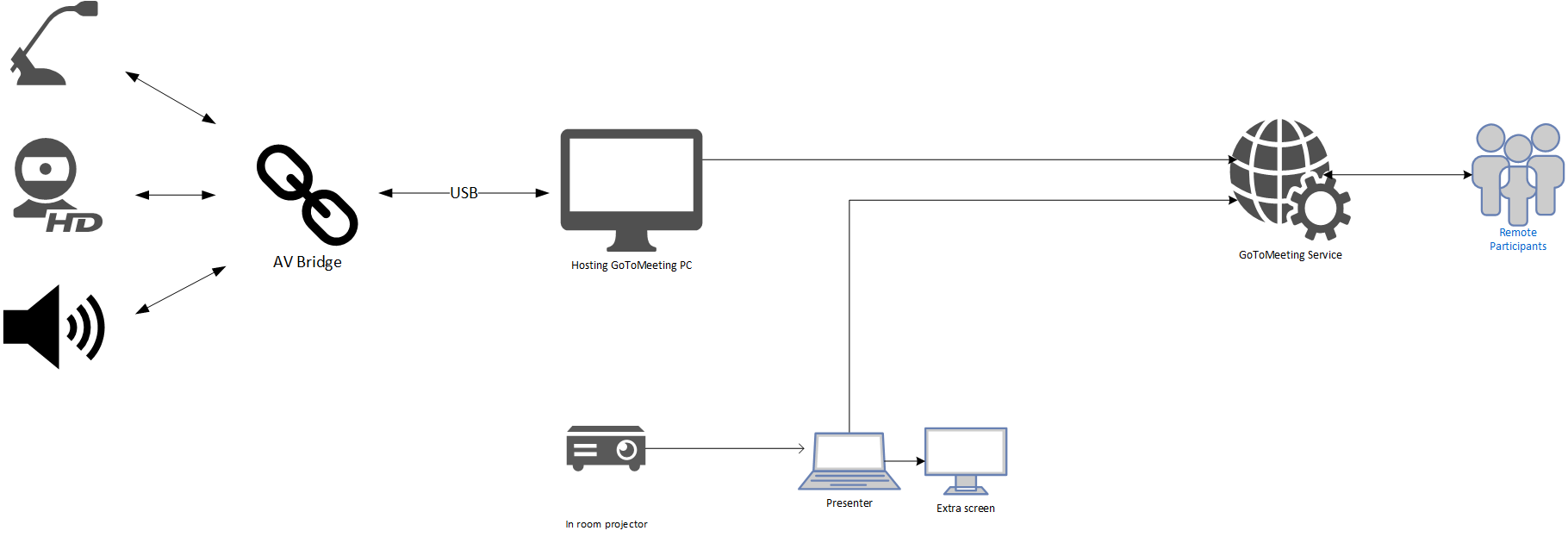
Generally this is the guideline
Use a dedicated computer to maintain the connection between the meeting room and the GoToMeeting. This computer must access and be a participant in the GoToMeeting.
- Connect the meeting room´s AV system to the computer which must access the GoToMeeting
- The use of a camera to display the meeting room is recommended. Connect the camera to the computer which must access the GoToMeeting.
Additional hints:
At the ECO, an additional screen is provided to the Chair. The presenter sharing their screen on the GoToMeeting should use an extra monitor to handle the MeetingHub., This avoids displaying to the participants sensitive information such as private chats or emails.
Test before a meeting
Before hosting a hybrid meeting, its always a good idea to test the setup.
ECO recommends the following steps to be tested:
-
Easy connecting and accessing the internet from a visitors perspective
-
Access to The MeetingHub from the venue
-
Access to GoTo and microphone processing in GoTo - i.e. does the sound from the microphone system at the venue relays to GoTo and vice-versa
-
If video is to be used - this should also be tested.
If your organisation do not have GoTo licenses, please sign up for 14 days free trial on this link: Get a free trial of GoToMeeting - GoTo
ECO can unfortunately not provide any access to GoTo prior to the meeting being held.
We sometimes see the problem that presenter appears to be sharing, but nothing is relayed to Goto - this is a firewall restriction at the location where the presenter is located.
For technical information about network and firewall settings please see this information from Allowlisting and Firewall Configuration - GoTo Meeting Support
Handling lost connections in meetings
The following provides a list of issues, incl. technical and procedural, to consider if the connection is lost:
Informing Online Participants
- Immediately notify online participants via email or messaging platform about the lost connection and the steps being taken to resolve it:
- Ensure clear and prompt communication to keep online participants informed and reduce frustration. To enable this option a mailing list with the participants of the group needs to be available outside the interrupted platform. One option is to use the group mailing list available on the respective website for the group. To care for the availability of the list it should be considered downloading it before the meeting starts.
- When informing online participants provide a clear timeline for when an update will be given regarding the connection status:
- Give online participants a specific time frame to expect updates, helping to manage expectations and reduce uncertainty.
Attempting to Reestablish Connection
- Check all connection points, including internet service and hardware:
- Verify and troubleshoot all possible sources of the connection issue to restore communication promptly. Last resort could be running the meeting from phone hotspot.
- Communicate with local IT / AV support and ECO IT support for immediate assistance:
- Engage technical support to quickly identify and resolve the issue.
- Restart the meeting platform and refresh the connection:
- Sometimes a simple restart can resolve technical glitches and reestablish connection.
- If possible, switch to an alternative platform or method of communication:
- Utilize secondary platforms or communication methods to continue the meeting without significant delay. Goto meeting can be run independently from MHub but it requires sending the 9-digit Goto meeting code to the participants
Proceeding with Onsite Participants Only
This could take different forms depending on if online participants are not connected at all or just in a listen only mode. For the latter ordinary activity in the meeting can basically continue with lower efficiency and maybe rescheduling the agenda. In particular, even with participants in a listening in mode and with the availability of MHub, decisions (including voting) can in principle be made.
Dependent on the number of onsite and online participants it may be considered to continue the meeting with onsite participants only.
The decision to continue the meeting without the online participants is considered to be case by case to be taken by the respective group.
In case the meeting cannot be continued, reschedule the meeting to a later date and time when all participants can be present. Ensure all participants can attend a rescheduled meeting to maintain inclusivity and fairness.
Ensure that all participants are informed promptly about the rescheduling and announce the meeting on the CEPT portal.
Handling Quorum for Voting
It is noted that only the ECC Plenary and the WG’s are entitled to vote, and the normal procedure applied is consensus and voting is usually avoided. However, it needs to be considered that a missing quorum could be used as an argument not to proceed with the meeting because there is a lack of administrations represented to take any decision. If a quorum is required for decision making and cannot be achieved with onsite participants only, the decision to continue the meeting should be taken by the group unanimously, and ,if possible, incl. the HoD’s participating online only.
Enhancing Clarity and Usability of ECC Deliverables
ECC Deliverables must comply with the relevant template, including both the editorial requirements and all annexes. Deliverables with multiple annexes and a high number of pages can make processing and readability challenging, especially for outside readers not involved in their development.
ECC Deliverables provide the basis for the development of, or contain itself, regulatory measures and must therefore be sound, with clear conclusions, agreed upon by the members of the groups to the maximum extent possible.
Key Principles for ECC Deliverables
1. Reproducibility of Studies
- All studies underpinning ECC Deliverables must be reproducible by all participants.
- Use open-source tools and methodologies, such as SEAMCAT, to ensure consistency and transparency.
- Include clear and realistic assumptions, methodologies, and input parameters to enable independent replication. Provide all necessary assumptions together with a sufficiently detailed algorithmic description (e.g. pseudo-code).
2. Clarity and Conciseness
- The main body of the ECC Deliverables, particularly ECC Reports, must include a clear summary and synthesis of all annexes to improve readability and clarify their status.
- Raw material, input contributions or non-reproducible studies from input documents shall not be included in annexes. Annexes should only support the main body and not serve as repositories for raw data.
3. Structure and Content
- ECC Deliverables must be concise, conclusive, and structured to present essential results and conclusions.
- The Office is available to assist in applying the template and ensuring compliance with such requirements.
Best Practices for Drafting ECC Deliverables
For Chairs and Rapporteurs
- Ensure that ECC Deliverables are drafted in accordance with the ECC template, both in terms of content and editorial requirements. Please note the “For contributors” section below.
- Limit the number of annexes and avoid including raw or unprocessed input documents.
- Include sound technical results with clear conclusions, agreed upon by the members to the maximum extent possible.
For Contributors
- Documents to be considered at a meeting should be submitted to the Chair and the ECO contact at least one week prior to the meeting.
- Submit contributions and studies using the ECC templates. Submit elements within contributions intended to be incorporated into ECC deliverables using the relevant templates
Support from the Office
- The Office is available to support drafters, including offering introductions to the template for newly appointed chairs and rapporteurs.
- The Office will assist in ensuring that ECC Reports are concise, reproducible, and aligned with the ECC’s regulatory objectives.
Final Notes
- These guidelines apply to all ECC deliverables, including ECC Decisions, ECC Recommendations, ECC Reports and CEPT Reports.
- The ECC Rules of Procedure (Edition 18) and ECC Working Methods (Edition 31) have been updated to reflect these principles.
Templates
General information on templates and their usage
Template overview
ECO maintains the following templates:
- x
- y
- z
Flow of ECC deliverables
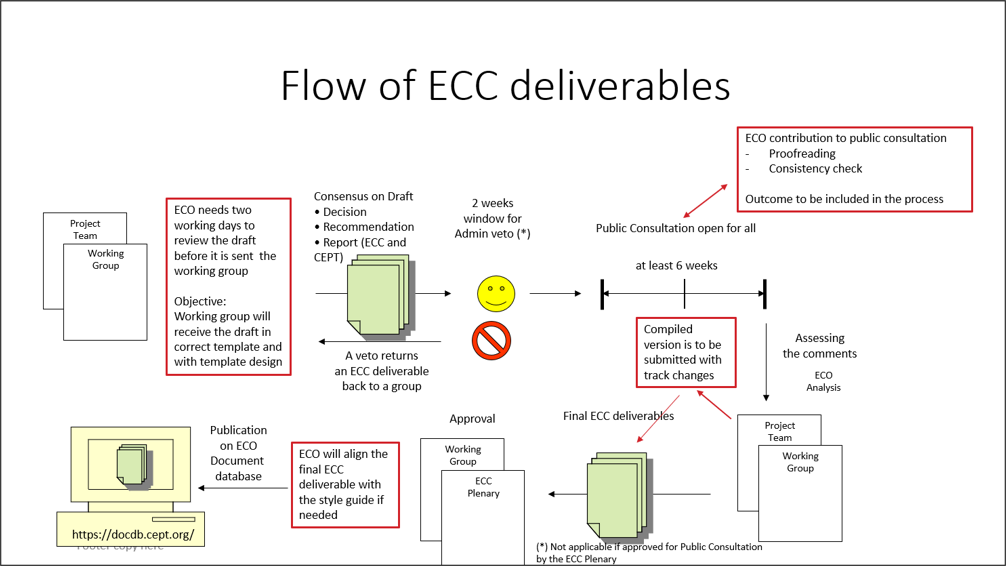
Instructions for the ECC report template
Introduction and general guidance
This annex contains instructions on the use of the ECC Report template. Please read carefully before commencing work on a new draft ECC Report. This annex should be deleted before finalisation of the document. It is suggested to save a separate copy of these instructions for reference.
- Consider the ECC Style Guide and Use of ECC brand identity;
- Passive voice is used in the ECC deliverables (see ECC Style Guide 2.2);
- Frequency ranges are normally written as “1500-1700 MHz”. In some specific cases “from 1500 to 1700 MHz” can be used;
- The language is British English (see ECC Style Guide 2.4) – note in particular “-ise” instead of “-ize” – e.g. “harmonise”, “desensitise”;
- Write numbers ‘one’ to ‘nine’ and ‘first’ to ‘ninth’ in full. 10 and above should appear as figures. Use preferably the following convention for numbers. Example of a number: “100000.00” (see ECC Style Guide 2.8). No separators used for large numbers, decimal points should use a dot “.”, 2 decimal places preferred (where applicable);
- Units should be separated with a space, e.g. “5 m”, 60 dB” or “45 MHz”. Emission limits specified per bandwidth are written as “10 dBm/kHz” or “10 dBm/(4 kHz)”
- Date format: “23 November 2011” (see ECC Style Guide 2.7);
Instructions on abbreviations
- Abbreviations (uncapitalised) should be spelt out the first time they are used in the document, e.g.: "fixed service (FS)"., with the exception of commonly understood terms. Note special format for “e.i.r.p.”, “pfd”
- Radiocommunications services are uncapitalised (“fixed service”, “mobile service”), also “base station” and “earth station”
Instructions on the template
- For assistance on an introduction and an overview of the template, please contact the ECO expert;
- For issues with the locked template, please contact editorial@eco.cept.org. You may contact ECO when the problem occurs or you may request a future booking. ECO usually replies within one working day;
- ECO is to review the final deliverable before it is submitted to the Working Group:
- The correct template must be used;
- The list of abbreviations must be finalised and consistent with abbreviations used;
- The list of references must be finalised and consistent, see example in A3.2.6;
- ECO needs to have at least two working days for finalising the editorial work before it is submitted to the Working Group.
Instructions for specific sections
Executive summary and conclusions
The Executive Summary should provide a short and concise explanation on the purpose of the respective ECC Report and should clearly indicate the covered subjects to which it applies. In addition, it should clearly explain the application of the document.
A conclusion may review the main points of the ECC Report. A conclusion might elaborate on the results of the ECC Report and suggest extensions. Typically the main conclusions are also included in the executive summary.
Table of contents
- All annex headings level 1-3 appear in table of contents by default in order to assist with editing. For reports with long annexes this may be amended during final approval if necessary - please inform the ECO;
- This is automatically styled and compiled from the headings, subheadings and page numbers from the document that follows. To update the Table of Contents move cursor within the table and press F9.
List of abbreviations
- During drafting phase and public consultation, the table format will appear with a frame for ease of editing;
- Before publication, ECO will reformat the table without visible frames;
- The rapporteur is to add all abbreviations, references and explanations before the draft is submitted to the working group for public consultation approval;
- During public consultation, ECO will only check consistency in the list of abbreviations;
- Organisations’ names are to be written in English where applicable.
- If translated English titles of national organisations are used include the country name in brackets, e.g.:
- BNetzA = Federal Network Agency (Germany);
- ANFR = National Frequency Agency (France)
Introduction
The introduction should succinctly provide the background and context to the work and outline the main aims of the report.
Definitions
- if the Definitions (optional section) is not used, it has to be deleted.
List of references
- The List of references is always the last annex of the ECC Report;
- The rapporteur is to add all list of references before the draft is submitted to the working group for public consultation approval;
- During public consultation, ECO will only check consistency in the list of references;
- Titles are to be copied in as they appear in the source, so spelling and numbering may be different from the standard ECC style;
- If hyperlinks are provided the full link must be shown;
- The rapporteur is to decide and add version number and date if relevant.
Information about references to ECC deliverables:
- If a draft version of an ECC deliverable is used, the reference has to show that a draft version is used. A footnote shall be added and the text “expected to be approved MM YYYY”. ECO keeps track of this and will update in https://docdb.cept.org/ accordingly;
- Only approved ECC deliverables should be referenced. ECC input documents are only used as a reference in exceptional cases;
- ECO is to keep a copy of the file together with the approved ECC deliverable in case of external requests.
- For cases of multiple references to the same document within the main body, only include cross-references the first time on each page or sub-section. In tables, cross references are allowed on each line (see above example).Examples of references
For an ECC Report:
[1] ECC Report 217: "The Use of Land, Maritime and Aeronautical Earth Stations on Mobile Platforms Operating with NGSO FSS Satellite Systems in the Frequency Range 17.3-20.2 GHz, 27.5-29.1 GHz and 29.5-30.0 GHz”, approved February 2015, latest amendment January 2020
For an ECC Recommendation:
[2] ECC Recommendation (15)01: “Cross-border coordination for Mobile/Fixed Communications Networks (MFCN) in the frequency bands: 694-790 MHz, 1427-1518 MHz and 3400-3800 MHz”, approved February 2015, latest amendment February 2020
For an ECC Decision:
[3] ECC Decision (19)04: “The harmonised use of spectrum, free circulation and use of earth stations on-board aircraft operating with GSO FSS networks and NGSO FSS systems in the frequency bands 12.75-13.25 GHz (Earth-to-space) and 10.7-12.75 GHz (space-to-Earth)”, approved March 2020
For a CEPT Report:
[4] CEPT Report 074: “Report from CEPT to the European Commission in response to the Mandate on spectrum for the future railway mobile communications system, Report A: Spectrum needs and feasibility (tasks 1 to 4)”, approved 3 July 2020
For an EC document (Decision or Directive):
[5] Commission Implementing Decision (EU) 2019/784 of 14 May 2019 on Harmonisation of the 24,25-27,5 GHz frequency band for terrestrial systems capable of providing wireless broadband electronic communications services in the Union
[6] Directive 2014/53/EU of the European Parliament and of the Council of 16 April 2014 on the harmonisation of the laws of the Member States relating to the making available on the market of radio equipment and repealing Directive 1999/5/EC
For an ETSI standard/specification/report (EN/TS/TR):
[7] ETSI EN 303 980 ([Version number], date): “Harmonised EN for fixed and in-motion Earth Stations communicating with non-geostationary satellite systems (NEST) in the 11 GHz to 14 GHz frequency bands covering essential requirements of article 3.2 of the Radio Equipment Directive 2014/53/EU”
Editor's Note 1: Rapporteur is to add version number and date if a specific version is used
For an ITU Report/Recommendation:
[8] Recommendation ITU-R F.1494: “Interference criteria to protect the fixed service from time varying aggregate interference from other services sharing the 10.7-12.75 GHz band on a co-primary basis”
[9] Report ITU-R SM.2421-0 (06/2018): "Unwanted emissions of digital radio systems"
Editor's Note 2: Rapporteur is to add version number and date if a specific version is used
For a journal paper:
[10] Flood, I.D and Allen S.M: “The Fixed Links Frequency Assignment Problem with Equipment Selection”, Wireless Pers Commun, vol. 71, pp. 181-194, 2012
For 3GPP specifications/reports:
[11] 3GPP TS 37.104 V[X.Y.Z]: “E-UTRA, UTRA and GSM/EDGE; Multi-Standard Radio (MSR) Base Station (BS) radio transmission and reception, (Release 10)”
[12] 3GPP TR 36.942 V[X.Y.Z], Evolved Universal Terrestrial Radio Access (E-UTRA); Radio Frequency (RF) system scenarios, (Release 8)
Editor's Note 3: Rapporteur is to add version number and date if a specific version is used
Style for referring to other publications inside the Report
a) ECC Report 200, annex 2.5 [1]
b) ETSI EN 302 208, figure 1 [2]
c) TS 36.101, table 6.6.2.1.1-1 [7]
d) CEPT Report 39, annex 3 [40]
e) Recommendation ITU-R M.2101, section 3.4.1 [23]
f) Recommendation ITU-R M.2101, page 79 [23]
Headings, lists and formatting
Headings
ECC Heading 1-4 will appear in the Table of contents;
All headings have margins at 0 cm, justified
Example:
Example:
Example:
Example:
Example:
Category five
this heading will not appear in table of contents
Annex headings
Annex ECC Heading 1-4 is used for the sections in the annexes
All headings have margins at 0 cm, justified
Example:
Example:
Example:
Example:
- All headings have the margin at 0 cm, justified;
- Annex ECC Heading 1-4 is used for the sections in the annexes;
- If you need another subheading, please use ECC Heading no numbering;
- Example:
- Category five
- this heading will not appear in table of contents
New styles
§ Five new additional styles are available in this latest template:
- ECC HL bold and blue;
- ECC HL bold and italics;
- ECC HL italics and petrol;
- ECC HL red;
- ECC Numbered List level 2.
Removing styles
If you need to remove an existing style in body text then highlight the text you wish to update and choose "ECC Paragraph". The style will then be in the ECC Paragraph format, you have to pay attention to update special characters (e.g. subscripts and superscripts). See example below.
§ If you need to remove an existing style in body text then highlight the text you wish to update and choose "ECC Paragraph". The style will then be in the ECC Paragraph format, you have to pay attention to update special characters (e.g. subscripts and superscripts).
Example of bulleted lists
§ Bullet point level 1 (style: ECC Bullets Lv1);
§ Bullet point level 1 (style: ECC Bullets Lv1);
§ Bullet point level 2 (style: ECC Bullets Lv2);
§ Bullet point level 2 (style: ECC Bullets Lv2);
§ Bullet point level 1 (style: ECC Bullets Lv1);
§ Bullet point level 1 (style: ECC Bullets Lv1);
§ Bullet point level 2 (style: ECC Bullets Lv2);
§ Bullet point level 3 (style: ECC Bullets Lv3);
§ Bullet point level 1 (style: ECC Bullets Lv1).
Example of numbered lists
1 Numbered list level 1 (style: ECC Numbered list);
2 Numbered list level 1 (style: ECC Numbered list); if you have text below number the following layout is to be used:
a Number 2a (style: ECC Number List level 2)
Example of lettered lists
a) Lettered list (style: ECC Lettered List)
b) Lettered list (style: ECC Lettered List); if you have text below number the following layout is to be used:
i) Letter list level 2 (style: ECC Lettered List Level 2;
ii) Letter list level 2 (style: ECC Lettered List Level 2.
List of styles used in the ECC Deliverables Template shown in alphabetical order
§ Cover page ‘approved DD MM YY’
This style is used on the cover page only to specify the date of approval of deliverable.
§ Cover page ‘last update DD MM YY’
This style is used on the cover page only to specify the last update of deliverable.
§ Cover page ‘Report No’
This style is used on the cover page only to specify ECC Deliverable number.
§ Cover page ‘Report title/description’
This style is used on the cover page only to specify title of the ECC deliverable.
§ Cover page ‘Table of Content’
This style is auxiliary and kept in the list of styles in order to maintain Table of content in the deliverables.
§ ECC Annex heading 1 – 4
This style is used for different levels of Annexes heading.
§ ECC Bullets Lv1 – Lv3
This style is used for three levels of ECC bulleted list.
§ ECC Caption
This style is used for Figure and Table head.
§ ECC Editor’s Note
This style is used to show editor’s note and will be always shown with yellow highlight.
§ ECC Figure/graph centred
This style is used to position a Figure in the centre.
§ ECC Footnote
This style is used only for the footnotes in the documents in exactly the same way as in an ‘unlocked template’ document.
§ ECC Footnote number
This style could be used in case if it is necessary to align numbering of ‘ECC Footnote’.
§ ECC Heading 1 – 4
This style is used for different levels of Sections heading.
§ ECC Heading no numbering
This style is used for Heading 1 but without numbering.
§ ECC HL blue .... and so on
Those styles are used to highlight some text in the document and should be removed from approved deliverables.
Upon requests, ECC has added the following new styles in order to ease work while drafting the Report
§ ECC HL bold and blue,
§ ECC HL bold and italics
§ ECC HL italics and petrol
§ ECC HL red
When you want to remove an existing style, highlight the text choose the style ECC Heading or ECC Paragraph
§ ECC HL bold, subscript, superscript, underlined
Those styles are used to highlight some text in the documents and can be either kept or removed from approved deliverables.
§ ECC Hyperlink
This style is used to highlight a hyperlink.
§ ECC Lettered list
This style is used to create a lettered list.
§ ECC Numbered list
This style is used to create a numbered list.
§ ECC Numbered list, level 2
This style is used for text under ECC Numbered list.
§ ECC page Footer and ECC page Header
This is to be used for footers and headers.
§ ECC paragraph
This style is used as a body text.
§ ECC Reference
This style is used for the list of references.
§ ECC Table Header red font
This style is used for ‘ECC table header’ – red coloured letters.
§ ECC Table Header white font
This style is used for ‘ECC table header’ – white coloured letters.
§ ECC Table note
This style is used for ‘ECC Table note’.
§ ECC Table text
This style is used for the Table text.
Figures
General instructions for figures
- Figure captions are positioned below the figure.
- In the figure caption, only the first letter of the title is capitalised; all other words shall not be capitalised unless they are terms that would normally be capitalised);
- Figure captions are without a full stop at the end;
- Figure captions are advised to be concise as possible, recommended one line. If text is longer than one line, please add the explanation as text before or after the figure;
- The figure and figure title is to be centred by using the style “ECC Figure/graph centered”;
- Figures shall use automatic numbering - Arabic numerals, beginning with 1.. ascending numbering throughout the ECC deliverable, i.e. "Figure 1:";
- Figures are to be inserted “in line with text”
- If two figures need to be next to each other then right click on the figure, select Wrap Text and Square option.
How to insert a figure caption
Example of a figure
Figure 1: Cab-radio horizontal antenna pattern at 880 MHz
Tables
General instruction for tables
- Table captions are positioned above the table;
- In the table caption, only the first letter of the title is capitalised; all other words shall not be capitalised unless they are terms that would normally be capitalised);
- Table captions are without a full stop at the end;
- Table captions are advised to be concise as possible, recommended one line. If text is longer than one line, please add the explanation as text before or after the table;
- The table and table caption are to be centred by using the style “ECC Figure/graph centred”;
- Tables shall use automatic numbering - Arabic numerals, beginning with 1.. ascending numbering throughout the ECC deliverable, i.e. "Table 1:";
- Notes shall be descriptive and concise, if more text is needed put it below/above the table;
- Figures are not allowed in table notes, they are to be placed below/above the table;
- If your table needs a different layout such as two red header rows, please contact editorial@eco.cept.org, ECO will fix this and reply within one working day;
- If the table is longer than a page length, the table number and title as well as column headings shall be repeated on each page. The template is designed to apply this automatically;
- Avoid copying and pasting tables as pictures. If this is necessary, add a reference from where the table was copied.
How to insert a table caption
How to insert a table
If this does not work according to your expectations, please contact editorial@eco.cept.org with instructions, ECO will aim to reply within one working day;
Information on different kind of tables
Table 1: Standard table format
|
Table style: ECC Table – red header Centred margin (Note 1) |
Table style: ECC Table – red header Centred margin |
|
Example of a subheading |
|
|
Text left margin Margin 0 cm Style: ECC Table text |
Text left margin Margin 0 cm Style: ECC Table text |
|
Text left margin Margin 0 cm Style: ECC Table text |
Text left margin Margin 0 cm (Note 2) Style: ECC Table text |
|
Note without a number refers to the entire table
Note 1: test to be tested, test to be tested, test to be tested test to be tested test to be tested test to be tested test to be tested test to be tested Note 2: test Note 3: notes with numbers are to be hanging 1 cm like in note 1 in order to ease readability |
|
Example of a standard table:
Table 2: Requirements on RMR cab-radio receiver characteristics
|
Parameter |
Value |
|
Level of the wanted signal |
Sensitivity +3 dB |
|
Maximum 5 MHz LTE interfering signal in 880-915 MHz (Note 1) |
-33 dBm (Note 2) |
|
The antenna connector of the radio module is the reference point. Note 1: This requirement covers both blocking and third-order intermodulation Note 2: -36.2 dBm for a desensitization of 1.7 dB is equivalent to -33 dBm for a desensitization of 3 dB |
|
Example of an alternative table layout with 2 heading rows:
Table 3: MFCN BS selectivity increase
|
RMR carrier |
MFCN BS selectivity increase |
|
|
compared to |
compared to |
|
|
10 MHz LTE/NR in 1900-1910 MHz |
24.3 dB |
40.6 dB |
Example of an alternative table layout with merged cells:
Table 4: LTE/NR FRMCS high-power cab-radio characteristics
|
Parameter |
FRMCS BS |
FRMCS BS |
Reference |
|
|
Channel bandwidth |
LTE: 1.4 or 5 MHz NR: 5 MHz |
10 MHz |
ETSI TS 136 101 [10] ETSI TS 138 101-1 [11] |
|
|
NR: 5.6 MHz |
|
Note |
||
|
Occupied bandwidth |
LTE: 1.08 or 4.5 MHz NR: 4.5 MHz |
LTE: 9 MHz NR: 9.36 MHz |
ETSI TS 136 101 [10] ETSI TS 138 101-1 [11] |
|
|
NR: 5.04 MHz |
|
Note |
||
|
Maximum output power |
31 dBm with UL power control |
Railway industry’s request |
||
|
Maximum e.i.r.p. |
33 dBm with UL power control |
|
||
|
ACLR |
37 dB |
ETSI TS 136 101 [10] Power Class 1 (note 1) |
||
|
Note: The 5.6 MHz channel bandwidth is considering a transmission bandwidth of 28 RB between 919.6725 and 924.7125 MHz, reflecting a possible 5.6 MHz NR channel. This is understood to be compatible with NR lower layers, subject to additional standardisation work, as necessary, to confirm and further specify this. Note 1: For a Power Class 3 UE, ACLR is 30 dB. |
||||
Equations
General information about equations
- Equation numbers are placed in brackets with right margin
- Equations should use the in-built equation tool to provide a consistent format.
- References to equation symbols in text should use italics
- All equations are to have automatic numbering before approval for public consultation
Instructions for Equations with automatic numbering
Method 1 (copy existing template):
1. Copy and paste the entire frame below and edit as necessary;
2. Right click the equation number, “(1)”- and select “update field”
|
|
(1) |
Method 2 (save template to gallery):
1. Copy the entire frame above
2. Select Insert->Equation->Save Selection to Equation Gallery. Choose a suitable name, e.g. “ECC Equation”
3. The numbered equation template will now be available for all new documents on your computer under Equation -> General (below the Built-In list)
Example of an equation
The total permitted interference:
|
|
|
(2) |
Where:
- IIB is the total permitted interference at the antenna connector in dBm;
- D is the acceptable degradation in receiver sensitivity, or desensitisation, in dB;
- N is the receiver thermal noise power in dBm.
CEPT Style and Brand Guide
Introduction
Welcome to the CEPT family style guide. This comprehensive document replaces all previous guidelines and unifies our visual and written communication across CEPT, its three business committees (ECC, Com-ITU, and CERP), and its permanent office the European Communications Office (ECO).
Following this guide ensures a cohesive and professional brand identity that reflects our commitment to excellence in telecommunication, radio spectrum, and postal regulations.
How to use the guide
This guide is designed to help you maintain consistency in all visual and written communications for the CEPT family. Each section provides clear guidelines and examples to ensure the correct application of our brand elements.
Revision History
| Date | Version | Remarks |
| 01.10.2026 | 1 | Initial release |
Brand description
Who we are
The European Conference of Postal and Telecommunications Administrations (CEPT) is an organisation where policymakers and regulators from 46 countries across Europe collaborate to harmonise telecommunication, radio spectrum, and postal regulations to improve efficiency and coordination for the benefit of European society.
CEPT is a voluntary association of European countries that seeks to deliver greater efficiency through effective coordination, creating a dynamic market in European posts and telecommunications.
CEPT conducts its work through three autonomous business committees (ECC, Com-ITU, and CERP). The chairs of these committees form the organisation’s Presidency, supported by the central office, the ECO, in Copenhagen, Denmark.
The ECO provides expert advice and administrative support to CEPT, facilitating the effective and transparent development and delivery of its policies and decisions.
Our values
- Professionalism: Upholding the highest standards of behaviour and ethics, committed to excellence, precision, and integrity.
- Leadership: Leading the transformation of Europe's postal and electronic communications landscape through strategic initiatives and collaboration.
- Collaborative Workforce: Believing in the power of collaboration, where the sum is greater than the parts.
- Cohesion: Uniting diverse voices and harnessing their collective power as facilitators.
- Facilitation: Providing a platform for dialogue, consensus-building, and decision-making to ensure smooth collaboration and effective outcomes.
- Subtlety and modesty: Understanding that impactful leadership often comes from empowering others and working behind the scenes to support and coordinate.
- Expert community: Valuing our greatest asset - our collective of experts whose knowledge guides our actions and strategies.
Written communication
Tone of voice and consistency
Consistency across communications: Consistency is essential in reinforcing the CEPT family brand and maintaining a uniform tone across all communication. It ensures that every piece of writing aligns with our core values and adheres to the guidelines established in this document. Consistency in language, tone, and style strengthens our brand identity and supports transparent and professional communication
- Professionalism: Our tone is always professional and respectful. We use precise and accurate language to convey our commitment to excellence and integrity, ensuring our communications are credible and trustworthy.
- Facilitation: We speak confidently and clearly, demonstrating our role as facilitators in the telecommunications sector. Our language is decisive and forward-looking, inspiring trust and confidence in our audience.
- Collaboration: Our tone is inclusive and supportive, reflecting our belief in the power of teamwork and partnership. We use language that fosters a sense of community and collective effort, emphasising "we" rather than "I."
- Cohesion: We use a unifying tone that brings diverse voices and perspectives together. Our language emphasises harmony and the strength of working together towards common goals.
- Facilitation: Our tone enables and supports discussions and decision-making processes. We use language that helps facilitate understanding and consensus among our stakeholders.
- Subtlety and modesty: We communicate with humility and respect, avoiding boastfulness. Our language is modest and focused on collective achievements rather than individual successes.
- Expertise: Our tone is knowledgeable and informative, reflecting our deep expertise in telecommunications. We use technical language appropriately, ensuring it is accessible to our audience without overwhelming them with jargon.
- Language usage
The language used in all CEPT family communications must be clear, precise, and appropriate for our audience. This ensures that our messages are easily understood and professionally presented.
· Plain English: Use plain English in all written materials. Keep sentences and paragraphs short, use everyday language, and avoid jargon unless necessary. When technical terms are required, define them clearly to ensure accessibility.
· Active voice: Employ the active voice to make communications more direct and engaging. For instance, "The CEPT team completed the project" is preferred over "The project was completed by the CEPT team”.
· British English: Adhere to British English spelling and grammar conventions. Examples include using "organise" instead of "organize" and "centre" instead of "center."
· Formality and tone: Tailor the level of formality based on the document type. Use a formal tone for official reports and technical papers, while a more informal tone is suitable for newsletters, social media, and internal communications.
Document structure
Headings and subheadings: Use clear and descriptive headings to organise content into sections. Subheadings should be used to divide sections further and should be formatted consistently.
Numbering: Number sections and subsections logically to guide the reader through the document. Sequential numbering, such as 1.1, 1.2, etc., helps maintain a clear structure for longer documents.
Paragraphs: Write in short, focused paragraphs, each covering a single topic. This enhances readability and keeps the document well-organised.
Tables and figures: Include tables and figures to summarise data or visually represent information. Label them clearly and include a brief explanation to clarify their relevance to the content.
Footnotes and references: Use footnotes or endnotes to add supplementary information without disrupting the flow of the main text. References should be cited appropriately, following the relevant style guide.
Appendices: Place supplementary details in appendices rather than in the main text. Reference these appendices in the main sections to guide the reader to additional information.
Longer documents
For documents exceeding 10-15 pages or those that are complex and detailed, include the following elements:
· Table of contents: start with a table of contents to facilitate easy navigation.
· Executive summary: provide a summary at the beginning to give an overview of the document’s key points.
· Numbered pages and sections: Ensure the pages are numbered, and the document is broken down into clearly numbered sections.
Document formatting
Line spacing
Select a line spacing between 1.15 and 1.5 that best suit your document's purpose and personal preference to ensure optimal readability and professional appearance. This flexibility allows you to adjust the text density to enhance clarity and ease of reading. However, for templates, always set line spacing to 1.15.
Paragraph spacing
Add spacing between paragraphs to separate them, improving the overall readability of the document.
Text alignment
· Primary alignment: The default for most text should be left-aligned, as this is the most readable format for long text passages. It’s especially suitable for digital documents, presentations, and most printed materials.
· Avoid centered text: Centered text is more complex and should be reserved for specific elements like headings, subheadings, or pull quotes. It should not be used for paragraphs or large blocks of text.
Bullet points
· Avoid single bullet points; if you only have one point, integrate it into the main text.
· Minimise punctuation within a bulleted list; a period is typically only necessary if the bullet point is a complete sentence.
· Begin each bullet point with a lowercase letter unless the point is a complete sentence.
· Numbered lists are best for sequential steps, while bulleted lists work well for non-sequential items of equal importance.
Images
Ensure the use of relevant images from the library that support the text and enhance the content's visual appeal. The images should be directly related to the content and help break up the text in a way that improves readability. Please find a selection of images in the ´image chooser’ in the Microsoft office package.
Punctuation and grammar
Full stops and commas
· Use a single space after full stops and commas
· Do not use full stops in abbreviations.
Inverted commas
· Use “double inverted commas” for direct quotes.
· Use ‘single inverted commas’ for emphasis or a quote within a quote.
· For quoted speech, open the inverted commas at the beginning of each paragraph and close them only at the end of the final paragraph if the speech continues across multiple paragraphs.
Hyphens and dashes
A dash (–) indicates a pause or break in a sentence, adding emphasis or setting off additional information. Insert a space on either side of the dash for readability. Be careful not to overuse dashes, as they can interrupt the flow of the text.
A hyphen (-) is half the length of a dash and is used to connect words or parts of words, such as in compound expressions (e.g., "well-known author"). Hyphens should also be used to avoid ambiguity in certain words (e.g., "re-sign" vs. "resign").
Avoid using hyphens in the following cases:
· Words starting with 'e', such as "email" instead of "e-mail."
· Adverbs ending in '-ly,' for example, "highly regarded" instead of "highly-regarded."
· Common compound words are now standardised without hyphens, such as "online" instead of "on-line."
· Prefixes, unless a hyphen is needed to avoid confusion, for example, "coordinate" instead of "co-ordinate."
Additional formatting details
Abbreviations and acronyms
Always write abbreviations out in full upon first use, followed by the abbreviation in brackets. An exception is made for abbreviations that are so familiar they are more commonly used in their shortened form rather than fully spelt out (e.g., MHz, GHz, Wi-Fi).
Acronyms are formed from the initial letters of a series of words and are typically pronounced as a word (e.g., "NATO"). Initialisms, on the other hand, refer to abbreviations formed from the initial letters of a series of words but are not pronounced as a word (e.g., "ECC" or "ITU").
In general, acronyms do not require the definite article "the" (e.g., NATO), whereas initialisms usually do (e.g., "the ECC", "the ITU"). Always use uppercase letters for acronyms and initialisms unless the organisation prefers lowercase.
See a complete list of abbreviations here.
Date and time formatting
Date: 23 November 2024.
Time: Use the 24-hour clock format: 08:00 and 14:00.
Figures and numbers
Write numbers ‘one’ to ‘nine’ and ‘first’ to ‘ninth’ in full. Use figures for ten and above.
The preferred format for numbers (use “.” for decimals): 1.00, 10.00, 100.00, 1000.00, 100000.00, 1000000.00.
Telephone numbers
Include the country code (preceded by ‘+’) followed by the subscriber number. Use the format the number holder prefers, e.g., +45 33 89 63 00.
Percentages
When writing percentages, use the word ‘per cent’. The symbol ‘%’ can be used in tables and formal deliverables.
This guide provides several CEPT family logo variants that suit different contexts and requirements. Each variant is crafted to ensure brand consistency across all communications while offering flexibility for specific applications.
· Primary CEPT Logo: This is the main logo, representing CEPT exclusively. It should primarily be used in formal communications directly from CEPT.
· Text-Only Logos: These simplified logos consist solely of text and are suitable for limited space or a minimalist design. The business units can use these logos in smaller digital formats, such as website footers or email signatures, as needed.
· Branded CEPT Logos: Each of the four business units under CEPT has a unique logo combining the primary CEPT emblem and the unit’s name. These branded logos allow each organisation to maintain its distinct identity while visibly aligning with CEPT’s brand. Business units may use these logos in their communications, ensuring a clear link to CEPT.
Logo variants:
· Full colour: This is the primary and preferred version of the logo for all general use, especially on the web and digital communications.
· Black and white: Perfect for use in documents, presentations, or simple designs where colour isn’t necessary.
· Negative white: A white version on a transparent background, ideal for dark backgrounds to ensure visibility.
File Formats:
· SVG: Scalable Vector Graphics (SVG) files are ideal for digital and web use where high resolution and scalability are needed. Use SVG files when logos are displayed at varying sizes, such as on websites or large screens, to ensure the logo remains sharp and clear.
· PNG: Portable Network Graphics (PNG) files are best for fixed-size digital uses, such as social media posts or email signatures. PNG files support transparent backgrounds and are ideal for applications with a smaller file size.
Each logo variant is available in multiple formats and resolutions to ensure optimal clarity across digital and social media platforms. Using the correct version and file type for each context helps maintain CEPT’s professional and cohesive brand image across all communications.
Practical guidelines for logos
· Placement: Place the logo in a prominent location, typically at the top left on documents.
· Clear space: Always maintain a clear area around the logo to prevent clutter. As a rule of thumb, leave a space equivalent to the height of the logo’s letters on all sides.
· Minimum size: To keep the logo clear and legible, avoid scaling it down too much. For digital use, the logo should be no smaller than 40px in height to ensure clarity on screens.
· Background colours:
o Use the full-colour logo on white or light backgrounds.
o For dark backgrounds, use the white (negative) logo.
o Avoid placing the logo on backgrounds with low contrast or busy patterns that may hinder visibility.
· Do’s and Don’ts:
o Do keep the logo proportional; avoid stretching or squashing it.
o Do not change the logo’s colours, apply shadows, rotate, or add any effects.
o Do not add other elements too close to the logo, as this may affect its visibility and impact.
Find all logos here. [link]
| CEPT |  |
| ECC |  |
| Com-ITU |  |
| CERP |  |
| ECO |  |
Colours
Colours of entities
Beyond our logos and distinct names, each entity within the CEPT family uses colours to establish its brand identity. These colours represent each entity’s specific character and focus while maintaining a cohesive appearance.
Given that several of our entities previously used shades of blue, we have continued this tradition by selecting a range of blue tones for our new palette. This choice respects our historical colour schemes and aligns with standard practices in our industry, where blue is often associated with professionalism, reliability, and trust.
Using these specific colours ensures that each part of the CEPT family is easily identifiable and retains its unique brand identity while contributing to a unified visual presence.
These are the five blue colours: 
Example: 
Basic colours
In addition to the five blue colours, we have five basic colours for use across entities: black, white and three shades of grey.
Grey colours are known for harmonising with a wide range of other colours, especially blue, which is often associated with professionalism and reliability. The grey tones create a neutral base that allows the blue shades to stand out and take centre stage, ensuring the visual identity remains clear and cohesive.
By consistently using these three primary colours across the web and office suite, we can maintain a professional and cohesive visual identity. The colours are versatile and can be adapted to various needs and media.
These are the basic colours. 
Practical guidelines for basic colours
Light grey / white
· Web: Use white as the primary background for web pages to ensure a clean, bright interface that allows blue elements to stand out.
· PowerPoint: Apply light grey sparingly in presentations, primarily for headers or small design elements, avoiding full-slide backgrounds to reduce ink usage when printing.
Medium grey
· Web: Use medium grey for secondary backgrounds, such as sidebars, footers, and less prominent sections. It can also be used to structure borders around images or boxes.
· PowerPoint: Apply medium grey for subtle background elements like headers or small design features, ensuring it contrasts nicely with lighter and darker shades. Avoid using it as a full-slide background.
Dark Grey
· Web: Dark grey is ideal for body text, subtitles, and captions, ensuring readability against lighter backgrounds. It’s also effective for links or buttons that need to stand out.
· Word: Use dark grey titles. It’s also suitable for borders and accent elements in documents.
· PowerPoint: Employ dark grey for key text elements like titles, bullet points, and essential information, ensuring visibility against lighter slide backgrounds.
Typography
Typography plays a central role in establishing a clear, professional, and cohesive visual identity across the CEPT family. To ensure both consistency and practical usability across platforms, CEPT uses a platform-specific typographic system.
Inter is used for all web and digital interfaces. It is a modern, highly readable typeface optimised for screen use, supporting clear hierarchy and accessibility across devices and screen sizes.
For desktop documents and presentations created in the Microsoft Office suite, Segoe UI is used. Segoe UI is the standard system font on Windows and is therefore available to all users without additional installation. Its visual characteristics are closely aligned with Inter, ensuring a consistent typographic appearance across platforms.
Font sizes are defined per platform to achieve visual consistency and readability rather than exact numerical matching. Due to natural differences in font metrics between typefaces, sizes may vary slightly between web and Office applications while maintaining the same visual hierarchy.
Practical guidelines for web
Font: Inter
Body Text: 16px, Regular, black
H1: 32px, Bold, dark grey
H2: 24px, Bold, dark grey
H3: 20px, Semi-Bold, dark grey
Call-to-actions*: 14px, Semi-Bold, dark grey
Footnotes: 12px, Light (300), medium grey
* A call-to-action (CTA) on a website is a prompt that encourages users to take a specific action. Examples include signing up, learning more, clicking here, downloading, and contacting us. These CTAs should be clear, concise, and stand out visually to guide users effectively.
Practical guidelines for Office Suite
Font: Segoe UI (Windows Default)
Word:
Body Text: 12pt, Regular, black
H1: 20pt, Bold, dark grey
H2: 16pt, semi-bold, dark grey
H3: 14pt, medium (500), dark grey
Hyperlinks: standard hyperlink blue
Footnotes: 9pt, Light (300), medium grey
PowerPoint:
Title slides:
Title: 44pt, Bold, dark grey
Subtitle: 24pt, Regular, medium grey
Content slides:
Headings: 32pt, Bold, dark grey
Body: 20pt, Regular, dark grey
Footnotes: 14pt, Regular, medium grey
Graphic elements
Icons
Below are some examples of the icons you can choose from. We work with two different formats for icons, each with its own advantages:
SVG: This format is good because it can be resized to any size without losing quality. It’s optimal for websites where icons must look sharp at any size.
· PNG: This format is used when the icon's size is fixed and high-quality details, such as transparency, are required. It is ideal for presentations or printed materials where the icon's size won’t change.
Using both formats ensures that our icons look good no matter where they are used.
All icons can be found here. [link]
Illustrations
Illustrations and graphic elements can be used for presentations and other places that need visual support. They can be found here. [link]
Social media
This style guide section focuses on creating content for our LinkedIn page. Here, you will find guidance on content formats and pillars to ensure our communications are engaging, professional, and aligned with our brand values.
In the following sections, you can find inspiration on different content formats and practical tips to maximise their impact. Additionally, we outline selected content pillars that can inspire themes and topics for writing.
Following these guidelines will help maintain a consistent and impactful LinkedIn presence that supports our organisational goals.
Content formats
· Documents: These are created as PDFs, with around 12 slides with 25-50 words each. Add text when posting, but ensure the overall length of the text is under 500 characters.
· Videos: The ideal length is 1-2 minutes. Focus on the first 8 seconds to capture attention and include a clear call to action.
· Text + Image: Ideal text length is 900-1,200 characters. Use genuine photos and limit images to five.
· Articles: Aim for 800-1,200 words with short paragraphs and headlines. Publish on weekdays and optimise for SEO.
Content pillars
· Personal stories: Humanise the brand with personal stories and experiences.
· Thought leadership: Share in-depth knowledge through white papers and articles.
· Industry insights: Use third-party content to inform the audience about industry trends. When incorporating third-party content to provide industry insights, ensure you have the appropriate rights or permissions. Properly attribute the content to its source and verify its accuracy and relevance to maintain the trust and professionalism of our communications.
· Product/Service highlights: Update on product specifications and new releases.
· Event announcements: Communicate company-organised events and employee participation.
· Employer branding: Highlight career opportunities and company culture.
· Customer-generated content: Leverage reviews and testimonials.
· Behind-the-scenes: Provide a glimpse into daily operations and company culture.