# Hosting Hybrid meetings

When hosting hybrid meetings, its is critical that all participants, remote or physical has the best possible quality of sound and video.

This requires some technical setup in the meetingroom.

It is also important that basic procedures are in place to handle medical and other emergencies, in line with national practices such as the common European emergency number 112. The host of the meeting could be invited to briefly explain the safety procedures applicable to the premises at the beginning of the meeting.

# Meeting room setup

When hosting a hybrid-meeting, the meeting facilities need to be prepared to connect the online participants and the physical participants.


##### **Internet Connection**<span class="heading-anchor-wrapper" role="presentation"><button aria-hidden="true" class="cc-wf6gg8" data-testid="anchor-button" type="button"><span aria-label="Copy" class="cc-kxjlgc" role="img"><svg class="cc-1t4wpzr" fill="none" role="presentation" viewbox="0 0 16 16"><path clip-rule="evenodd" d="M8.22 2.22a3.932 3.932 0 1 1 5.56 5.56l-2.25 2.25-1.06-1.06 2.25-2.25a2.432 2.432 0 0 0-3.44-3.44L7.03 5.53 5.97 4.47zm3.06 3.56-5.5 5.5-1.06-1.06 5.5-5.5zM2.22 8.22l2.25-2.25 1.06 1.06-2.25 2.25a2.432 2.432 0 0 0 3.44 3.44l2.25-2.25 1.06 1.06-2.25 2.25a3.932 3.932 0 1 1-5.56-5.56" fill="currentcolor" fill-rule="evenodd"></path></svg></span></button></span>

Make sure an stable, available and unobstructed - preferably a dedicated and exclusive - internet connection are available to the participants. As most meetings are conducted as hybrid, it is important that the participants can access the internet to make use of the systems for managing and conducting a transparent hybrid meeting.

#####  

##### **Software**

The MeetingHub platform, developed by ECO, provides a common space for the interaction of both physical and remote participants, thanks to common features such as a single raise-hand queue and a simple chat system.

For the online presentations, ECO uses the GoToMeeting tool. The ECO expert will facilitate the access to the account(s) needed at the meeting.

<span class="_ca0qidpf _u5f3idpf _n3tdidpf _19bvidpf _19itidpf _1reo15vq _18m915vq _1bsbt94y _4t3it94y _kqswstnw _ogto7mnp _o5721q9c" data-testid="visually-hidden-heading-anchor"><span class="heading-anchor-wrapper" role="presentation"><button aria-hidden="false" aria-label="Copy link to heading" aria-labelledby="--Software:" class="cc-wf6gg8" data-testid="anchor-button" tabindex="-1" type="button"><span aria-label="Copy" class="cc-kxjlgc" role="img"><svg class="cc-1t4wpzr" fill="none" role="presentation" viewbox="0 0 16 16"><path clip-rule="evenodd" d="M8.22 2.22a3.932 3.932 0 1 1 5.56 5.56l-2.25 2.25-1.06-1.06 2.25-2.25a2.432 2.432 0 0 0-3.44-3.44L7.03 5.53 5.97 4.47zm3.06 3.56-5.5 5.5-1.06-1.06 5.5-5.5zM2.22 8.22l2.25-2.25 1.06 1.06-2.25 2.25a2.432 2.432 0 0 0 3.44 3.44l2.25-2.25 1.06 1.06-2.25 2.25a3.932 3.932 0 1 1-5.56-5.56" fill="currentcolor" fill-rule="evenodd"></path></svg></span></button></span></span>

##### **Hardware**

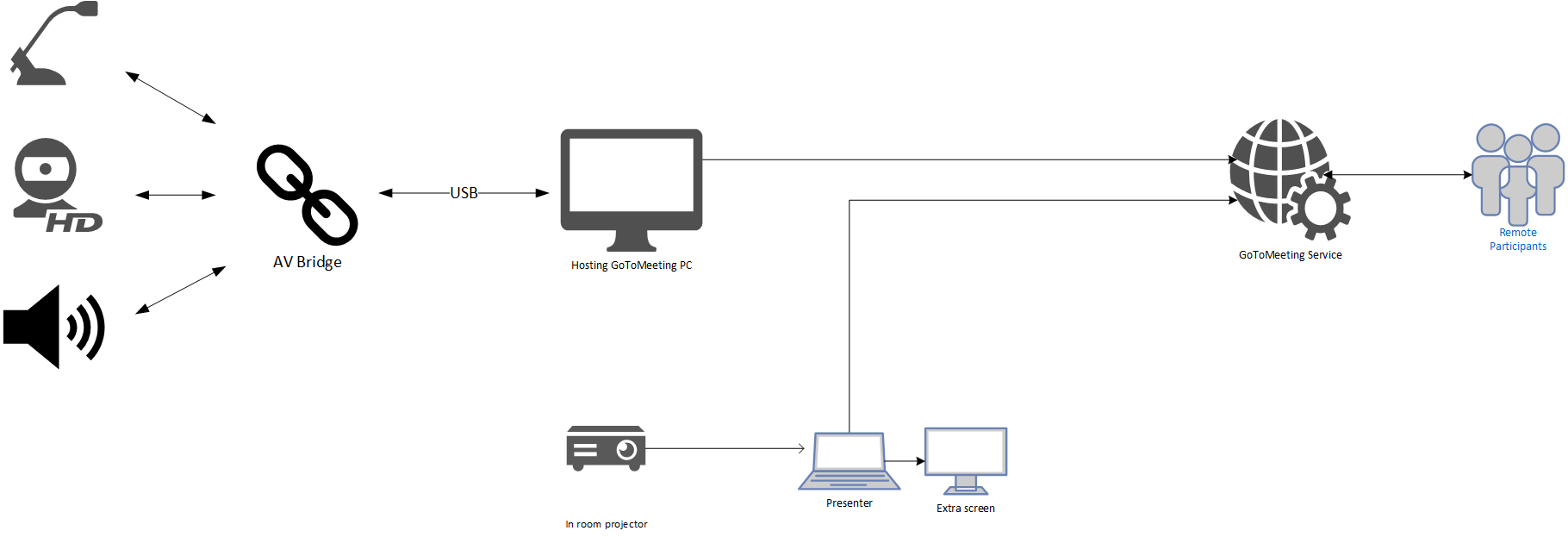
At the ECO we use a dedicated computer to connect the meeting room to the GoToMeeting.

This dedicated computer, is connected to the room´s AV system. Once this dedicated computer accesses the GoToMeeting, the meeting room attendance is integrated and becomes part of the virtual meeting.

<span class="heading-anchor-wrapper" role="presentation"><button aria-hidden="true" class="cc-wf6gg8" data-testid="anchor-button" type="button"><span aria-label="Copy" class="cc-kxjlgc" role="img"><svg class="cc-1t4wpzr" fill="none" role="presentation" viewbox="0 0 16 16"><path clip-rule="evenodd" d="M8.22 2.22a3.932 3.932 0 1 1 5.56 5.56l-2.25 2.25-1.06-1.06 2.25-2.25a2.432 2.432 0 0 0-3.44-3.44L7.03 5.53 5.97 4.47zm3.06 3.56-5.5 5.5-1.06-1.06 5.5-5.5zM2.22 8.22l2.25-2.25 1.06 1.06-2.25 2.25a2.432 2.432 0 0 0 3.44 3.44l2.25-2.25 1.06 1.06-2.25 2.25a3.932 3.932 0 1 1-5.56-5.56" fill="currentcolor" fill-rule="evenodd"></path></svg></span></button></span>

A schematic description of the connections deployed at the ECO is provided below:

[![image.png](https://wiki.cept.org/uploads/images/gallery/2025-04/scaled-1680-/Z6Z1VFHOT0r0cmAi-image.png)](https://wiki.cept.org/uploads/images/gallery/2025-04/Z6Z1VFHOT0r0cmAi-image.png)
##### **Generally this is the guideline** 

Use a dedicated computer to maintain the connection between the meeting room and the GoToMeeting. This computer must access and be a participant in the GoToMeeting.

- Connect the meeting room´s AV system to the computer which must access the GoToMeeting
- The use of a camera to display the meeting room is recommended. Connect the camera to the computer which must access the GoToMeeting.<span class="_ca0qidpf _u5f3idpf _n3tdidpf _19bvidpf _19itidpf _1reo15vq _18m915vq _1bsbt94y _4t3it94y _kqswstnw _ogto7mnp _o5721q9c" data-testid="visually-hidden-heading-anchor"><span class="heading-anchor-wrapper" role="presentation"><button aria-hidden="false" aria-label="Copy link to heading" aria-labelledby="--Generally-this-is-the-guideline:" class="cc-wf6gg8" data-testid="anchor-button" tabindex="-1" type="button"><span aria-label="Copy" class="cc-kxjlgc" role="img"><svg class="cc-1t4wpzr" fill="none" role="presentation" viewbox="0 0 16 16"><path clip-rule="evenodd" d="M8.22 2.22a3.932 3.932 0 1 1 5.56 5.56l-2.25 2.25-1.06-1.06 2.25-2.25a2.432 2.432 0 0 0-3.44-3.44L7.03 5.53 5.97 4.47zm3.06 3.56-5.5 5.5-1.06-1.06 5.5-5.5zM2.22 8.22l2.25-2.25 1.06 1.06-2.25 2.25a2.432 2.432 0 0 0 3.44 3.44l2.25-2.25 1.06 1.06-2.25 2.25a3.932 3.932 0 1 1-5.56-5.56" fill="currentcolor" fill-rule="evenodd"></path></svg></span></button></span></span>

**Additional hints:**

At the ECO, an additional screen is provided to the Chair. The presenter sharing their screen on the GoToMeeting should use an extra monitor to handle the MeetingHub., This avoids displaying to the participants sensitive information such as private chats or emails.

<span class="_ca0qidpf _u5f3idpf _n3tdidpf _19bvidpf _19itidpf _1reo15vq _18m915vq _1bsbt94y _4t3it94y _kqswstnw _ogto7mnp _o5721q9c" data-testid="visually-hidden-heading-anchor"><span class="heading-anchor-wrapper" role="presentation"><button aria-hidden="false" aria-label="Copy link to heading" aria-labelledby="--Hardware:" class="cc-wf6gg8" data-testid="anchor-button" tabindex="-1" type="button"><span aria-label="Copy" class="cc-kxjlgc" role="img"><svg class="cc-1t4wpzr" fill="none" role="presentation" viewbox="0 0 16 16"></svg></span></button></span></span>

# Test before a meeting

Before hosting a hybrid meeting, its always a good idea to test the setup.

**ECO recommends the following steps to be tested:**

- Easy connecting and accessing the internet from a visitors perspective

- Access to The MeetingHub from the venue

- Access to GoTo and microphone processing in GoTo - i.e. does the sound from the microphone system at the venue relays to GoTo and vice-versa

- If video is to be used - this should also be tested.

If your organisation do not have GoTo licenses, please sign up for 14 days free trial on this link: [Get a free trial of GoToMeeting - GoTo](https://www.goto.com/meeting/trial "https://www.goto.com/meeting/trial")

ECO can unfortunately not provide any access to GoTo prior to the meeting being held.

We sometimes see the problem that presenter appears to be sharing, but nothing is relayed to Goto - this is a firewall restriction at the location where the presenter is located.

For technical information about network and firewall settings please see this information from [Allowlisting and Firewall Configuration - GoTo Meeting Support](https://support.goto.com/meeting/help/allowlisting-and-firewall-configuration "https://support.goto.com/meeting/help/allowlisting-and-firewall-configuration")

# Handling lost connections in meetings

The following provides a list of issues, incl. technical and procedural, to consider if the connection is lost:

###  

### <span class="TextRun SCXW254221417 BCX2" data-contrast="none" lang="EN-GB" style="color: rgb(34, 34, 34); font-size: 17pt; line-height: 27px; font-family: 'Inter', 'Inter_EmbeddedFont', 'Inter_MSFontService', sans-serif;" xml:lang="EN-GB"><span class="NormalTextRun SCXW254221417 BCX2">Informing Online Participants</span></span><span class="EOP SCXW254221417 BCX2" data-ccp-props="{"201341983":2,"335557856":16777215,"335559738":188,"335559739":158,"335559740":288}" style="font-size: 17pt; line-height: 27px; font-family: 'Inter', 'Inter_EmbeddedFont', 'Inter_MSFontService', sans-serif; color: rgb(34, 34, 34);"> </span>

- <span lang="EN-GB" style="font-size: 10.5pt; font-family: Inter; mso-fareast-font-family: 'Times New Roman'; mso-bidi-font-family: 'Times New Roman'; mso-font-kerning: 0pt; mso-ligatures: none; mso-ansi-language: EN-GB; mso-fareast-language: EN-GB;">Immediately notify online participants via email or messaging platform about the lost connection and the steps being taken to resolve it:</span>
- <span lang="EN-GB" style="font-size: 10.5pt; font-family: Inter; mso-fareast-font-family: 'Times New Roman'; mso-bidi-font-family: 'Times New Roman'; mso-font-kerning: 0pt; mso-ligatures: none; mso-ansi-language: EN-GB; mso-fareast-language: EN-GB;">Ensure clear and prompt communication to keep online participants informed and reduce frustration. To enable this option a mailing list with the participants of the group needs to be available outside the interrupted platform. One option is to use the group mailing list available on the respective website for the group. To care for the availability of the list it should be considered downloading it before the meeting starts.</span>

- <span lang="EN-GB" style="font-size: 10.5pt; font-family: Inter; mso-fareast-font-family: 'Times New Roman'; mso-bidi-font-family: 'Times New Roman'; mso-font-kerning: 0pt; mso-ligatures: none; mso-ansi-language: EN-GB; mso-fareast-language: EN-GB;">When informing online participants provide a clear timeline for when an update will be given regarding the connection status:</span>
- <span lang="EN-GB" style="font-size: 10.5pt; font-family: Inter; mso-fareast-font-family: 'Times New Roman'; mso-bidi-font-family: 'Times New Roman'; mso-font-kerning: 0pt; mso-ligatures: none; mso-ansi-language: EN-GB; mso-fareast-language: EN-GB;">Give online participants a specific time frame to expect updates, helping to manage expectations and reduce uncertainty.</span>


### <span lang="EN-GB" style="font-size: 17.0pt; font-family: Inter; mso-fareast-font-family: 'Times New Roman'; mso-bidi-font-family: 'Times New Roman'; color: #222222; mso-font-kerning: 0pt; mso-ligatures: none; mso-ansi-language: EN-GB; mso-fareast-language: EN-GB;">Attempting to Reestablish Connection</span>

- <span lang="EN-GB" style="font-size: 10.5pt; font-family: Inter; mso-fareast-font-family: 'Times New Roman'; mso-bidi-font-family: 'Times New Roman'; mso-font-kerning: 0pt; mso-ligatures: none; mso-ansi-language: EN-GB; mso-fareast-language: EN-GB;">Check all connection points, including internet service and hardware:</span>
- <span lang="EN-GB" style="font-size: 10.5pt; font-family: Inter; mso-fareast-font-family: 'Times New Roman'; mso-bidi-font-family: 'Times New Roman'; mso-font-kerning: 0pt; mso-ligatures: none; mso-ansi-language: EN-GB; mso-fareast-language: EN-GB;">Verify and troubleshoot all possible sources of the connection issue to restore communication promptly. Last resort could be running the meeting from phone hotspot.</span>

- <span lang="EN-GB" style="font-size: 10.5pt; font-family: Inter; mso-fareast-font-family: 'Times New Roman'; mso-bidi-font-family: 'Times New Roman'; mso-font-kerning: 0pt; mso-ligatures: none; mso-ansi-language: EN-GB; mso-fareast-language: EN-GB;">Communicate with local IT / AV support and ECO IT support for immediate assistance:</span>
- <span lang="EN-GB" style="font-size: 10.5pt; font-family: Inter; mso-fareast-font-family: 'Times New Roman'; mso-bidi-font-family: 'Times New Roman'; mso-font-kerning: 0pt; mso-ligatures: none; mso-ansi-language: EN-GB; mso-fareast-language: EN-GB;">Engage technical support to quickly identify and resolve the issue.</span>

- <span lang="EN-GB" style="font-size: 10.5pt; font-family: Inter; mso-fareast-font-family: 'Times New Roman'; mso-bidi-font-family: 'Times New Roman'; mso-font-kerning: 0pt; mso-ligatures: none; mso-ansi-language: EN-GB; mso-fareast-language: EN-GB;">Restart the meeting platform and refresh the connection:</span>
- <span lang="EN-GB" style="font-size: 10.5pt; font-family: Inter; mso-fareast-font-family: 'Times New Roman'; mso-bidi-font-family: 'Times New Roman'; mso-font-kerning: 0pt; mso-ligatures: none; mso-ansi-language: EN-GB; mso-fareast-language: EN-GB;">Sometimes a simple restart can resolve technical glitches and reestablish connection.</span>

- <span lang="EN-GB" style="font-size: 10.5pt; font-family: Inter; mso-fareast-font-family: 'Times New Roman'; mso-bidi-font-family: 'Times New Roman'; mso-font-kerning: 0pt; mso-ligatures: none; mso-ansi-language: EN-GB; mso-fareast-language: EN-GB;">If possible, switch to an alternative platform or method of communication:</span>
- <span lang="EN-GB" style="font-size: 10.5pt; font-family: Inter; mso-fareast-font-family: 'Times New Roman'; mso-bidi-font-family: 'Times New Roman'; mso-font-kerning: 0pt; mso-ligatures: none; mso-ansi-language: EN-GB; mso-fareast-language: EN-GB;">Utilize secondary platforms or communication methods to continue the meeting without significant delay. Goto meeting can be run independently from MHub but it requires sending the 9-digit Goto meeting code to the participants</span>


### <span lang="EN-GB" style="font-size: 17.0pt; font-family: Inter; mso-fareast-font-family: 'Times New Roman'; mso-bidi-font-family: 'Times New Roman'; color: #222222; mso-font-kerning: 0pt; mso-ligatures: none; mso-ansi-language: EN-GB; mso-fareast-language: EN-GB;">Proceeding with Onsite Participants Only</span>

<span lang="EN-GB" style="font-size: 10.5pt; font-family: Inter; mso-fareast-font-family: 'Times New Roman'; mso-bidi-font-family: 'Times New Roman'; color: #444444; mso-font-kerning: 0pt; mso-ligatures: none; mso-ansi-language: EN-GB; mso-fareast-language: EN-GB;">This could take different forms depending on if online participants are not connected at all or just in a listen only mode. For the latter ordinary activity in the meeting can basically continue with lower efficiency and maybe rescheduling the agenda. In particular, even with participants in a listening in mode and with the availability of MHub, decisions (including voting) can in principle be made.</span>

<span lang="EN-GB" style="font-size: 10.5pt; font-family: Inter; mso-fareast-font-family: 'Times New Roman'; mso-bidi-font-family: 'Times New Roman'; color: #444444; mso-font-kerning: 0pt; mso-ligatures: none; mso-ansi-language: EN-GB; mso-fareast-language: EN-GB;">Dependent on the number of onsite and online participants it may be considered to continue the meeting with onsite participants only.</span>

<span lang="EN-GB" style="font-size: 10.5pt; font-family: Inter; mso-fareast-font-family: 'Times New Roman'; mso-bidi-font-family: 'Times New Roman'; color: #444444; mso-font-kerning: 0pt; mso-ligatures: none; mso-ansi-language: EN-GB; mso-fareast-language: EN-GB;">  
The decision to continue the meeting without the online participants is considered to be case by case to be taken by the respective group.  
  
In case the meeting cannot be continued, reschedule the meeting to a later date and time when all participants can be present. Ensure all participants can attend a rescheduled meeting to maintain inclusivity and fairness.  
  
</span>

<span lang="EN-GB" style="font-size: 10.5pt; font-family: Inter; mso-fareast-font-family: 'Times New Roman'; mso-bidi-font-family: 'Times New Roman'; color: #444444; mso-font-kerning: 0pt; mso-ligatures: none; mso-ansi-language: EN-GB; mso-fareast-language: EN-GB;">Ensure that all participants are informed promptly about the rescheduling and announce the meeting on the CEPT portal.</span>

####  

### <span lang="EN-GB" style="font-size: 20.0pt; font-family: Inter; mso-fareast-font-family: 'Times New Roman'; mso-bidi-font-family: 'Times New Roman'; color: #222222; mso-font-kerning: 0pt; mso-ligatures: none; mso-ansi-language: EN-GB; mso-fareast-language: EN-GB;">Handling Quorum for Voting</span>

<span lang="EN-GB" style="font-size: 10.5pt; font-family: Inter; mso-fareast-font-family: 'Times New Roman'; mso-bidi-font-family: 'Times New Roman'; color: #444444; mso-font-kerning: 0pt; mso-ligatures: none; mso-ansi-language: EN-GB; mso-fareast-language: EN-GB;"> </span>

<span lang="EN-GB" style="font-size: 10.5pt; font-family: Inter; mso-fareast-font-family: 'Times New Roman'; mso-bidi-font-family: 'Times New Roman'; color: #444444; mso-font-kerning: 0pt; mso-ligatures: none; mso-ansi-language: EN-GB; mso-fareast-language: EN-GB;">It is noted that only the ECC Plenary and the WG’s are entitled to vote, and the normal procedure applied is consensus and voting is usually avoided. However, it needs to be considered that a missing quorum could be used as an argument not to proceed with the meeting because there is a lack of administrations represented to take any decision. If a quorum is required for decision making and cannot be achieved with onsite participants only, the decision to continue the meeting should be taken by the group unanimously, and ,if possible, incl. the HoD’s participating online only.</span>