How to register to attend a meeting
To register to a meeting, you need to:
-
Log in with your CEPT profile account (see how to make an account here)
-
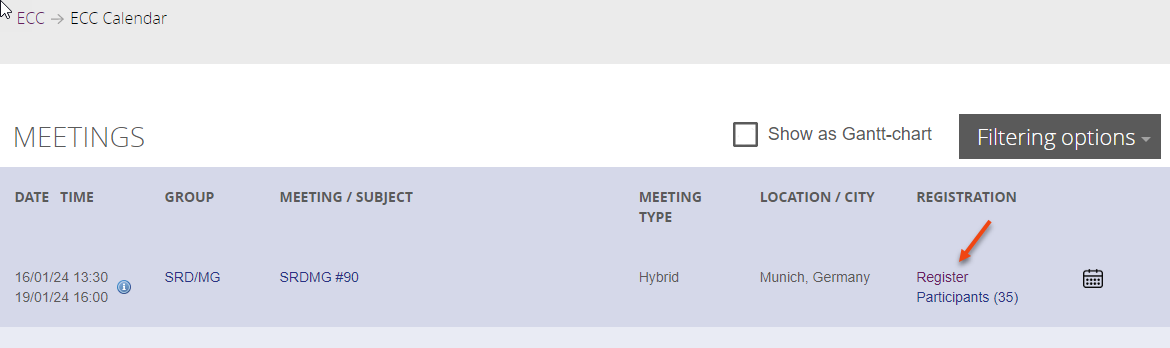
go to the group or the meeting calendar and find the “register” button for the meeting you want to register to:
-
There can be circumstances where the register button is not visible to you, mainly for closed group meetings, please contact Chair of the relevant group if you think you should have access.
-
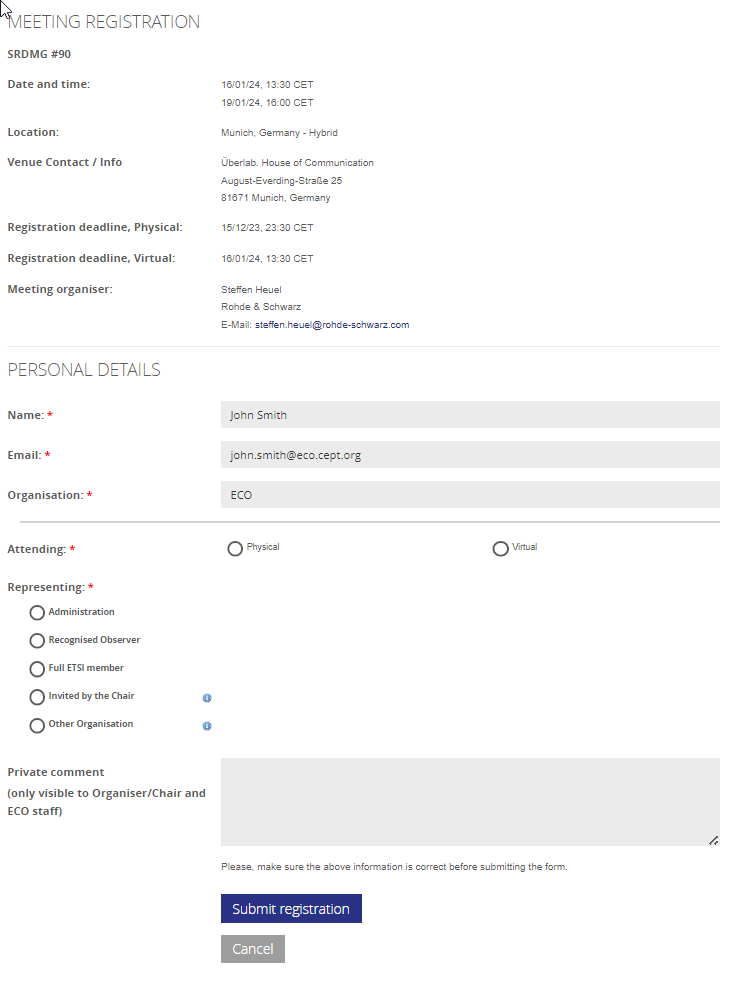
Fill in the missing info and “submit” the form. See explanation of the different representing fields below.
You will receive an email confirmation of your attendance from the system and be able to see the meetings you are participating in, in your Start Page under “my meetings”.
Detailed field description in meeting registration:
Part 1 - Meeting registration details - contains general info about the meeting and a access link for the mHub in case the meeting is either Virtual or Hybrid.
Part 2 - Personal details - show your personal details from the profile data. It is NOT possible to edit these data on this form. If data are not correct, please cancel the registration and proceed to your profile section and edit these.
Part 3 - Attendance type and affiliation - is where you indicate how you will attend the meeting, and which entity you are representing during the meeting.
Attending: if a meeting is Hybrid the option to participate either physical or virtual are indicated as options. Please note that a meeting can be hybrid with no more available seats in either physical or virtual, in which case the option is not selectable.
Representing: Under "Representing" you will indicate which entity you are representing, while attending the meeting, according to the following options:
-
Administration: Indicate which administration you represent. You will also be able to indicate if you are appointed "Head of Delegation" for that administration.
-
Recognised Observer: This option will show a dropdown list of the CEPT´s LoU/MoU partner Organisations. Please select the recognised Observer you represent from this list.
-
Full ETSI member: This field is only visible if the meeting is held in a Project Team of the ECC Plenary and of the Working Groups of the ECC. The option will show a dropdown list of Full ETSI Members as published by ETSI. Please select the organisation you represent from this list.
-
Invited by the Chair or Other organisation: Use these if you are either invited by the Chair or you intend to participate in a meeting representing an Organisation other than those in the options above. If you are representing an Organisation other than your own, please indicate it here.
This choice is subject to the Chair´s approval.
Private Comment: If you have a private comment for the organiser/Chair of the meeting, please use the text field. The note will ONLY be visible to the organiser of the meeting, the Chair and ECO staff. Please do not use this field to enter any personal information - this includes any dieatary constraints - if such information is needed for the organiser, please contact these directly.