5 Generic module
As mentioned earlier in this manual, virtually all radio interference scenarios on terrestrial paths can be addressed in both co-channel (sharing) and adjacent frequency (compatibility) interference studies. A number of various radiocommunications services can be modelled using the generic module:
- Broadcasting: Terrestrial systems and earth stations (e.g. DTH receivers) of satellite systems;
- Fixed services: Point-to-point and point-to-multipoint fixed systems;
- Mobile Services: Land mobile systems, short range devices and earth based components of satellite systems.
This flexibility is achieved by the way the system parameters are defined as constant values or random variables through their distribution functions. It is therefore possible to model even very complex situations by relatively simple variations of some elementary functions. This section explains the use of these parameters in SEAMCAT calculations, where appropriate.
- 5.1 Generic system tab
- 5.2 Receiver
- Introduction
- 5.2.1 Receiver identification
- 5.2.2 Antenna pointing
- 5.2.3 Antenna patterns identification
- 5.2.4 Reception characteristics
- 5.2.5 Interference criteria
- 5.3 Transmitter
- Introduction
- 5.3.1 Transmitter identification
- 5.3.2 Transmitter power
- 5.3.3 Transmitter antenna pointing
- 5.3.4 Antenna patterns identification
- 5.3.5 Emission characteristics
- 5.4 Transmitter to Receiver Path
5.1 Generic system tab
Intro
This tab allows you to update all scenario parameters of for a generic system .
In the upper part of the tab, you have three panels.

5.1.1 System
You can name and write some description of the victim system you want to simulate.
5.1.2 General
The user can enter the frequency. The frequency value is overwritten at the “Scenario” tab level.
|
Description |
Symbol |
Type |
Unit |
Comments |
|
Frequency |
f |
Distribution or Scalar |
MHz |
Distribution of the centre frequency of the system |
You have access to 3 sub tabs to set the generic system:
-
Receiver: This will be used either as VLR or ILR;
-
Transmitter: This will beused either as VLT or ILT;
-
Transmitter to Receiver Path (i.e. either VLT ->VLR or ILT ->ILR).
5.2 Receiver
Introduction
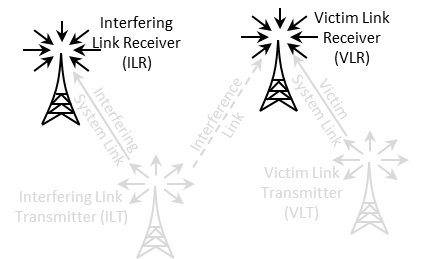
It can be the VLR or the ILR as illustrated in Figure 143.
The receiver consists of 5 panels (Figure 144); Receiver identification, antenna pointing, antenna patterns identification, reception characteristics and interference criteria.
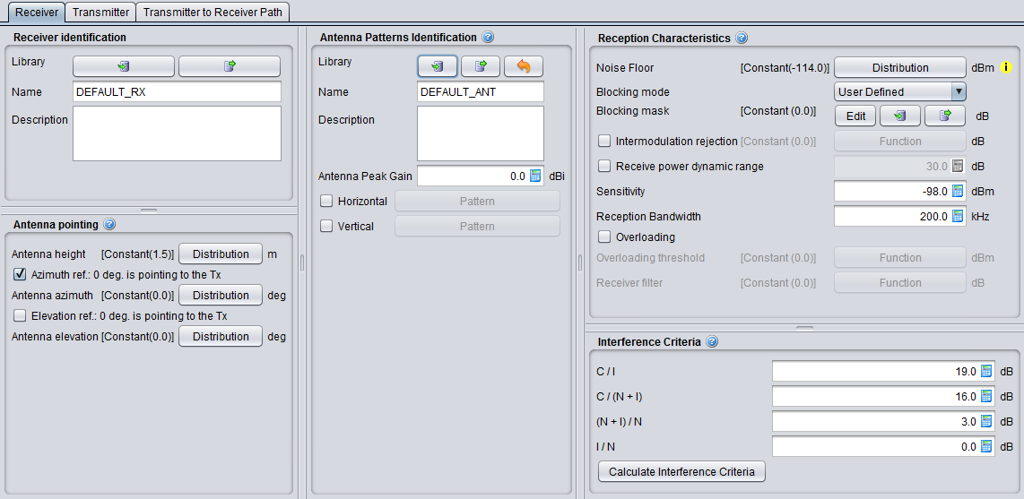
5.2.1 Receiver identification
This panel is a common interface that is reused in all other radio system.
|
Description |
Symbol |
Type |
Unit |
Comments |
|
Library
|
- |
Library |
- |
Allows to import/export the receiver characteristics from/to the library to/from the workspace |
|
Name |
- |
Free text |
- |
Freely chose a name and a description for the receiver. Remember that the settings can be exported to the library, so it is important that the description is accurate enough when reusing or sharing it. |
|
Description |
- |
Free text |
- |
5.2.2 Antenna pointing
This panel is a common interface that is reused in other radio system. It contains all information relative to the antenna other than the radiation pattern.
Table 10: Receiver antenna pointing GUI
|
Description |
Symbol |
Type |
Unit |
Comments |
|
Antenna height |
h |
Distribution or Scalar |
m |
See ANNEX 11:. |
|
Azimuth ref. 0 deg is pointing to the Tx |
- |
Boolean |
- |
When selected, the antenna (i.e. for an antenna azimuth distribution of 0°) is pointing by default at the VLT. If not selected, it looks EAST. |
|
Antenna azimuth: Antenna alignment horizontal tolerance |
dH |
Distribution or Scalar |
degree |
This is the angle between the Rx main beam and the direction to Tx. E.g. if antenna azimuth=0, the Rx and Tx antennas are strictly aligned in the horizontal plane, see ANNEX 11:. |
|
Elevation ref. 0 is pointing to the Tx |
- |
Boolean |
- |
When selected, the antenna (i.e. for an antenna elevation distribution of 0°) is tilted by default towards the VLT. If not selected, it is set horizontal. |
|
Antenna elevation: Antenna alignment vertical tolerance |
dV |
Distribution or Scalar |
degree |
This is the vertical angle between the Rx main beam and the direction towards Tx. E.g. if antenna elevation=0, the Rx and Tx antennas are strictly aligned in the vertical plane, see ANNEX 11: on p. 312. |
5.2.3 Antenna patterns identification
This panel is a common interface that is reused in all other radio system. It contains all information relative to the antenna radiation pattern:
|
Description |
Symbol |
Type |
Unit |
Comments |
|
Library
|
- |
Library |
- |
Allows to import/export the antenna pattern from/to the library to/from the workspace. |
|
Name |
- |
Free text |
- |
|
|
Description |
- |
Free text |
- |
|
|
Antenna peak gain |
G |
Scalar |
dBi |
Antennae are implemented as plugins, therefore see ANNEX 11: as separate guidance on the the radiation pattern. |
|
Horizontal |
- |
Pattern |
- |
Pattern selection. See working range in ANNEX 11:. |
|
Vertical |
- |
Pattern |
- |
Pattern selection. See working range in ANNEX 11:. |
5.2.4 Reception characteristics
This panel consists in setting of the receiver characteristics of the generic system:
|
Description |
Symbol |
Type |
Unit |
Comments |
|
Noise floor: define a distribution of the noise floor |
N |
Distribution or Scalar |
dBm |
See section 1.2.3 for further details
|
|
Blocking mode
|
- |
Boolean |
- |
Blocking mode and associated blocking mask |
|
Blocking response: Receiver frequency response (receiver blocking performance) |
blocking |
Function (X,Y) (MHz) |
dBm or dB depend. on mode |
Receiver mask attenuation (positive or negative values depending on the chosen blocking mode, see below) versus frequency, see ANNEX 8: |
|
Intermodulation rejection: Intermodulation response (intermodulation interference) |
intermod |
Function (X,Y) (MHz) |
dB |
Receiver mask at the intermodulation frequency. (see Annex A5.3 for further details) |
|
Receive power dynamic range
|
Pcmax |
Scalar |
dB |
Used in the calculation of the dRSS. It is the maximum range of the received power that the VLR can accept, in terms of the maximum receive power over the VLR’s sensitivity threshold. If the trialled dRSS value exceeds sens+Pcmax , the dRSS is set to the latter value. See ANNEX 14:. |
|
Sensitivity
|
sens |
Scalar |
dBm/VLR reception bandwidth |
Sensitivity of the receiver. See Section 1.2.4 |
|
Reception bandwidth: Operating bandwidth |
B |
Scalar |
kHz |
Bandwidth of the receiver. |
|
Overloading |
- |
Boolean |
- |
When selected, the overloading calclulation is performed. See Annex A5.4 for further details. |
|
Overloading threshold
|
Oth |
Function (X,Y) (MHz) |
dBm |
It is the maximum interfering signal level close to which the receiver loses its ability to discriminate against interfering signals at frequencies differing from that of the wanted signal |
|
Receiver filter |
Rx_filter |
Function (X,Y) (MHz) |
dB |
Filtering of the receiver (if any). The filtering of the receiver is by default 0 dB (similarly to the default blocking filtering value). It is used in connection with the overloading calculation. |
5.2.5 Interference criteria
Section 1.4 presented the concept of interference criteria (C/I, C/(N+I), (N+I)/N, I/N) when the victim is a generic system. The consistency between these values falls under the responsibility of the user. It should be noted that only one criterion is used at a time in the final interference calculation.
It is important to remember that these parameters are also used in the evaluation of the two blocking modes (Protection ratio and Sensitivity) as presented in See section 1.4.5.
SEAMCAT performs a consistency checking between the interference criteria as explained in ANNEX 3:.
|
Description |
Symbol |
Type |
Unit |
Comments |
|
Interference criteria |
C/I C/(N+I) (N+I)/N I/N |
Scalar |
dB |
At least one of these criteria should be defined: (C/I, C/(N+I), (N+I)/N, I/N). |
|
Calculate interference criteria |
- |
calculator |
- |
This feature allows the evaluation of the consistency between the entered interference criteria (C/I, C/(N+I), (N+I)/N, I/N) and proposes alternative values that can be selected to ensure consistency between them. |
The “calculate interference criteria” is a user friendly calculator for the interference criteria. It avoids conspicuous calculations, increases the transparency and avoids consistency check warnings because of the use of inconsistent sets of values.
The calculation and selection of a consistent set of interference criteria is implemented. The calculator opens with the existing values in the interference criteria fields of the workspace. A checkbox (default: ON) allows to force the consistency of the C/(N+I) value with the workspace, i.e. the values ‘Noise floor’ and ‘Sensitivity’. The relation between the values is given in the formula C/(N+I) [dB] = Sensitivity [dBm] – Noise floor [dBm]
The Interference Criteria Calculator displays all possible sets of consistent interference criteria rounded to two decimals. The same set is displayed only once. As a consequence of rounding, the displayed sets are differ at least 0.01 dB in one of the four values.
When you select the column of values you want and click ok, the values are copy/pasted to the “Interference criteria” panel.

5.3 Transmitter
Introduction
It can be the ILT or the VLT as illustrated in Figure 146.

It consists in 4 panels (Figure 147); Transmitter identification, antenna pointing, antenna patterns identification, emission characteristics.

5.3.1 Transmitter identification
This is the same panel as in section 5.2.1 so that transmitter characteristics can be imported/exported from/to the library to/from the workspace and you can freely chose a name and a description.
5.3.2 Transmitter power
In SEAMCAT, the transmitter power (P) is expressed as conducted power in dBm, including feeder loss. The antenna peak gain (G) is expressed in dBi.
Consequently, the power calculated by SEAMCAT at the antenna output is the effective isotropic radiated power (e.i.r.p.) expressed in dBm:
e.i.r.p (dBm) = P (dBm)+G (dBi)
If the transmitter power is defined as e.i.r.p (dBm) or e.r.p (dBm), the conducted power (P), including feeder loss, can be calculated as follows:
P (dBm)= e.i.r.p (dBm)-G (dBi);
P (dBm)= e.r.p (dBm)-G (dBi)+2.15.
If the antenna gain is not known, it should be assumed zero, then:
P (dBm)= e.i.r.p (dBm);
P (dBm)= e.r.p (dBm)+2.15.
Note that G (dBi)= G (dBd)+2.15.
Example 1: Pt= 50 dBm (conducted transmitter power), Lf (feeder loss) = 2 dB, Gant (antenna gain) = 15 dBi
SEAMCAT settings should be: Power (dBm) = 50 - 2 = 48, Antenna Peak Gain (dBi) = 15
e.i.r.p (dBm) calculated by SEAMCAT= P (dBm)+G (dBi) = 48 + 15 = 63 dBm
Example 2: e.i.r.p = 63 dBm, Gant = 15 dBi, feeder loss in not needed
SEAMCAT settings should be: Power (dBm) = 63 - 15 = 48, Antenna Peak Gain (dBi) = 15
e.i.r.p (dBm) calculated by SEAMCAT= P (dBm)+G (dBi) = 48 + 15 = 63 dBm
Example 3: e.r.p = 60.85 dBm, Gant = 12.85 dBd, feeder loss in not needed
SEAMCAT settings should be: Power (dBm)= 60.85 - 12.85 = 48, Antenna Peak Gain (dBi) = 12.85 + 2.15 = 15
e.i.r.p (dBm) calculated by SEAMCAT= P (dBm)+G (dBi) = 48 + 15 = 63 dBm
Example 4: e.i.r.p = 63 dBm, no other information available
SEAMCAT settings should be: Power (dBm) = 63, Antenna Peak Gain (dBi) = 0
e.i.r.p (dBm) calculated by SEAMCAT= P (dBm)+G (dBi) = 63 + 0 = 63 dBm
Example 5: e.r.p = 60.85 dBm, no other information available
SEAMCAT settings should be: Power (dBm) = 60.85, Antenna Peak Gain (dBi) = 2.15
e.i.r.p (dBm) calculated by SEAMCAT= P (dBm)+G (dBi) = 60.85 + 2.15 = 63 dBm
5.3.3 Transmitter antenna pointing
This is the same panel as in section 5.2.1 so that transmitter characteristics can be imported/exported from/to the library to/from the workspace and you can freely chose a name and a description.
5.3.4 Antenna patterns identification
It contains all information relative to the antenna radiation pattern. It is similar to the receiver antenna patterns identification (Section 5.2.3).
5.3.5 Emission characteristics
This panel consists in setting of the emission characteristics of your generic system.
|
Description |
Symbol |
Type |
Unit |
Comments |
|
Power |
P |
Scalar or Distribution |
dBm |
This is the transmitter power supplied to the antenna of the generic system, including feeder loss. |
|
Interfere is CR: |
|
Boolean |
|
When the CR button is checked then it allows to set the emission characteristics of the VLT and ILT (used for the sRSS calculation only. See Section 6) |
|
Emission mask:
|
emission_rel(f) |
Function (X,Y) (kHz)
|
dBc/ reference bandw. (kHz) |
Define the mask of the transmitter, in the emission bandwidth and out of the emission bandwidth. It is the unwanted signal level from the ILT. (See ANNEX 7:) |
|
Unwanted emissions floor: Noise floor signal level |
emission_floor(f) |
Function (X,Y) (kHz) |
dBm/ reference bandw. (kHz) |
Define the minimum strength of the unwanted emissions. So the unwanted emissions equal to Max(PTx + Unwanted emission, Unwanted emissions floor) (see Annex A7.4) |
|
Power control |
|
|
|
If Power control is checked, the 3 following parameters have to be defined. This Power control is used to limit the output power of the transmitter (see ANNEX 14:) |
|
Power control step size |
PC step |
Scalar |
dB |
|
|
Min threshold |
PC threshold |
Scalar |
dBm/ emission bandw |
If the received power is lower than this threshold, then no power control takes place |
|
Dynamic range |
PC dyn |
Scalar |
dB |
If the received power is higher than Pc treshold + Pc dyn then the full power control takes place, i.e. the power is decreased by Pc dyn |
5.4 Transmitter to Receiver Path
Introduction
3 elements form the path between the VLR and the VLT or the ILR and ILT as illustrated in Figure 148.
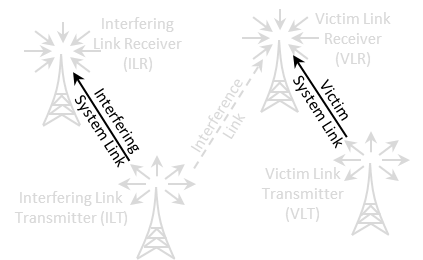
Figure 148: Transmitter to Receiver Path illustration

Figure 149: Transmitter to Receiver Path GUI
5.4.1 Relative location
See ANNEX 12: for further details on the algorithm and conventions.

|
Description |
Symbol |
Type |
Unit |
Comments |
|
Correlation distance |
- |
Boolean |
- |
When checked, the only the Delta X and Y are editable. |
|
Delta X |
X |
Distribution |
Km |
Horizontal distance between the transmitter and receiver. It can be used to shift horizontally the distributed receivers. |
|
Delta Y |
Y |
Distribution |
Km |
Vertical distance between the transmitter and receiver. It can be used to shift vertically the distributed receivers. |
|
Path azimuth |
- |
Distribution |
Degree |
Horizontal angle for the location of the Rx respect to the Tx. If constant, the Rx’s location will be on a straight line. If not, the location of the Rx will be on an angular area. (See Annex A12.3) |
|
Path distance factor |
- |
Distribution |
- |
Distance factor to describe path length between the Tx and the Rx. If the path factor is constant, the Rx will be located on a circle around the Tx. (See Annex A12.2) |
|
Use of polygon |
- |
Boolean |
- |
When this is checked, you can select other shape of deployement than the default circle |
|
Shape of the polygon |
- |
Boolean |
- |
You can select between hexagon (6 sides), heptagon (7 sides), Octagon (8 sides), Pentagon (5 sides), Rectangle (4 sides) and Triangle (3 sides) |
|
Turn CCW |
- |
Distribution |
Degree |
Allows to rotate counter clock wise the selected polygon |
5.4.2 Coverage radius
A coverage radius is calculated for both the victim link and the interfering link. It is the 
for the victim link (VLR-VLT) and the  for the interfering link (ILR-ILT) (see Annex A13.1). The receivers will be randomly deployed within the area centred on the transmitter and delimited by the coverage radius if the non-correlated option is selected.
Three different modes are available for calculating the maximum radius .
-
User-defined radius allows directly entering the maximum radius (See Annex A13.1.1);
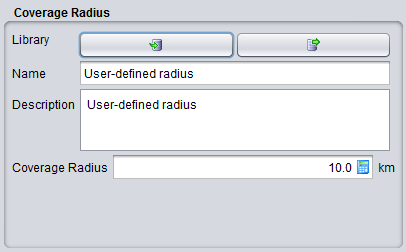
Figure 151: User-defined coverage radius dialog box
Table 16: Description on User-defined coverage radius
|
Description |
Symbol |
Type |
Unit |
Comments |
|
Coverage radius |
Rmax |
Scalar |
km |
The coverage radius defines the coverage of the system, i.e. the maximum distance between an ILT and a ILR or between a VLT and a VLR.
|
- The noise-limited network option will calculate the coverage radius based on the formula for noise-limited network. If this option is chosen, a set of input boxes will appear below allowing the user to enter specific parameters required for this calculation. In this case it is considered that the coverage of the transmitter is limited only by propagation losses and other elements in thelink budget, with received signal operating at the sensitivity limit. The details of the calculation are given in Annex A13.1.2.
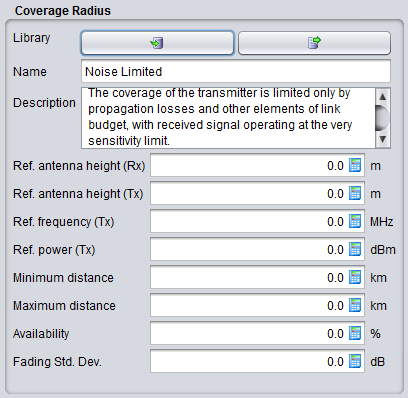
Figure 152: Noise limited network coverage radius dialog box
The coverage radius in the noise-limited network is defined by the parameters of Table 17. Note that the input parameters for the Noise-limited network interface are set to zero by default in order to independently define the radius from some parameters set elsewhere in the link.
|
Description |
Symbol |
Type |
Unit |
Comments |
|
Reference antenna height (receiver): |
h0 |
Scalar |
m |
The height used for coverage radius calculations. If a distribution is used to define the real height, the coverage radius would be different in each trial, here the value may be fixed. |
|
Reference antenna height (transmitter): |
h0 |
Scalar |
m |
The height used for coverage radius calculations. |
|
Reference frequency |
fVLR |
Scalar |
MHz |
|
|
Reference power |
PVLT |
Scalar |
dBm |
|
|
Minimum distance |
|
|
km |
|
|
Maximum distance |
|
|
km |
|
|
Availability |
|
|
% |
|
|
Fading standard deviation |
|
|
dB |
|
|
Reference percentage of time |
|
|
% |
|
Traffic-limited network option will calculate the coverage radius, based on the formula for traffic-limited network. If this option is chosen, a set of input boxes will appear below allowing user to enter specific parameters required for this calculation (See Annex A13.1.3).
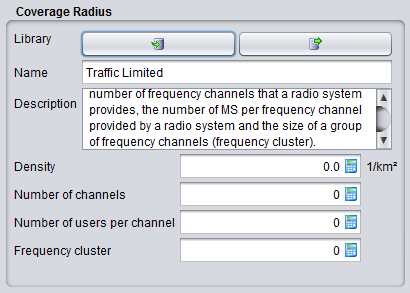
The consistency of this parameter should be verified against the sensitivity, so that if a receiver is placed at given distance (e.g. at the maximum coverage radius) the received power is higher than the sensitivity for a reasonable percentage of occurrences (availability).
5.4.3 Local environment
The percentage of transceivers being indoor and outdoor can be selected thanks to this panel. It will work in combination with the chosen propagation model that you will select. By default the transmitter and receiver are located outdoor. For each elements of the link, it is possible to add  or remove
  a probability of indoor.
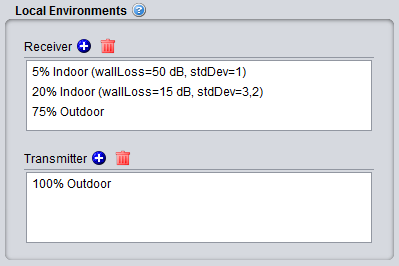 Figure 154: Example of setting up the outdoor/indoor ratio
You can edit the field by double cliking
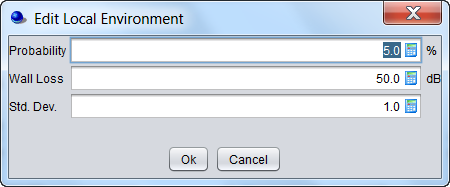 Figure 155: Graphical interface to edit the probability, wall loss and associated standard deviation
Table 19: Local environment and wall loss
|
Description |
Symbol |
Type |
Unit |
Comments |
|
Local environment: Receiver |
Indoor/ outdoor |
- |
- |
Environment of the receiver antenna: outdoor, indoor It is used for both VLR and ILR. |
|
Local environment: Transmitter |
Indoor/ outdoor |
- |
- |
Environment of the transmitter antenna: outdoor, indoor It is used for both VLT and ILT. |
|
Probability |
- |
Scalar |
% |
Probability that a Tx or Rx is located indoors or outdoors. |
|
Wall loss |
or |
Scalar |
dB |
Attenuation of external walls separating indoor and outdoor propagation environments. This parameter is associated to the selected propagation model. |
|
Std. dev. |
or |
Scalar |
dB |
Wall loss stdandard deviation (indoor - outdoor) |
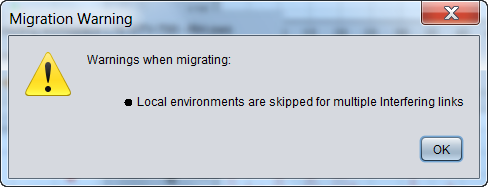
Note that when opening a workspace created prior to SEAMCAT version 5, all settings are mapped to the current SEAMCAT version running on your machine. As the parameter local environment didn’t exist before version 5, a warning may appear indicating that “local environments are skipped for multiple interfering links”. This means that SEAMCAT was not able to automatically set the parameters of the local environments (most likely due to a scenario with multiple interferers). Therefore, there is a need to edit the local environment manually.
5.4.4 Propagation Model
A suitable propagation model can be selected to be applied when calculating signal loss along the path between transmitters and receivers. Further information on propagation models are presented in detail in ANNEX 17.