# 3.5 Extract results vectors (dRSS, iRSS etc...)

You can extract the dRSS vectors from the “Results” panel in the newly create workspace results in Figure 95

[![image.png](https://wiki.cept.org/uploads/images/gallery/2026-04/scaled-1680-/tT8lzrBkyRCVnTzz-image.png)](https://wiki.cept.org/uploads/images/gallery/2026-04/tT8lzrBkyRCVnTzz-image.png)
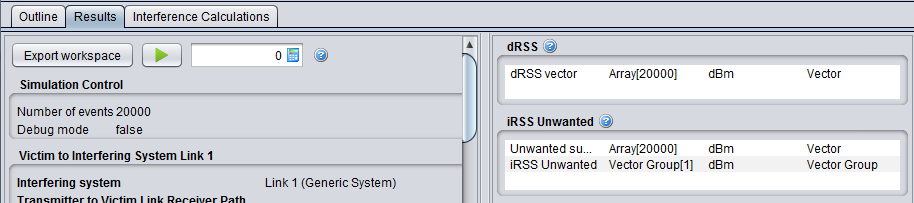
<div class="rich-media-item mediaSingleView-content-wrap image-align-start css-sgu6fp align-center" data-layout="align-start" data-media-vc-wrapper="true" data-node-type="mediaSingle" data-renderer-start-pos="112" data-vc="media-single" data-width="914" data-width-type="pixel" id="bkmrk-figure-95%3A-results-p"><div class="css-i67apr"><div data-alt="" data-collection="contentId-494140" data-context-id="494140" data-file-mime-type="image/png" data-file-name="95.png" data-file-size="19680" data-height="203" data-id="744f08b3-aafa-49ee-9d5a-e5fb41bc32d7" data-node-type="media" data-renderer-start-pos="113" data-type="file" data-width="914"><div class="_2rko18qm _vchhusvi _kqswh2mm _ect4ttxp _p12f1osq _c71l1osq _1bsb1qmm _4t3ine4n _1hlmd0i9 _1rquusvi _eg541i5c _mts3kb7n _1ntskb7n _yfmhtlke _5sb1v00u new-file-experience-wrapper" data-media-vc-wrapper="true" data-testid="media-card-view" id="bkmrk-figure-95%3A-results-p-1"><div class="_1reo15vq _18m915vq _2rko18qm _1e0c1txw _kqswh2mm _p12f1osq _1bsb1osq _4t3i1osq _c71l1osq media-file-card-view" data-cursor="pointer" data-test-media-name="95.png" data-test-progress="1" data-test-source="remote" data-test-status="complete" data-testid="media-file-card-view"><div class="_kqswstnw _1bsb1osq _4t3i1osq _1e0c1txw _2lx21bp4 _1bah1h6o _4cvr1h6o" data-testid="ImageRendererWrapper">![](blob:https://ecowiki.atlassian.net/66ff6cd8-1987-4feb-9047-e75b43289d82#media-blob-url=true&id=744f08b3-aafa-49ee-9d5a-e5fb41bc32d7&collection=contentId-494140&contextId=494140&width=914&height=203&alt=&clientId=113268fe-fe5b-4bc3-8ff3-07965dbf1d18)**Figure 95: Results panel to extract any of the vectors generated by SEAMCAT**</div></div></div><div class="_kqswstnw _1bsb1osq _4t3i1osq _1e0c1txw _2lx21bp4 _1bah1h6o _4cvr1h6o" data-testid="ImageRendererWrapper"></div></div></div></div>[![image.png](https://wiki.cept.org/uploads/images/gallery/2026-04/scaled-1680-/2QTFhvyuLgYnUrmE-image.png)](https://wiki.cept.org/uploads/images/gallery/2026-04/2QTFhvyuLgYnUrmE-image.png)

<div class="rich-media-item mediaSingleView-content-wrap image-align-start css-1fcvn4m align-center" data-layout="align-start" data-media-vc-wrapper="true" data-node-type="mediaSingle" data-renderer-start-pos="193" data-vc="media-single" data-width="463" data-width-type="pixel" id="bkmrk-figure-96%3A-example-o"><div class="css-lxubws"><div data-alt="" data-collection="contentId-494140" data-context-id="494140" data-file-mime-type="image/png" data-file-name="96.png" data-file-size="61543" data-height="475" data-id="d1e9d3f0-3158-48df-b162-e6cb0215cf87" data-node-type="media" data-renderer-start-pos="194" data-type="file" data-width="880"><div class="_2rko18qm _vchhusvi _kqswh2mm _ect4ttxp _p12f1osq _c71l1osq _1bsb1qmm _4t3ine4n _1hlmd0i9 _1rquusvi _eg541i5c _mts3kb7n _1ntskb7n _yfmhtlke _5sb1v00u new-file-experience-wrapper" data-media-vc-wrapper="true" data-testid="media-card-view" id="bkmrk-figure-96%3A-example-o-1"><div class="_1reo15vq _18m915vq _2rko18qm _1e0c1txw _kqswh2mm _p12f1osq _1bsb1osq _4t3i1osq _c71l1osq media-file-card-view" data-cursor="pointer" data-test-media-name="96.png" data-test-progress="1" data-test-source="remote" data-test-status="complete" data-testid="media-file-card-view"><div class="_kqswstnw _1bsb1osq _4t3i1osq _1e0c1txw _2lx21bp4 _1bah1h6o _4cvr1h6o" data-testid="ImageRendererWrapper">![](blob:https://ecowiki.atlassian.net/4373c825-02fb-461c-98b7-bc023f54543a#media-blob-url=true&id=d1e9d3f0-3158-48df-b162-e6cb0215cf87&collection=contentId-494140&contextId=494140&width=880&height=475&alt=&clientId=113268fe-fe5b-4bc3-8ff3-07965dbf1d18)**Figure 96: Example of the dRSS vector**</div></div></div></div></div></div>When double clicking on a result vector field (Figure 36 (#1)) the display panel as shown in Figure 96, offers three options to display the results in vector (limited to 20.000 events), <span data-highlighted="true" data-vc="highlighted-text"><span class="_kqswh2mm"><span class="_5pioz8co _189e1dm9 _1il9buyh _19lc184f _d0altlke" data-testid="definition-highlighter">CDF</span></span></span> and PDF format.

In addition, some statistical information can be displayed such as average, median, standard deviation (StdDev), variance, min and max. Further information about these statistics (i.e. how they are computed) are to be found in Section A1.5.