# 3.2.5 Positioning the VLT vs VLR
Define now the positions of transmitters and receivers of the victim link.
[](https://wiki.cept.org/uploads/images/gallery/2026-04/vIRhk4dX97qHmygd-image.png)
**Figure 76: Selecting the Tx to Rx path tab**
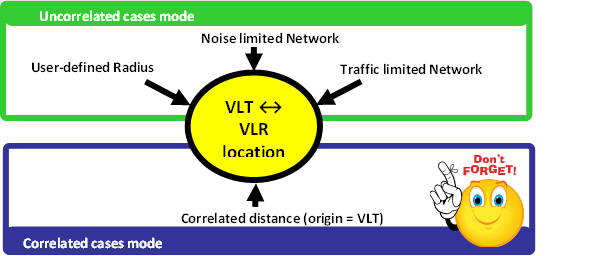
SEAMCAT allows defining the locations of the Victim link receiver and the Victim link transmitter in a fixed manner (correlated) or following some distribution (uncorrelated) as summarised in Figure 77. The input parameters are detailed in section 5.4, and the algorithms are detailed in ANNEX 13:
[](https://wiki.cept.org/uploads/images/gallery/2026-04/9WbxoZmsxhQel0B9-image.png)
**Figure 77: Summary of the VLT ↔ VLR location capability in SEAMCAT**
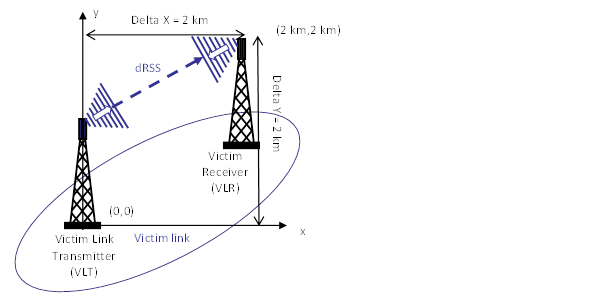
In this exercise, set the distance between the ***VLT*** and ***the VLR*** as fixed (correlated distance) (x = y = 2 km) as illustrated in Figure 78.
[](https://wiki.cept.org/uploads/images/gallery/2026-04/mUS8XZV2gvyA3tR2-image.png)
**Figure 78: Distance between the Victim link transmitter and the Victim link receiver (Victim Link)**
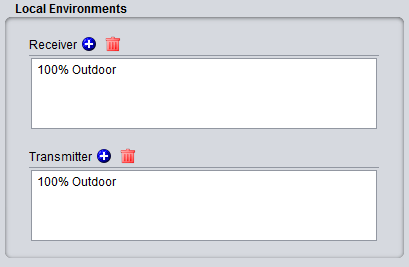
It is assumed that the Tx and Rx are both outdoor as shown in Figure 79.
[](https://wiki.cept.org/uploads/images/gallery/2026-04/oaPKmW2hur1V5iab-image.png)
**Figure 79: Example of setting up the outdoor/indoor ratio**
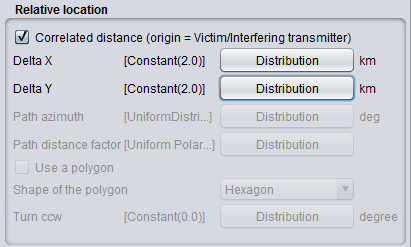
For this, select the correlated distance option of SEAMCAT as shown in Figure 80. In SEAMCAT, the origin of the coverage radius (see ANNEX 13:) is the **transmitter** (this is also reminded in the GUI) of the link.
[](https://wiki.cept.org/uploads/images/gallery/2026-04/IazINlgkqiWQYITE-image.png)
**Figure 80: Illustration of the correlated distance in SEAMCAT**