# 2.5 Create or update a simulation workspace

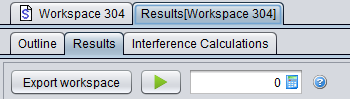
To start, create a new workspace (see **<span class="fabric-text-color-mark" data-renderer-mark="true" data-text-custom-color="#ff0000">1</span>** in Figure 25 or open an existing one (**<span class="fabric-text-color-mark" data-renderer-mark="true" data-text-custom-color="#ff0000">2</span>**).

<div class="pm-table-container with-shadow-observer" data-layout="align-start" data-testid="table-container" id="bkmrk-"><div class="pm-table-wrapper" data-autosize="false" data-layout="align-start" data-number-column="false" data-table-local-id="" data-vc="table-node-wrapper"><table data-layout="align-start" data-number-column="false" data-table-width="760" data-testid="renderer-table"><colgroup></colgroup><tbody><tr><th aria-sort="none" class="ak-renderer-tableHeader-sortable-column__wrapper" colspan="1" rowspan="1"><div class="ak-renderer-tableHeader-sortable-column"><div class="rich-media-item mediaSingleView-content-wrap image-align-start css-tly51f" data-layout="align-start" data-media-vc-wrapper="true" data-node-type="mediaSingle" data-renderer-start-pos="89" data-vc="media-single" data-width="350" data-width-type="pixel"><div class="css-1x6dfld"><div class="css-vhfmu2" contenteditable="false" data-media-badges="true" data-testid="media-badges">  
</div><div data-alt="" data-collection="contentId-493588" data-context-id="493588" data-file-mime-type="" data-file-name="file" data-file-size="1" data-height="99" data-id="e5b5ef09-70e3-45ee-b75d-c8ff4909cecf" data-node-type="media" data-renderer-start-pos="90" data-type="file" data-width="350"><div class="_2rko18qm _vchhusvi _kqswh2mm _ect4ttxp _p12f1osq _c71l1osq _1bsb1qmm _4t3ine4n _1hlmd0i9 _1rquusvi _eg541i5c _mts3kb7n _1ntskb7n _yfmhtlke _5sb1v00u new-file-experience-wrapper" data-media-vc-wrapper="true" data-testid="media-card-view"><div class="_1reo15vq _18m915vq _2rko18qm _1e0c1txw _kqswh2mm _p12f1osq _1bsb1osq _4t3i1osq _c71l1osq media-file-card-view" data-cursor="pointer" data-test-media-name="26a.png" data-test-progress="1" data-test-source="remote" data-test-status="complete" data-testid="media-file-card-view"><div class="_kqswstnw _1bsb1osq _4t3i1osq _1e0c1txw _2lx21bp4 _1bah1h6o _4cvr1h6o" data-testid="ImageRendererWrapper">![](blob:https://ecowiki.atlassian.net/209181bd-e0e2-43ff-9b08-08c237ad33e4#media-blob-url=true&id=e5b5ef09-70e3-45ee-b75d-c8ff4909cecf&collection=contentId-493588&contextId=493588&width=350&height=99&alt=&clientId=113268fe-fe5b-4bc3-8ff3-07965dbf1d18)</div></div></div></div></div></div></div>[![image.png](https://wiki.cept.org/uploads/images/gallery/2026-04/scaled-1680-/4VjOWcSuGUV70Hey-image.png)](https://wiki.cept.org/uploads/images/gallery/2026-04/4VjOWcSuGUV70Hey-image.png)

<div class="ak-renderer-tableHeader-sortable-column"><div class="rich-media-item mediaSingleView-content-wrap image-align-start css-tly51f" data-layout="align-start" data-media-vc-wrapper="true" data-node-type="mediaSingle" data-renderer-start-pos="89" data-vc="media-single" data-width="350" data-width-type="pixel"><div class="css-1x6dfld"><div data-alt="" data-collection="contentId-493588" data-context-id="493588" data-file-mime-type="" data-file-name="file" data-file-size="1" data-height="99" data-id="e5b5ef09-70e3-45ee-b75d-c8ff4909cecf" data-node-type="media" data-renderer-start-pos="90" data-type="file" data-width="350"><div class="_2rko18qm _vchhusvi _kqswh2mm _ect4ttxp _p12f1osq _c71l1osq _1bsb1qmm _4t3ine4n _1hlmd0i9 _1rquusvi _eg541i5c _mts3kb7n _1ntskb7n _yfmhtlke _5sb1v00u new-file-experience-wrapper" data-media-vc-wrapper="true" data-testid="media-card-view" id="bkmrk--1"><div class="_1reo15vq _18m915vq _2rko18qm _1e0c1txw _kqswh2mm _p12f1osq _1bsb1osq _4t3i1osq _c71l1osq media-file-card-view" data-cursor="pointer" data-test-media-name="26a.png" data-test-progress="1" data-test-source="remote" data-test-status="complete" data-testid="media-file-card-view"><div class="_kqswstnw _1bsb1osq _4t3i1osq _1e0c1txw _2lx21bp4 _1bah1h6o _4cvr1h6o" data-testid="ImageRendererWrapper">  
</div></div></div></div></div></div><figure class="ak-renderer-tableHeader-sorting-icon__wrapper ak-renderer-tableHeader-sorting-icon__no-order"><div role="presentation"><div aria-disabled="false" aria-hidden="false" aria-label="No sort applied to the column" class="ak-renderer-tableHeader-sorting-icon css-7smbrx" role="button" tabindex="0"><div class="sorting-icon-svg__no_order ak-renderer-tableHeader-sorting-icon-inactive css-1asrlx7">  
</div></div></div></figure></div></th><th aria-sort="none" class="ak-renderer-tableHeader-sortable-column__wrapper" colspan="1" rowspan="1"><div class="ak-renderer-tableHeader-sortable-column"><div class="rich-media-item mediaSingleView-content-wrap image-align-start css-1xw8ifg" data-layout="align-start" data-media-vc-wrapper="true" data-node-type="mediaSingle" data-renderer-start-pos="94" data-vc="media-single" data-width="477" data-width-type="pixel"><div class="css-1pwi4cf"><div class="css-vhfmu2" contenteditable="false" data-media-badges="true" data-testid="media-badges">  
</div><div data-alt="" data-collection="contentId-493588" data-context-id="493588" data-file-mime-type="" data-file-name="file" data-file-size="1" data-height="60" data-id="b09ccac6-d026-4d1d-9c3c-54efe63e4ec6" data-node-type="media" data-renderer-start-pos="95" data-type="file" data-width="477"><div class="_2rko18qm _vchhusvi _kqswh2mm _ect4ttxp _p12f1osq _c71l1osq _1bsb1qmm _4t3ine4n _1hlmd0i9 _1rquusvi _eg541i5c _mts3kb7n _1ntskb7n _yfmhtlke _5sb1v00u new-file-experience-wrapper" data-media-vc-wrapper="true" data-testid="media-card-view" id="bkmrk--2"><div class="_1reo15vq _18m915vq _2rko18qm _1e0c1txw _kqswh2mm _p12f1osq _1bsb1osq _4t3i1osq _c71l1osq media-file-card-view" data-cursor="pointer" data-test-media-name="26b.png" data-test-progress="1" data-test-source="remote" data-test-status="complete" data-testid="media-file-card-view"><div class="_kqswstnw _1bsb1osq _4t3i1osq _1e0c1txw _2lx21bp4 _1bah1h6o _4cvr1h6o" data-testid="ImageRendererWrapper">![](blob:https://ecowiki.atlassian.net/3d8c77ce-8086-4533-9176-92075fa92c26#media-blob-url=true&id=b09ccac6-d026-4d1d-9c3c-54efe63e4ec6&collection=contentId-493588&contextId=493588&width=477&height=60&alt=&clientId=113268fe-fe5b-4bc3-8ff3-07965dbf1d18)</div></div></div></div></div></div><figure class="ak-renderer-tableHeader-sorting-icon__wrapper ak-renderer-tableHeader-sorting-icon__no-order">[![image.png](https://wiki.cept.org/uploads/images/gallery/2026-04/scaled-1680-/DETvDyLtxbfIM2PV-image.png)](https://wiki.cept.org/uploads/images/gallery/2026-04/DETvDyLtxbfIM2PV-image.png)

<div role="presentation"><div aria-disabled="false" aria-hidden="false" aria-label="No sort applied to the column" class="ak-renderer-tableHeader-sorting-icon css-7smbrx" role="button" tabindex="0"><div class="sorting-icon-svg__no_order ak-renderer-tableHeader-sorting-icon-inactive css-1asrlx7">  
</div></div></div></figure></div></th></tr></tbody></table>

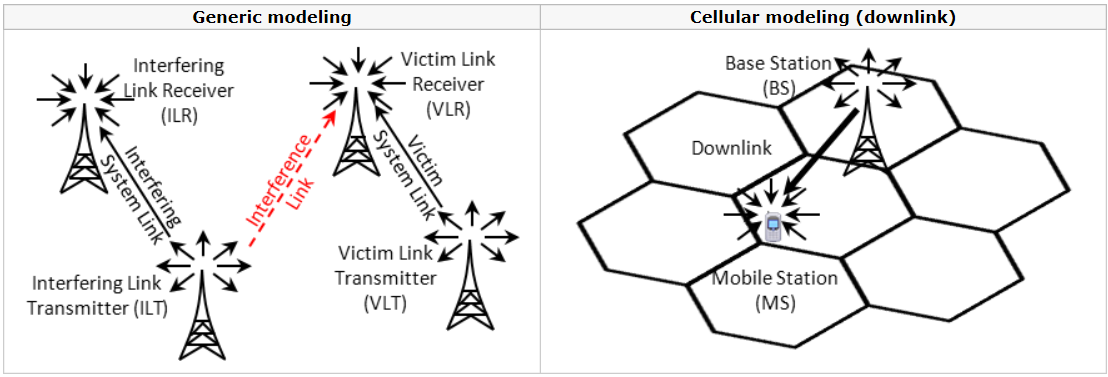
</div><div class="pm-table-sticky-scrollbar-container-view-page" data-vc="table-sticky-scrollbar-container"></div></div><div class="fabric-editor-block-mark fabric-editor-alignment align-center" data-align="center" id="bkmrk-figure-26%3A-illustrat">**Figure 26: Illustration of how to create or open a workspace**</div>A simulation scenario is a part of a scenario workspace, which defines all technical parameters of modeled links as well as some related modelling assumptions, such as physical (mutual) placement of transceivers, propagation modelling settings and so on. Within SEAMCAT a simulation scenario is based upon the concept of links. A link stands for a pairing of one transmitter with one receiver[\[1\]](https://ecowiki.atlassian.net/wiki/spaces/SH/pages/493588/2.5+Create+or+update+a+simulation+workspace "#") operating together in a given wireless system. Such a link is also called a “system link”.

When a new workspace is created, all of its scenario elements are populated with default values (representing a hypothetical interference case between two systems at 900 MHz, as shown in Figure 27). Therefore after creating a new workspace the first step should be to review and modify the scenario parameters so that the resulting simulation scenario reflects the configuration of the wireless systems to be simulated.

To create or update a simulation workspace, the following steps need to be followed:

1. Set the technical characterisitic of the various systems that you want to investigate. In the example of Figure 26 the first system is Generic and the second one is an <span data-highlighted="true" data-vc="highlighted-text"><span class="_kqswh2mm"><span class="_5pioz8co _189e1dm9 _1il9buyh _19lc184f _d0altlke" data-testid="definition-highlighter">OFDMA</span></span></span> <span data-highlighted="true" data-vc="highlighted-text"><span class="_kqswh2mm"><span class="_5pioz8co _189e1dm9 _1il9buyh _19lc184f _d0altlke" data-testid="definition-highlighter">UL</span></span></span> system. Do not forget to export the systems used to the library environment so that they can be reused at a latter point of time.

    
    <div class="rich-media-item mediaSingleView-content-wrap image-align-start css-fpkvbh" data-layout="align-start" data-media-vc-wrapper="true" data-node-type="mediaSingle" data-renderer-start-pos="1473" data-vc="media-single" data-width="941" data-width-type="pixel"><div class="css-8at157"><div class="css-vhfmu2" contenteditable="false" data-media-badges="true" data-testid="media-badges">  
    </div><div data-alt="" data-collection="contentId-493588" data-context-id="493588" data-file-mime-type="" data-file-name="file" data-file-size="1" data-height="166" data-id="c309319d-d0a5-43a7-80d3-845744ad1522" data-node-type="media" data-renderer-start-pos="1474" data-type="file" data-width="941"><div class="_2rko18qm _vchhusvi _kqswh2mm _ect4ttxp _p12f1osq _c71l1osq _1bsb1qmm _4t3ine4n _1hlmd0i9 _1rquusvi _eg541i5c _mts3kb7n _1ntskb7n _yfmhtlke _5sb1v00u new-file-experience-wrapper" data-media-vc-wrapper="true" data-testid="media-card-view" id="bkmrk--3"><div class="_1reo15vq _18m915vq _2rko18qm _1e0c1txw _kqswh2mm _p12f1osq _1bsb1osq _4t3i1osq _c71l1osq media-file-card-view" data-cursor="pointer" data-test-media-name="27.png" data-test-progress="1" data-test-source="remote" data-test-status="complete" data-testid="media-file-card-view"><div class="_kqswstnw _1bsb1osq _4t3i1osq _1e0c1txw _2lx21bp4 _1bah1h6o _4cvr1h6o" data-testid="ImageRendererWrapper">![](blob:https://ecowiki.atlassian.net/1d8ed2c7-07dc-4fe8-b16f-7cada95d51e8#media-blob-url=true&id=c309319d-d0a5-43a7-80d3-845744ad1522&collection=contentId-493588&contextId=493588&width=941&height=166&alt=&clientId=113268fe-fe5b-4bc3-8ff3-07965dbf1d18)</div></div></div></div></div></div>![image.png](https://wiki.cept.org/uploads/images/gallery/2026-04/scaled-1680-/6hc9ve5U3ipTXGtU-image.png)
    
    **Figure 27: Setting various systems (import/export to library environment)**  
      
    <div class="rich-media-item mediaSingleView-content-wrap image-align-start css-l3vz9j" data-layout="align-start" data-media-vc-wrapper="true" data-node-type="mediaSingle" data-renderer-start-pos="1554" data-vc="media-single" data-width="734" data-width-type="pixel"><div class="css-10v650h"><div class="css-vhfmu2" contenteditable="false" data-media-badges="true" data-testid="media-badges">  
    </div><div data-alt="" data-collection="contentId-493588" data-context-id="493588" data-file-mime-type="" data-file-name="file" data-file-size="1" data-height="377" data-id="1f7842a3-82a9-4ca5-aa69-ffbc3f12a6c1" data-node-type="media" data-renderer-start-pos="1555" data-type="file" data-width="1108"><div class="_2rko18qm _vchhusvi _kqswh2mm _ect4ttxp _p12f1osq _c71l1osq _1bsb1qmm _4t3ine4n _1hlmd0i9 _1rquusvi _eg541i5c _mts3kb7n _1ntskb7n _yfmhtlke _5sb1v00u new-file-experience-wrapper" data-media-vc-wrapper="true" data-testid="media-card-view"><div class="_1reo15vq _18m915vq _2rko18qm _1e0c1txw _kqswh2mm _p12f1osq _1bsb1osq _4t3i1osq _c71l1osq media-file-card-view" data-cursor="pointer" data-test-media-name="28.png" data-test-progress="1" data-test-source="remote" data-test-status="complete" data-testid="media-file-card-view"><div class="_kqswstnw _1bsb1osq _4t3i1osq _1e0c1txw _2lx21bp4 _1bah1h6o _4cvr1h6o" data-testid="ImageRendererWrapper">![](blob:https://ecowiki.atlassian.net/3ad6a95c-982d-4c98-8a48-931d5db95e46#media-blob-url=true&id=1f7842a3-82a9-4ca5-aa69-ffbc3f12a6c1&collection=contentId-493588&contextId=493588&width=1108&height=377&alt=&clientId=113268fe-fe5b-4bc3-8ff3-07965dbf1d18)</div></div></div></div></div></div>[![image.png](https://wiki.cept.org/uploads/images/gallery/2026-04/scaled-1680-/6OiF4cfTMO9OA058-image.png)](https://wiki.cept.org/uploads/images/gallery/2026-04/6OiF4cfTMO9OA058-image.png)
    
    <div class="inline-extension-renderer css-e2q2ep"><span class="css-6k4g17">  
    </span></div>**Figure 28: Overview of the various systems which can be simulated in SEAMCAT (i.e. Generic and cellular)**
2. Set the scenario (see section ‎10);
3. Set the path characteristics between the victim and the interferer (relative position, interferer’s density, path loss correlation and propagation model). Links can also be added, duplicated, etc...;
4. The number of events to simulate can be set in the simulation control panel. It is also possible to choose whether to run a simulation in the debug mode or not;
5. Having reviewed the scenario, the simulation can be run.

---

[\[1\]](https://ecowiki.atlassian.net/wiki/spaces/SH/pages/493588/2.5+Create+or+update+a+simulation+workspace "#") Cellular systems with multiple receivers (downlink) or multiple transmitters (uplink) are handled differently