2.4.2 Results workspace
When a simulation is performed, SEAMCAT automatically generates a separate workspace to contain the results which appears as a separate tab entitled ’Results[Workspace xyz]’ and stores read only information.
 Figure 23: Illustration of the workspace results (Highest hierarchy level)
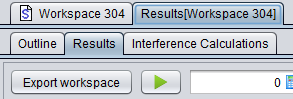
It is not possible to edit any of the input fields in the results tab. It is however possible to select ‘Export workspace’ to generate and open a new workspace scenario entitled ‘Exported Workspace xyz‘ :
 |
|

Figure 24: Illustration of exporting a results workspace into a scenario workspace
The results workspace consists of the following tabs depending on the scenario set-up:
-
Outline: The outline of the simulation can be seen with both a summary of the dRSS and iRSS calculation and a graphical overview of the Tx/Rx positions for the victim and interferer(s);
-
Results: gives access to a list of all results generated by SEAMCAT and from the EPPs used in the simulation;
-
Interference calculations: It gives access to the Interference calculation engine;
-
CDMA Capacity Finding: This panel is only available when a CDMA system is used in the scenario. It indicates the non-interfered capacity (i.e. number of UEs) when the network is gradually filled up with UEs while measuring a specific system outage depending on uplink (UL) or downlink (DL) configuration;
-
Cellular Structure: This panel is only available when a cellular system (CDMA or OFDMA) is used in the scenario. It shows the results of the cellular specific simulation – i.e. layout of the cells, position of users and indication of dropped users.
