# 2.13 Simulation report

Any simulations and their results overview can be presented in a report. This report is automatically generated by SEAMCAT. Select the **Report command** from the Workspace menu, click on the Report icon of the toolbar ([![image.png](https://wiki.cept.org/uploads/images/gallery/2026-04/scaled-1680-/qo0Hutme6CUSirfK-image.png)](https://wiki.cept.org/uploads/images/gallery/2026-04/qo0Hutme6CUSirfK-image.png)) or press &lt;<span data-highlighted="true" data-vc="highlighted-text"><span class="_kqswh2mm"><span class="_5pioz8co _189e1dm9 _1il9buyh _19lc184f _d0altlke" data-testid="definition-highlighter">CTRL</span></span></span>+R&gt; to activate the **Report options** window:

[![image.png](https://wiki.cept.org/uploads/images/gallery/2026-04/scaled-1680-/pwJp9s4rjxd9Doij-image.png)](https://wiki.cept.org/uploads/images/gallery/2026-04/pwJp9s4rjxd9Doij-image.png)
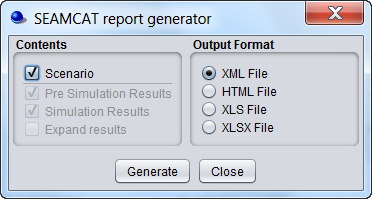
<div class="rich-media-item mediaSingleView-content-wrap image-center css-pt6vsa" data-layout="center" data-media-vc-wrapper="true" data-node-type="mediaSingle" data-renderer-start-pos="279" data-vc="media-single" data-width="372" data-width-type="pixel" id="bkmrk-figure-40%3A-seamcat-r"><div class="css-1dbpmvt"><div data-alt="" data-collection="contentId-493679" data-context-id="493679" data-file-mime-type="" data-file-name="file" data-file-size="1" data-height="199" data-id="fccb591f-86a0-4d95-87f6-d2a660cbdf54" data-node-type="media" data-renderer-start-pos="280" data-type="file" data-width="372"><div class="_2rko18qm _vchhusvi _kqswh2mm _ect4ttxp _p12f1osq _c71l1osq _1bsb1qmm _4t3ine4n _1hlmd0i9 _1rquusvi _eg541i5c _mts3kb7n _1ntskb7n _yfmhtlke _5sb1v00u new-file-experience-wrapper" data-media-vc-wrapper="true" data-testid="media-card-view"><div class="_1reo15vq _18m915vq _2rko18qm _1e0c1txw _kqswh2mm _p12f1osq _1bsb1osq _4t3i1osq _c71l1osq media-file-card-view" data-cursor="pointer" data-test-media-name="41.png" data-test-progress="1" data-test-source="remote" data-test-status="complete" data-testid="media-file-card-view"><div class="_kqswstnw _1bsb1osq _4t3i1osq _1e0c1txw _2lx21bp4 _1bah1h6o _4cvr1h6o align-center" data-testid="ImageRendererWrapper">![](blob:https://ecowiki.atlassian.net/6eca80ba-079a-4610-8e6e-15cdc0d553be#media-blob-url=true&id=fccb591f-86a0-4d95-87f6-d2a660cbdf54&collection=contentId-493679&contextId=493679&width=372&height=199&alt=&clientId=113268fe-fe5b-4bc3-8ff3-07965dbf1d18)**Figure 40: SEAMCAT report generator panel**</div></div></div></div></div></div>In this dialog window, the contents of the generated report can be configured, by checking or un-checking following items:

- **Scenario:** It indicates whether all scenario parameters should be included or not;
- **Pre Simulation results**: Pre-simulation is a result group where a simulation can store results that are calculated before the simulation starts. This is used primarily for the cellular simulations were complex calculations are conducted before the simulation begins (e.g. capacity findings for <span data-highlighted="true" data-vc="highlighted-text"><span class="_kqswh2mm"><span class="_5pioz8co _189e1dm9 _1il9buyh _19lc184f _d0altlke" data-testid="definition-highlighter">CDMA</span></span></span>). For some simulation this can be empty. Currently the generic simulation has no need for presimulation results and therefore leaves the group empty;
- **Simulation results**: It indicates whether simulation control parameters should be included or not;
- **Expand results**: It allows expanding tabular data by checking or unchecking the Expand tabular data option.

There are three formats for the report:

- XML File (default);
- HTML File;
- Excel File (.xls and .xlsx).

When clicking on “Generate”, a file is automatically generated in the “reports” folder under the SEAMCAT home directory (see Figure 15).

For all other data types the output is similar to their display in the workspace tree view except that couples of values defining user-defined random data, functions, and radiation patterns are fully expanded.

[![image.png](https://wiki.cept.org/uploads/images/gallery/2026-04/scaled-1680-/SXevaq7tvs7fzi9Z-image.png)](https://wiki.cept.org/uploads/images/gallery/2026-04/SXevaq7tvs7fzi9Z-image.png)
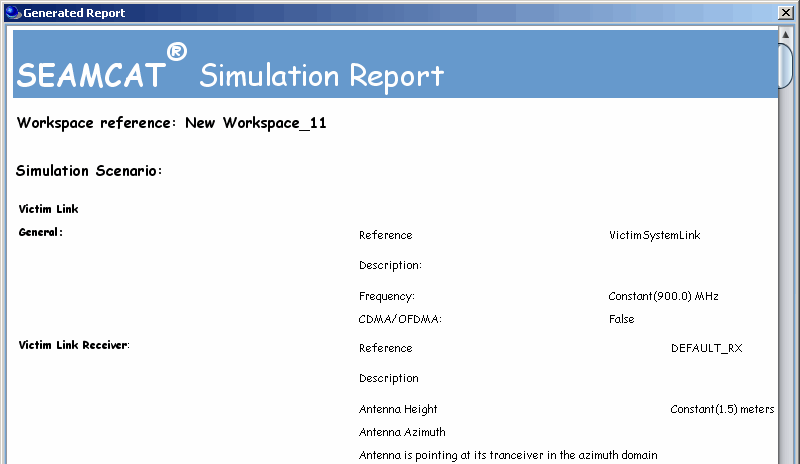
<div class="rich-media-item mediaSingleView-content-wrap image-align-start css-cxwrl5" data-layout="align-start" data-media-vc-wrapper="true" data-node-type="mediaSingle" data-renderer-start-pos="1666" data-vc="media-single" data-width="431" data-width-type="pixel" id="bkmrk-figure-41%3A-example-o"><div class="css-1dtlzwm"><div data-alt="" data-collection="contentId-493679" data-context-id="493679" data-file-mime-type="" data-file-name="file" data-file-size="1" data-height="464" data-id="ce075f07-1f6d-4cab-ad7d-9acb7c46c497" data-node-type="media" data-renderer-start-pos="1667" data-type="file" data-width="800"><div class="_2rko18qm _vchhusvi _kqswh2mm _ect4ttxp _p12f1osq _c71l1osq _1bsb1qmm _4t3ine4n _1hlmd0i9 _1rquusvi _eg541i5c _mts3kb7n _1ntskb7n _yfmhtlke _5sb1v00u new-file-experience-wrapper" data-media-vc-wrapper="true" data-testid="media-card-view" id="bkmrk-figure-41%3A-example-o-1"><div class="_1reo15vq _18m915vq _2rko18qm _1e0c1txw _kqswh2mm _p12f1osq _1bsb1osq _4t3i1osq _c71l1osq media-file-card-view" data-cursor="pointer" data-test-media-name="42.gif" data-test-progress="1" data-test-source="remote" data-test-status="complete" data-testid="media-file-card-view"><div class="_kqswstnw _1bsb1osq _4t3i1osq _1e0c1txw _2lx21bp4 _1bah1h6o _4cvr1h6o align-center" data-testid="ImageRendererWrapper">![](blob:https://ecowiki.atlassian.net/74abcb5b-b6ba-4d3f-8ab0-a11d2590300e#media-blob-url=true&id=ce075f07-1f6d-4cab-ad7d-9acb7c46c497&collection=contentId-493679&contextId=493679&width=800&height=464&alt=&clientId=113268fe-fe5b-4bc3-8ff3-07965dbf1d18)**Figure 41: Example of a report generated in SEAMCAT in a html format**</div></div></div></div></div></div>