# 2.4 Simulation Workspace

# 2.4.1 Scenario workspace

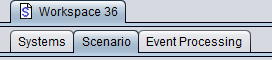
A scenario workspace can be seen as a working environment for a given study where all input fields are editable. It consists of the following three tabs:

- **Systems**: This allows setting the characteristic of the systems to investigate (generic Tx, Rx and path between Tx/Rx or cellular general settings, positioning);
- **Scenario**: This sets the simulation scenario, i.e. the selection of the systems to be used as victim or interferer(s) as well as the path between the victim and the interfer(s), the number of events and optional selection of debug mode;
- **Event processing**: The event processing plugin (EPP) environment allows the processing of intermediary SEAMCAT results for each simulated event. Some EPPs are available built in to the tool, but it is also possible to create customized EPPs.
![image.png](https://wiki.cept.org/uploads/images/gallery/2026-04/scaled-1680-/WELCyGtNZ5EtCtG4-image.png)

**Figure 22: Illustration of the workspace scenario (Highest hierarchy level)**

# 2.4.2 Results workspace

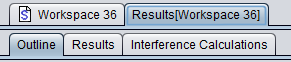
When a simulation is performed, SEAMCAT automatically generates a separate workspace to contain the results which appears as a separate tab entitled ’Results\[Workspace xyz\]’ and stores <u data-renderer-mark="true">read only information.</u>

![image.png](https://wiki.cept.org/uploads/images/gallery/2026-04/scaled-1680-/OtNbUaFwn3bXCzOE-image.png)**Figure 23: Illustration of the workspace results (Highest hierarchy level)**

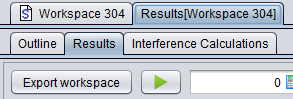
It is not possible to edit any of the input fields in the results tab. It is however possible to select ‘Export workspace’ to generate and open a new workspace scenario entitled ‘Exported Workspace xyz‘ :

<table border="1" id="bkmrk-" style="border-collapse: collapse; width: 100%;"><colgroup><col style="width: 50%;"></col><col style="width: 50%;"></col></colgroup><tbody><tr><td>[![image.png](https://wiki.cept.org/uploads/images/gallery/2026-04/scaled-1680-/27g6xNa9omkeOly5-image.png)](https://wiki.cept.org/uploads/images/gallery/2026-04/27g6xNa9omkeOly5-image.png)  
</td><td>[![image.png](https://wiki.cept.org/uploads/images/gallery/2026-04/scaled-1680-/kiA6EP3pckHOBsjL-image.png)](https://wiki.cept.org/uploads/images/gallery/2026-04/kiA6EP3pckHOBsjL-image.png)

</td></tr></tbody></table>

**Figure 24: Illustration of exporting a results workspace into a scenario workspace**

 The results workspace consists of the following tabs depending on the scenario set-up:

- Outline: The outline of the simulation can be seen with both a summary of the dRSS and iRSS calculation and a graphical overview of the Tx/Rx positions for the victim and interferer(s);
- Results: gives access to a list of all results generated by SEAMCAT and from the EPPs used in the simulation;
- Interference calculations: It gives access to the Interference calculation engine;
- <span data-highlighted="true" data-vc="highlighted-text"><span class="_kqswh2mm"><span class="_5pioz8co _189e1dm9 _1il9buyh _19lc184f _d0altlke" data-testid="definition-highlighter">CDMA</span></span></span> Capacity Finding: This panel is only available when a <span data-highlighted="true" data-vc="highlighted-text">CDMA</span> system is used in the scenario. It indicates the non-interfered capacity (i.e. number of UEs) when the network is gradually filled up with UEs while measuring a specific system outage depending on uplink (<span data-highlighted="true" data-vc="highlighted-text"><span class="_kqswh2mm"><span class="_5pioz8co _189e1dm9 _1il9buyh _19lc184f _d0altlke" data-testid="definition-highlighter">UL</span></span></span>) or downlink (DL) configuration;
- Cellular Structure: This panel is only available when a cellular system (<span data-highlighted="true" data-vc="highlighted-text">CDMA</span> or <span data-highlighted="true" data-vc="highlighted-text"><span class="_kqswh2mm"><span class="_5pioz8co _189e1dm9 _1il9buyh _19lc184f _d0altlke" data-testid="definition-highlighter">OFDMA</span></span></span>) is used in the scenario. It shows the results of the cellular specific simulation – i.e. layout of the cells, position of users and indication of dropped users.

<div class="rich-media-item mediaSingleView-content-wrap image-center css-hu70de" data-layout="center" data-media-vc-wrapper="true" data-node-type="mediaSingle" data-renderer-start-pos="1635" data-vc="media-single" data-width="394" data-width-type="pixel" id="bkmrk--1"><div class="css-1tdqf2i"><div class="css-vhfmu2" contenteditable="false" data-media-badges="true" data-testid="media-badges">  
</div><div data-alt="" data-collection="contentId-493580" data-context-id="493580" data-file-mime-type="" data-file-name="file" data-file-size="1" data-height="63" data-id="f01d8f7a-88ab-46dc-b4a1-f2a89937a029" data-node-type="media" data-renderer-start-pos="1636" data-type="file" data-width="394"><div class="_2rko18qm _vchhusvi _kqswh2mm _ect4ttxp _p12f1osq _c71l1osq _1bsb1qmm _4t3ine4n _1hlmd0i9 _1rquusvi _eg541i5c _mts3kb7n _1ntskb7n _yfmhtlke _5sb1v00u new-file-experience-wrapper" data-media-vc-wrapper="true" data-testid="media-card-view" id="bkmrk--2"><div class="_1reo15vq _18m915vq _2rko18qm _1e0c1txw _kqswh2mm _p12f1osq _1bsb1osq _4t3i1osq _c71l1osq media-file-card-view" data-cursor="pointer" data-test-media-name="25.png" data-test-progress="1" data-test-source="remote" data-test-status="complete" data-testid="media-file-card-view"><div class="_kqswstnw _1bsb1osq _4t3i1osq _1e0c1txw _2lx21bp4 _1bah1h6o _4cvr1h6o" data-testid="ImageRendererWrapper">![](blob:https://ecowiki.atlassian.net/83e0b36d-adcd-4651-b51c-f6b4b44f9b27#media-blob-url=true&id=f01d8f7a-88ab-46dc-b4a1-f2a89937a029&collection=contentId-493580&contextId=493580&width=394&height=63&alt=&clientId=113268fe-fe5b-4bc3-8ff3-07965dbf1d18)</div></div></div></div></div></div>[![image.png](https://wiki.cept.org/uploads/images/gallery/2026-04/scaled-1680-/Bovl94mR16LeI1V4-image.png)](https://wiki.cept.org/uploads/images/gallery/2026-04/Bovl94mR16LeI1V4-image.png)

<div class="fabric-editor-block-mark fabric-editor-alignment" data-align="center" id="bkmrk-figure-25%3A-results-w">**Figure 25: Results workspace with a Cellular system (the “<span data-highlighted="true" data-vc="highlighted-text">CDMA</span> capacity finding” is only available with <span data-highlighted="true" data-vc="highlighted-text">CDMA</span> simulation)**</div>