# 13.4.4 Receiver elements

To create or modify a library receiver element, select the **Receivers** command from the **Library pull-down menu** or directly with **CTRL+SHIFT+R**.

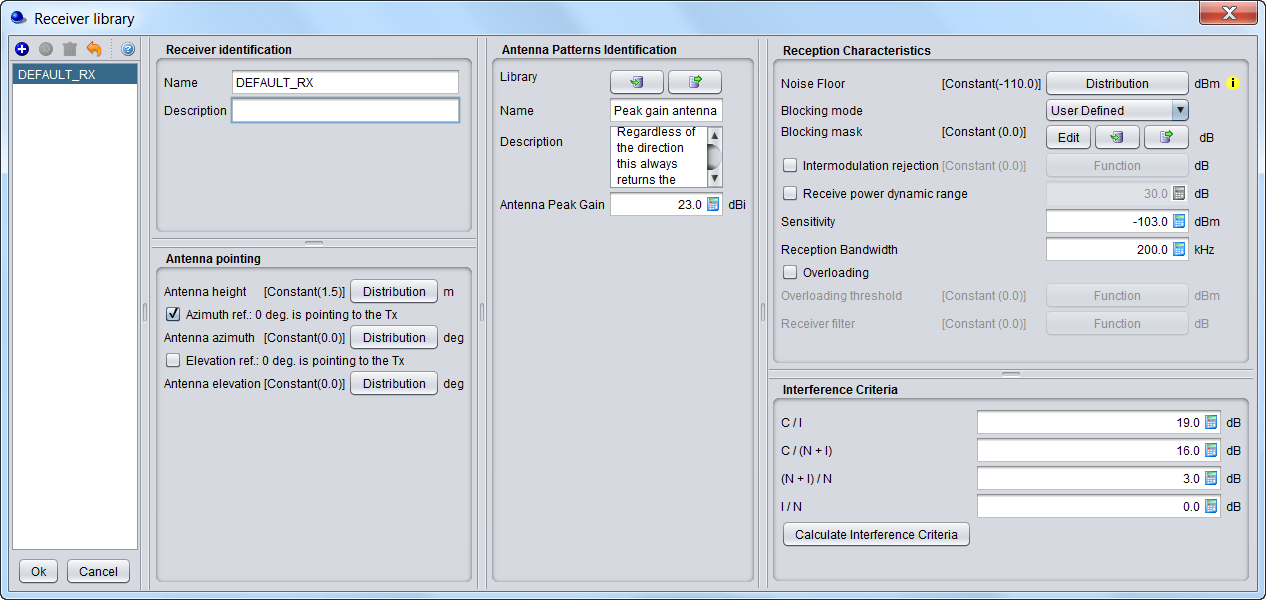
This activates the Receiver Library window which displays a list of existing receiver elements in the library. Please note that it is the same interface as in the workspace, so that it is easy to fill. If no receiver has been previously created , the list will contain only the DEFAULT receiver elements:
![image.png](https://wiki.cept.org/uploads/images/gallery/2026-06/scaled-1680-/USOeApjQIGLFa5WP-image.png)

<div class="rich-media-item mediaSingleView-content-wrap image-align-start css-g5bla6" data-layout="align-start" data-media-vc-wrapper="true" data-node-type="mediaSingle" data-renderer-start-pos="450" data-vc="media-single" data-width="844" data-width-type="pixel" id="bkmrk-figure-288%3A-receiver"><div class="css-13ztf7b"><div data-alt="" data-collection="contentId-493122" data-context-id="493122" data-file-mime-type="" data-file-name="file" data-file-size="1" data-height="600" data-id="22ed2414-1e65-4ca9-88fd-adca950f33b4" data-node-type="media" data-renderer-start-pos="451" data-type="file" data-width="1266"><div class="_2rko18qm _vchhusvi _kqswh2mm _ect4ttxp _p12f1osq _c71l1osq _1bsb1qmm _4t3ine4n _1hlmd0i9 _1rquusvi _eg541i5c _mts3kb7n _1ntskb7n _yfmhtlke _5sb1v00u new-file-experience-wrapper" data-media-vc-wrapper="true" data-testid="media-card-view" id="bkmrk-figure-288%3A-receiver-1" role="none"><div class="_1reo15vq _18m915vq _2rko18qm _1e0c1txw _kqswh2mm _p12f1osq _1bsb1osq _4t3i1osq _c71l1osq media-file-card-view" data-cursor="pointer" data-test-media-name="8.png" data-test-progress="1" data-test-source="remote" data-test-status="complete" data-testid="media-file-card-view"><div class="_kqswstnw _1bsb1osq _4t3i1osq _1e0c1txw _2lx21bp4 _1bah1h6o _4cvr1h6o align-center" data-testid="ImageRendererWrapper">![](blob:https://ecowiki.atlassian.net/e4bf2365-421c-43b1-b9ea-35e5a7e1a24c#media-blob-url=true&id=22ed2414-1e65-4ca9-88fd-adca950f33b4&collection=contentId-493122&contextId=493122&width=1266&height=600&alt=&clientId=113268fe-fe5b-4bc3-8ff3-07965dbf1d18)**Figure 288: Receiver library elements**</div></div></div></div></div></div>The parameters of receiver are grouped in 5 different panels:

- **Receiver identification**: to define receiver name (unique identifier), description;
- **Antenna pointing**: It contains all information relative to the antenna other than the radiation pattern (Please read here more about antenna azimuth/elevation settings);
- **Antenna patterns identification**: to define a specific antenna to be associated with that particular receiver. Note that is possible to select one of the existing antenna library elements or define completely new antenna parameters to be associated only with the given receiver;
- **Reception characteristics**: to define the basic receiver features, such as bandwidth, sensitivity, blocking (selectivity) function, etc.;
- **Interference criterion**: to define the required minimum C/I and/or other interference criterion, as appropriate.

**Note 1:** It is possible to scroll up and down and see the differences in the receivers.

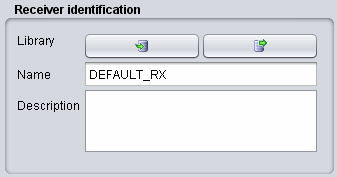
**Note 2:** It is possible to create a receiver from the workspace and export it to your library environment
![image.png](https://wiki.cept.org/uploads/images/gallery/2026-06/scaled-1680-/gn77mtHddUiuDkxf-image.png)

<div class="rich-media-item mediaSingleView-content-wrap image-align-start css-1tl8lct" data-layout="align-start" data-media-vc-wrapper="true" data-node-type="mediaSingle" data-renderer-start-pos="1549" data-vc="media-single" data-width="337" data-width-type="pixel" id="bkmrk-figure-289%3A-example-"><div class="css-jmc7sj"><div data-alt="" data-collection="contentId-493122" data-context-id="493122" data-file-mime-type="" data-file-name="file" data-file-size="1" data-height="177" data-id="d41f2d51-1764-4b99-aaad-f12e556f0ce2" data-node-type="media" data-renderer-start-pos="1550" data-type="file" data-width="337"><div class="_2rko18qm _vchhusvi _kqswh2mm _ect4ttxp _p12f1osq _c71l1osq _1bsb1qmm _4t3ine4n _1hlmd0i9 _1rquusvi _eg541i5c _mts3kb7n _1ntskb7n _yfmhtlke _5sb1v00u new-file-experience-wrapper" data-media-vc-wrapper="true" data-testid="media-card-view" id="bkmrk-figure-289%3A-example--1" role="none"><div class="_1reo15vq _18m915vq _2rko18qm _1e0c1txw _kqswh2mm _p12f1osq _1bsb1osq _4t3i1osq _c71l1osq media-file-card-view" data-cursor="pointer" data-test-media-name="9.gif" data-test-progress="1" data-test-source="remote" data-test-status="complete" data-testid="media-file-card-view"><div class="_kqswstnw _1bsb1osq _4t3i1osq _1e0c1txw _2lx21bp4 _1bah1h6o _4cvr1h6o align-center" data-testid="ImageRendererWrapper">![](blob:https://ecowiki.atlassian.net/421eb4ff-9ba1-4b2d-ad9f-0d4b873aa0a3#media-blob-url=true&id=d41f2d51-1764-4b99-aaad-f12e556f0ce2&collection=contentId-493122&contextId=493122&width=337&height=177&alt=&clientId=113268fe-fe5b-4bc3-8ff3-07965dbf1d18)**Figure 289: Example on how to import/export to/from the workspace/library for the receiver elements**</div></div></div></div></div></div>