# 13.3 Edit and share library element

When opening a library item from the workspace menu, the following interface will appear (as an example, the antenna interface is shown in the figure below).

![image.png](https://wiki.cept.org/uploads/images/gallery/2026-06/scaled-1680-/cQ0v1hqf9zSEX8TQ-image.png)

<div class="rich-media-item mediaSingleView-content-wrap image-center css-1fbizlg" data-layout="center" data-media-vc-wrapper="true" data-node-type="mediaSingle" data-renderer-start-pos="162" data-vc="media-single" data-width="799" data-width-type="pixel" id="bkmrk-figure-280%3A-example-"><div class="css-1p9o766"><div data-alt="" data-collection="contentId-493028" data-context-id="493028" data-file-mime-type="" data-file-name="file" data-file-size="1" data-height="95" data-id="1bbb3c04-3f8d-4da7-91a6-f984365a2127" data-node-type="media" data-renderer-start-pos="163" data-type="file" data-width="799"><div class="_2rko18qm _vchhusvi _kqswh2mm _ect4ttxp _p12f1osq _c71l1osq _1bsb1qmm _4t3ine4n _1hlmd0i9 _1rquusvi _eg541i5c _mts3kb7n _1ntskb7n _yfmhtlke _5sb1v00u new-file-experience-wrapper" data-media-vc-wrapper="true" data-testid="media-card-view" id="bkmrk-figure-280%3A-example--1" role="none"><div class="_1reo15vq _18m915vq _2rko18qm _1e0c1txw _kqswh2mm _p12f1osq _1bsb1osq _4t3i1osq _c71l1osq media-file-card-view" data-cursor="pointer" data-test-media-name="80.gif" data-test-progress="1" data-test-source="remote" data-test-status="complete" data-testid="media-file-card-view"><div class="_kqswstnw _1bsb1osq _4t3i1osq _1e0c1txw _2lx21bp4 _1bah1h6o _4cvr1h6o align-center" data-testid="ImageRendererWrapper">![](blob:https://ecowiki.atlassian.net/2595073e-b5ee-4730-96ee-5c7b333fbc58#media-blob-url=true&id=1bbb3c04-3f8d-4da7-91a6-f984365a2127&collection=contentId-493028&contextId=493028&width=799&height=95&alt=&clientId=113268fe-fe5b-4bc3-8ff3-07965dbf1d18)**Figure 280: Example of the antenna interface library**</div></div></div></div></div></div> All the library elements follow the **same** command feature [![image.png](https://wiki.cept.org/uploads/images/gallery/2026-06/scaled-1680-/sWWkuFl4T7a3Bfik-image.png)](https://wiki.cept.org/uploads/images/gallery/2026-06/sWWkuFl4T7a3Bfik-image.png). They are available for you to allow:

- **Creating** a new antenna, click on [![image.png](https://wiki.cept.org/uploads/images/gallery/2026-06/scaled-1680-/kzjMvc13OCV2ld7J-image.png)](https://wiki.cept.org/uploads/images/gallery/2026-06/kzjMvc13OCV2ld7J-image.png)
- **Deleting** an existing antenna, select it in the list and click on [![image.png](https://wiki.cept.org/uploads/images/gallery/2026-06/scaled-1680-/xN8mcTIf2BvXb3SI-image.png)](https://wiki.cept.org/uploads/images/gallery/2026-06/xN8mcTIf2BvXb3SI-image.png)
- **Duplicating** an existing antenna, select it in the list and click on [![image.png](https://wiki.cept.org/uploads/images/gallery/2026-06/scaled-1680-/Aco8SDY268YF986T-image.png)](https://wiki.cept.org/uploads/images/gallery/2026-06/Aco8SDY268YF986T-image.png). Reference of the new antenna is derived from the reference of the selected one by incrementing the integer suffix of that reference, if any, or adding character '1' to the end of the original name.
- **Reloading** the pre-defined libraries (it will delete any entries that you may have made), click [![image.png](https://wiki.cept.org/uploads/images/gallery/2026-06/scaled-1680-/dZBvhRkagEsRpzqV-image.png)](https://wiki.cept.org/uploads/images/gallery/2026-06/dZBvhRkagEsRpzqV-image.png) ;
- Getting on-line **help by** clicking on [![image.png](https://wiki.cept.org/uploads/images/gallery/2026-06/scaled-1680-/CgBP9dxExalhdd5l-image.png)](https://wiki.cept.org/uploads/images/gallery/2026-06/CgBP9dxExalhdd5l-image.png)
    
    <div class="inline-extension-renderer css-e2q2ep"><div data-testid="inline-image"><div class="_1e0c1nu9" role="presentation"><a class="_ymio1r31 _ypr0glyw _zcxs1o36 _mizu1v1w _1ah3dkaa _ra3xnqa1 _128mdkaa _1cvmnqa1 _4davt94y _4bfu1r31 _1hms8stv _ajmmnqa1 _vchhusvi _kqswh2mm _ect4ttxp _syaz13af _1a3b1r31 _4fpr8stv _5goinqa1 _f8pj13af _9oik1r31 _1bnxglyw _jf4cnqa1 _30l313af _1nrm1r31 _c2waglyw _1iohnqa1 _9h8h12zz _10531ra0 _1ien1ra0 _n0fx1ra0 _1vhv17z1">![](blob:https://ecowiki.atlassian.net/8b9e8c49-8a05-47c9-b537-18092dd30943#media-blob-url=true&id=b697fb77-57b0-4fc7-b2a1-7b42e4d6c693&clientId=113268fe-fe5b-4bc3-8ff3-07965dbf1d18&contextId=contentId-493028&collection=contentId-493028)</a></div></div></div> When adding a new elements, enter the name (unique identifier), description of the elements as well as their technical parameters.

**Note:** Tooltips are available on the buttons to remember their meaning [![image.png](https://wiki.cept.org/uploads/images/gallery/2026-06/scaled-1680-/XZOBfgqCuGtIjELr-image.png)](https://wiki.cept.org/uploads/images/gallery/2026-06/XZOBfgqCuGtIjELr-image.png)
<div class="inline-extension-renderer css-e2q2ep" id="bkmrk--1"><div data-testid="inline-image"></div></div>Once a broad library of various elements are populated, it might be useful to exchange it with other team members working on studies involving similar wireless systems.

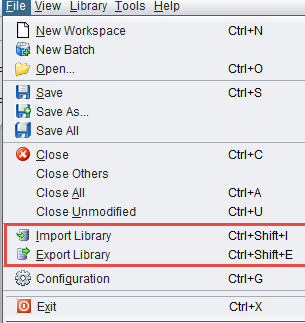
To share the created library, an export file may be created by using command **Export Library** in menu section **File**. When selecting this menu option, you will be offered a choice of defining the file name and the entire current library and a library copy will be unloaded to that file.
![image.png](https://wiki.cept.org/uploads/images/gallery/2026-06/scaled-1680-/YtgoWt94fdjyCpOn-image.png)

<div class="rich-media-item mediaSingleView-content-wrap image-align-start css-1u5mjaf" data-layout="align-start" data-media-vc-wrapper="true" data-node-type="mediaSingle" data-renderer-start-pos="1513" data-vc="media-single" data-width="236" data-width-type="pixel" id="bkmrk-figure-281%3A-general-"><div class="css-vkqov7"><div data-alt="" data-collection="contentId-493028" data-context-id="493028" data-file-mime-type="" data-file-name="file" data-file-size="1" data-height="323" data-id="273e1fd1-63dd-499e-999b-5b272d8204ed" data-node-type="media" data-renderer-start-pos="1514" data-type="file" data-width="305"><div class="_2rko18qm _vchhusvi _kqswh2mm _ect4ttxp _p12f1osq _c71l1osq _1bsb1qmm _4t3ine4n _1hlmd0i9 _1rquusvi _eg541i5c _mts3kb7n _1ntskb7n _yfmhtlke _5sb1v00u new-file-experience-wrapper" data-media-vc-wrapper="true" data-testid="media-card-view" id="bkmrk-figure-281%3A-general--1" role="none"><div class="_1reo15vq _18m915vq _2rko18qm _1e0c1txw _kqswh2mm _p12f1osq _1bsb1osq _4t3i1osq _c71l1osq media-file-card-view" data-cursor="pointer" data-test-media-name="81.png" data-test-progress="1" data-test-source="remote" data-test-status="complete" data-testid="media-file-card-view"><div class="_kqswstnw _1bsb1osq _4t3i1osq _1e0c1txw _2lx21bp4 _1bah1h6o _4cvr1h6o align-center" data-testid="ImageRendererWrapper">![](blob:https://ecowiki.atlassian.net/05beda64-eb57-4843-8925-872d4d7531de#media-blob-url=true&id=273e1fd1-63dd-499e-999b-5b272d8204ed&collection=contentId-493028&contextId=493028&width=305&height=323&alt=&clientId=113268fe-fe5b-4bc3-8ff3-07965dbf1d18)**Figure 281: General import/export library**</div></div></div></div></div></div>The SEAMCAT library exchange files are saved using XML format with a unique file extension ***.sli*** (for Seamcat Library). Such library export file may then be distributed within a group of users and may be uploaded by any user via the command **Import Library** on the **File** menu.

In case of collision of an imported and an existing library element that have the same name (e.g, there will always be a collision between the DEFAULT library elements saved in an exchange file and those existing in target SEAMCAT copy), a choice will be given to either to overwrite the existing elements or to import new library items after renaming them.