# 13 Library of scenario elements

# 13.1 Library overview

SEAMCAT library is a useful tool for creating and storing various elements that are part of a wireless system so that they can be re used at a later point of time. The SEAMCAT library contains the following elements:

- Systems and System Plugins (SP)
- Spectrum Emission Masks (SEM)
- Receiver Blocking Masks (RBM)
- Receivers
- Transmitters
- CDMA Link Level Data
- Antenna Gain Plugins (AGP)
- Coverage Radius Plugins (CRP)
- Propagation Model Plugins (PMP)
- Event Processing Plugins (EPP)

Note that technical library management functions are available regardless of whether a simulation workspace has been loaded or not. The library can be saved in a separate file too so that you can also share them.

[![image.png](https://wiki.cept.org/uploads/images/gallery/2026-06/scaled-1680-/ju1AsuOpUzAdGY2U-image.png)](https://wiki.cept.org/uploads/images/gallery/2026-06/ju1AsuOpUzAdGY2U-image.png)
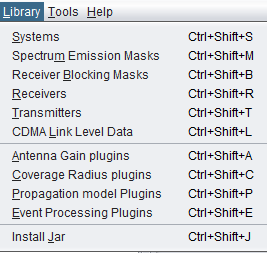
<div class="fabric-editor-block-mark fabric-editor-alignment align-center" id="bkmrk-figure-274%3A-overview">**Figure 274: Overview of the SEAMCAT library elements**</div>

# 13.2 Import / export a library element in/from a workspace

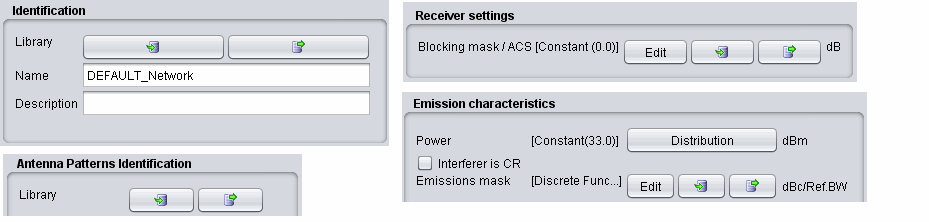
 Modification of existing (default) library elements as well as creation of new elements can be managed through the relevant options of Library menu. Once stored, the library elements may be then easily inserted into scenario by selecting a particular library element in the *Definition* field for relevant transceiver in either victim or interfering links, as illustrated in the following picture:
![image.png](https://wiki.cept.org/uploads/images/gallery/2026-06/scaled-1680-/tVxDaO1Tzs1uotVg-image.png)

<div class="rich-media-item mediaSingleView-content-wrap image-align-start css-p7s6el" id="bkmrk-figure-275%3A-import-%2F"><div class="css-48okk9"><div><div class="_2rko18qm _vchhusvi _kqswh2mm _ect4ttxp _p12f1osq _c71l1osq _1bsb1qmm _4t3ine4n _1hlmd0i9 _1rquusvi _eg541i5c _mts3kb7n _1ntskb7n _yfmhtlke _5sb1v00u new-file-experience-wrapper" id="bkmrk-figure-275%3A-import-%2F-1"><div class="_1reo15vq _18m915vq _2rko18qm _1e0c1txw _kqswh2mm _p12f1osq _1bsb1osq _4t3i1osq _c71l1osq media-file-card-view"><div class="_kqswstnw _1bsb1osq _4t3i1osq _1e0c1txw _2lx21bp4 _1bah1h6o _4cvr1h6o align-center">**Figure 275: Import / export a library element in/from a workspace**</div></div></div></div></div></div>[![image.png](https://wiki.cept.org/uploads/images/gallery/2026-06/scaled-1680-/VsszPWqkhtQv8V6Q-image.png)](https://wiki.cept.org/uploads/images/gallery/2026-06/VsszPWqkhtQv8V6Q-image.png)

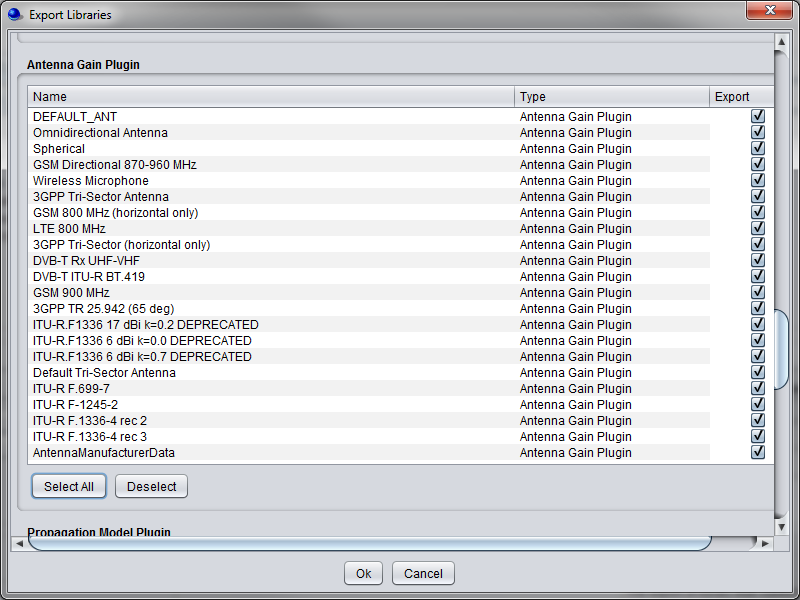
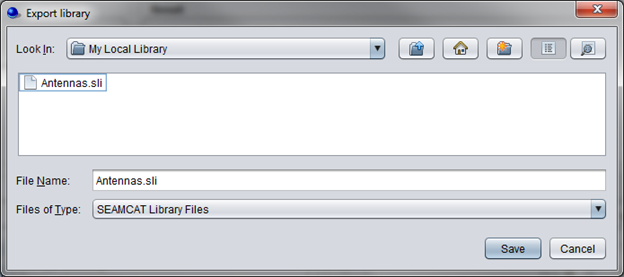
<div class="rich-media-item mediaSingleView-content-wrap image-align-start css-1k2qn11" id="bkmrk-figure-276%3A-import-%2F"><div class="css-11o0vja"><div><div class="_2rko18qm _vchhusvi _kqswh2mm _ect4ttxp _p12f1osq _c71l1osq _1bsb1qmm _4t3ine4n _1hlmd0i9 _1rquusvi _eg541i5c _mts3kb7n _1ntskb7n _yfmhtlke _5sb1v00u new-file-experience-wrapper" id="bkmrk-figure-276%3A-import-%2F-1"><div class="_1reo15vq _18m915vq _2rko18qm _1e0c1txw _kqswh2mm _p12f1osq _1bsb1osq _4t3i1osq _c71l1osq media-file-card-view"><div class="_kqswstnw _1bsb1osq _4t3i1osq _1e0c1txw _2lx21bp4 _1bah1h6o _4cvr1h6o align-center">**Figure 276: Import / export a library to save or share your work**</div></div></div></div></div></div>It is possible to save customised libraries on locally by “exporting” them. The libraries are saved with the extension ***“.sli”***. Any library item can be selected (Figure 277), and the path to the folder where these items will be saved can also be specified (Figure 278).
![image.png](https://wiki.cept.org/uploads/images/gallery/2026-06/scaled-1680-/cev9WoXsi1h5jVaw-image.png)

<div class="rich-media-item mediaSingleView-content-wrap image-align-start css-ss2ic" id="bkmrk-figure-277%3A%C2%A0export-l"><div class="css-1a59ukh"><div><div class="_2rko18qm _vchhusvi _kqswh2mm _ect4ttxp _p12f1osq _c71l1osq _1bsb1qmm _4t3ine4n _1hlmd0i9 _1rquusvi _eg541i5c _mts3kb7n _1ntskb7n _yfmhtlke _5sb1v00u new-file-experience-wrapper" id="bkmrk-figure-277%3A%C2%A0export-l-1"><div class="_1reo15vq _18m915vq _2rko18qm _1e0c1txw _kqswh2mm _p12f1osq _1bsb1osq _4t3i1osq _c71l1osq media-file-card-view"><div class="_kqswstnw _1bsb1osq _4t3i1osq _1e0c1txw _2lx21bp4 _1bah1h6o _4cvr1h6o align-center">**Figure 277: Export library elements locally**</div></div></div></div></div></div>![image.png](https://wiki.cept.org/uploads/images/gallery/2026-06/scaled-1680-/dWWaHMm50uig8QpN-image.png)

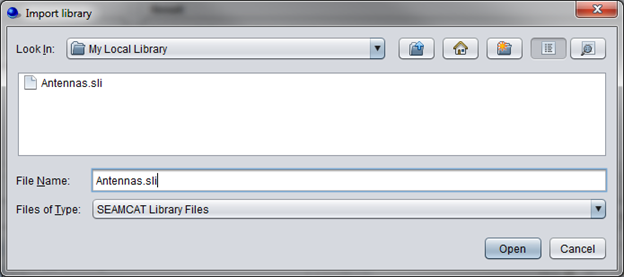
<div class="rich-media-item mediaSingleView-content-wrap image-align-start css-1fcb71w" id="bkmrk--4"><div class="css-1h1cxoc"><div><div class="_2rko18qm _vchhusvi _kqswh2mm _ect4ttxp _p12f1osq _c71l1osq _1bsb1qmm _4t3ine4n _1hlmd0i9 _1rquusvi _eg541i5c _mts3kb7n _1ntskb7n _yfmhtlke _5sb1v00u new-file-experience-wrapper" id="bkmrk--5"><div class="_1reo15vq _18m915vq _2rko18qm _1e0c1txw _kqswh2mm _p12f1osq _1bsb1osq _4t3i1osq _c71l1osq media-file-card-view"><div class="_kqswstnw _1bsb1osq _4t3i1osq _1e0c1txw _2lx21bp4 _1bah1h6o _4cvr1h6o"></div></div></div></div></div></div><div class="fabric-editor-block-mark fabric-editor-alignment align-center" id="bkmrk-figure-278%3A-select-w">**Figure 278: Select where the library should be saved.**</div>Library items can be shared and uploaded into SEAMCAT by using the *“import”* button.
![image.png](https://wiki.cept.org/uploads/images/gallery/2026-06/scaled-1680-/NftxY6y8gAPzYAds-image.png)

<div class="rich-media-item mediaSingleView-content-wrap image-align-start css-1fcb71w" id="bkmrk-figure-279%3A-import-."><div class="css-1h1cxoc"><div><div class="_2rko18qm _vchhusvi _kqswh2mm _ect4ttxp _p12f1osq _c71l1osq _1bsb1qmm _4t3ine4n _1hlmd0i9 _1rquusvi _eg541i5c _mts3kb7n _1ntskb7n _yfmhtlke _5sb1v00u new-file-experience-wrapper" id="bkmrk-figure-279%3A-import-.-1"><div class="_1reo15vq _18m915vq _2rko18qm _1e0c1txw _kqswh2mm _p12f1osq _1bsb1osq _4t3i1osq _c71l1osq media-file-card-view"><div class="_kqswstnw _1bsb1osq _4t3i1osq _1e0c1txw _2lx21bp4 _1bah1h6o _4cvr1h6o align-center">**Figure 279: Import .sli files**</div></div></div></div></div></div>Once a library element is **imported** ([![image.png](https://wiki.cept.org/uploads/images/gallery/2026-06/scaled-1680-/MSG4PdLZbhu5s0Or-image.png)](https://wiki.cept.org/uploads/images/gallery/2026-06/MSG4PdLZbhu5s0Or-image.png)) into a given scenario, there remains no link between the original library element and its copy in the workspace. That is, if at some later stage a library element is modified or suppressed it will not produce any change in replicas of that library element previously pasted into existing workspaces. Upon clicking on the *import* button, you will have to chose from a drop down list the element that you want as shown below:

A library can be created from a workspace and **exported** ([![image.png](https://wiki.cept.org/uploads/images/gallery/2026-06/scaled-1680-/4yryM7mbT0M8Hb2a-image.png)](https://wiki.cept.org/uploads/images/gallery/2026-06/4yryM7mbT0M8Hb2a-image.png))to a local library folder. SEAMCAT will automatically place the new element in the right category of the library.

# 13.3 Edit and share library element

When opening a library item from the workspace menu, the following interface will appear (as an example, the antenna interface is shown in the figure below).

![image.png](https://wiki.cept.org/uploads/images/gallery/2026-06/scaled-1680-/cQ0v1hqf9zSEX8TQ-image.png)

<div class="rich-media-item mediaSingleView-content-wrap image-center css-1fbizlg" id="bkmrk-figure-280%3A-example-"><div class="css-1p9o766"><div><div class="_2rko18qm _vchhusvi _kqswh2mm _ect4ttxp _p12f1osq _c71l1osq _1bsb1qmm _4t3ine4n _1hlmd0i9 _1rquusvi _eg541i5c _mts3kb7n _1ntskb7n _yfmhtlke _5sb1v00u new-file-experience-wrapper" id="bkmrk-figure-280%3A-example--1"><div class="_1reo15vq _18m915vq _2rko18qm _1e0c1txw _kqswh2mm _p12f1osq _1bsb1osq _4t3i1osq _c71l1osq media-file-card-view"><div class="_kqswstnw _1bsb1osq _4t3i1osq _1e0c1txw _2lx21bp4 _1bah1h6o _4cvr1h6o align-center">**Figure 280: Example of the antenna interface library**</div></div></div></div></div></div> All the library elements follow the **same** command feature [![image.png](https://wiki.cept.org/uploads/images/gallery/2026-06/scaled-1680-/sWWkuFl4T7a3Bfik-image.png)](https://wiki.cept.org/uploads/images/gallery/2026-06/sWWkuFl4T7a3Bfik-image.png). They are available for you to allow:

- **Creating** a new antenna, click on [![image.png](https://wiki.cept.org/uploads/images/gallery/2026-06/scaled-1680-/kzjMvc13OCV2ld7J-image.png)](https://wiki.cept.org/uploads/images/gallery/2026-06/kzjMvc13OCV2ld7J-image.png)
- **Deleting** an existing antenna, select it in the list and click on [![image.png](https://wiki.cept.org/uploads/images/gallery/2026-06/scaled-1680-/xN8mcTIf2BvXb3SI-image.png)](https://wiki.cept.org/uploads/images/gallery/2026-06/xN8mcTIf2BvXb3SI-image.png)
- **Duplicating** an existing antenna, select it in the list and click on [![image.png](https://wiki.cept.org/uploads/images/gallery/2026-06/scaled-1680-/Aco8SDY268YF986T-image.png)](https://wiki.cept.org/uploads/images/gallery/2026-06/Aco8SDY268YF986T-image.png). Reference of the new antenna is derived from the reference of the selected one by incrementing the integer suffix of that reference, if any, or adding character '1' to the end of the original name.
- **Reloading** the pre-defined libraries (it will delete any entries that you may have made), click [![image.png](https://wiki.cept.org/uploads/images/gallery/2026-06/scaled-1680-/dZBvhRkagEsRpzqV-image.png)](https://wiki.cept.org/uploads/images/gallery/2026-06/dZBvhRkagEsRpzqV-image.png) ;
- Getting on-line **help by** clicking on [![image.png](https://wiki.cept.org/uploads/images/gallery/2026-06/scaled-1680-/CgBP9dxExalhdd5l-image.png)](https://wiki.cept.org/uploads/images/gallery/2026-06/CgBP9dxExalhdd5l-image.png)
    
    <div class="inline-extension-renderer css-e2q2ep"><div><div class="_1e0c1nu9"><a class="_ymio1r31 _ypr0glyw _zcxs1o36 _mizu1v1w _1ah3dkaa _ra3xnqa1 _128mdkaa _1cvmnqa1 _4davt94y _4bfu1r31 _1hms8stv _ajmmnqa1 _vchhusvi _kqswh2mm _ect4ttxp _syaz13af _1a3b1r31 _4fpr8stv _5goinqa1 _f8pj13af _9oik1r31 _1bnxglyw _jf4cnqa1 _30l313af _1nrm1r31 _c2waglyw _1iohnqa1 _9h8h12zz _10531ra0 _1ien1ra0 _n0fx1ra0 _1vhv17z1"></a></div></div></div> When adding a new elements, enter the name (unique identifier), description of the elements as well as their technical parameters.

**Note:** Tooltips are available on the buttons to remember their meaning [![image.png](https://wiki.cept.org/uploads/images/gallery/2026-06/scaled-1680-/XZOBfgqCuGtIjELr-image.png)](https://wiki.cept.org/uploads/images/gallery/2026-06/XZOBfgqCuGtIjELr-image.png)
<div class="inline-extension-renderer css-e2q2ep" id="bkmrk--1"><div></div></div>Once a broad library of various elements are populated, it might be useful to exchange it with other team members working on studies involving similar wireless systems.

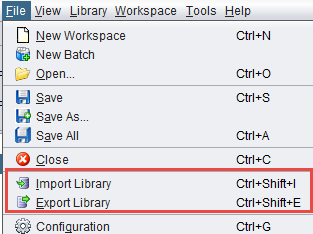
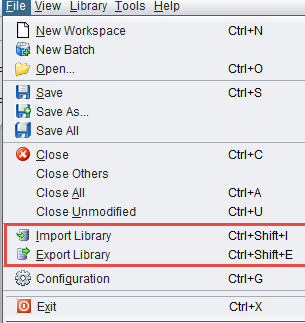
To share the created library, an export file may be created by using command **Export Library** in menu section **File**. When selecting this menu option, you will be offered a choice of defining the file name and the entire current library and a library copy will be unloaded to that file.
![image.png](https://wiki.cept.org/uploads/images/gallery/2026-06/scaled-1680-/YtgoWt94fdjyCpOn-image.png)

<div class="rich-media-item mediaSingleView-content-wrap image-align-start css-1u5mjaf" id="bkmrk-figure-281%3A-general-"><div class="css-vkqov7"><div><div class="_2rko18qm _vchhusvi _kqswh2mm _ect4ttxp _p12f1osq _c71l1osq _1bsb1qmm _4t3ine4n _1hlmd0i9 _1rquusvi _eg541i5c _mts3kb7n _1ntskb7n _yfmhtlke _5sb1v00u new-file-experience-wrapper" id="bkmrk-figure-281%3A-general--1"><div class="_1reo15vq _18m915vq _2rko18qm _1e0c1txw _kqswh2mm _p12f1osq _1bsb1osq _4t3i1osq _c71l1osq media-file-card-view"><div class="_kqswstnw _1bsb1osq _4t3i1osq _1e0c1txw _2lx21bp4 _1bah1h6o _4cvr1h6o align-center">**Figure 281: General import/export library**</div></div></div></div></div></div>The SEAMCAT library exchange files are saved using XML format with a unique file extension ***.sli*** (for Seamcat Library). Such library export file may then be distributed within a group of users and may be uploaded by any user via the command **Import Library** on the **File** menu.

In case of collision of an imported and an existing library element that have the same name (e.g, there will always be a collision between the DEFAULT library elements saved in an exchange file and those existing in target SEAMCAT copy), a choice will be given to either to overwrite the existing elements or to import new library items after renaming them.

# 13.4 Library elements

# 13.4.1 System elements

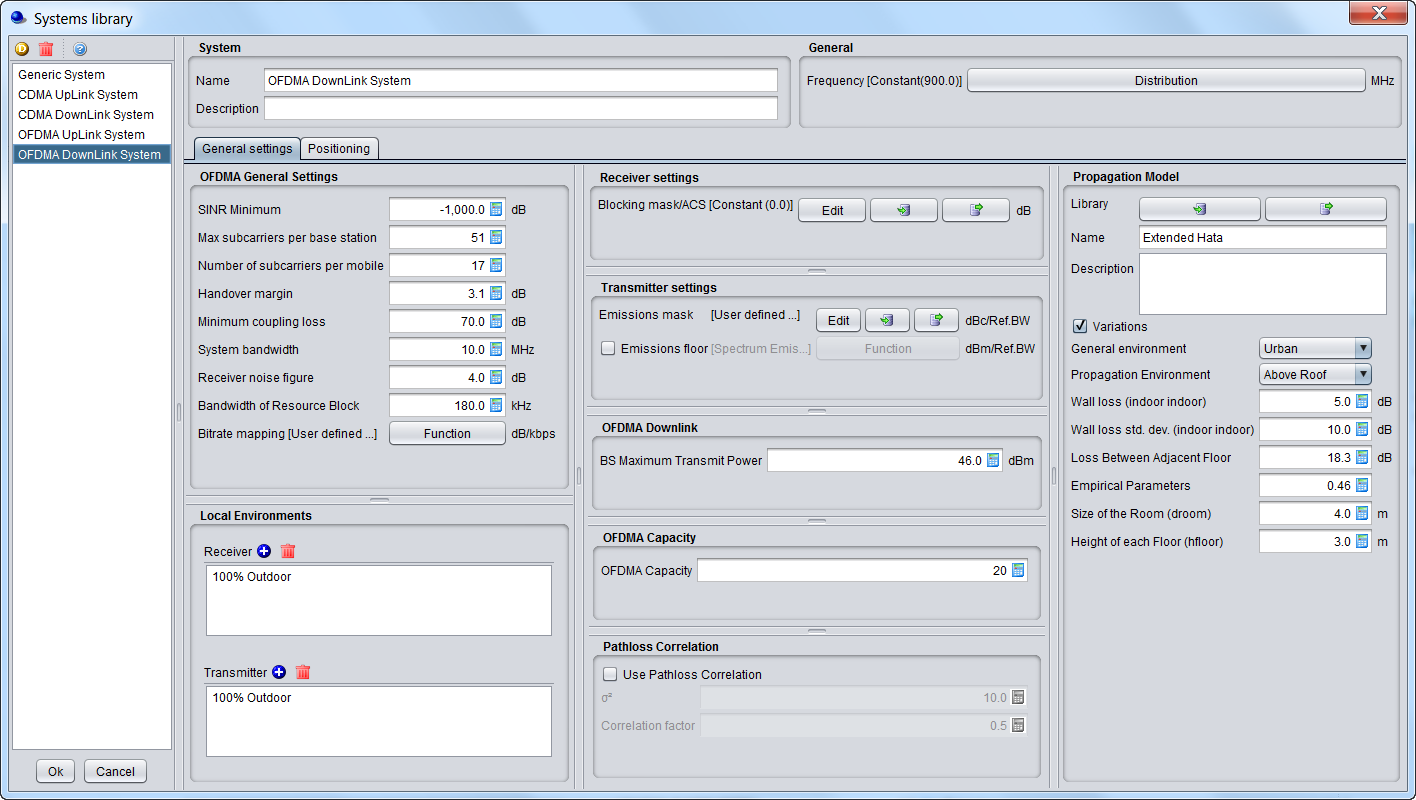
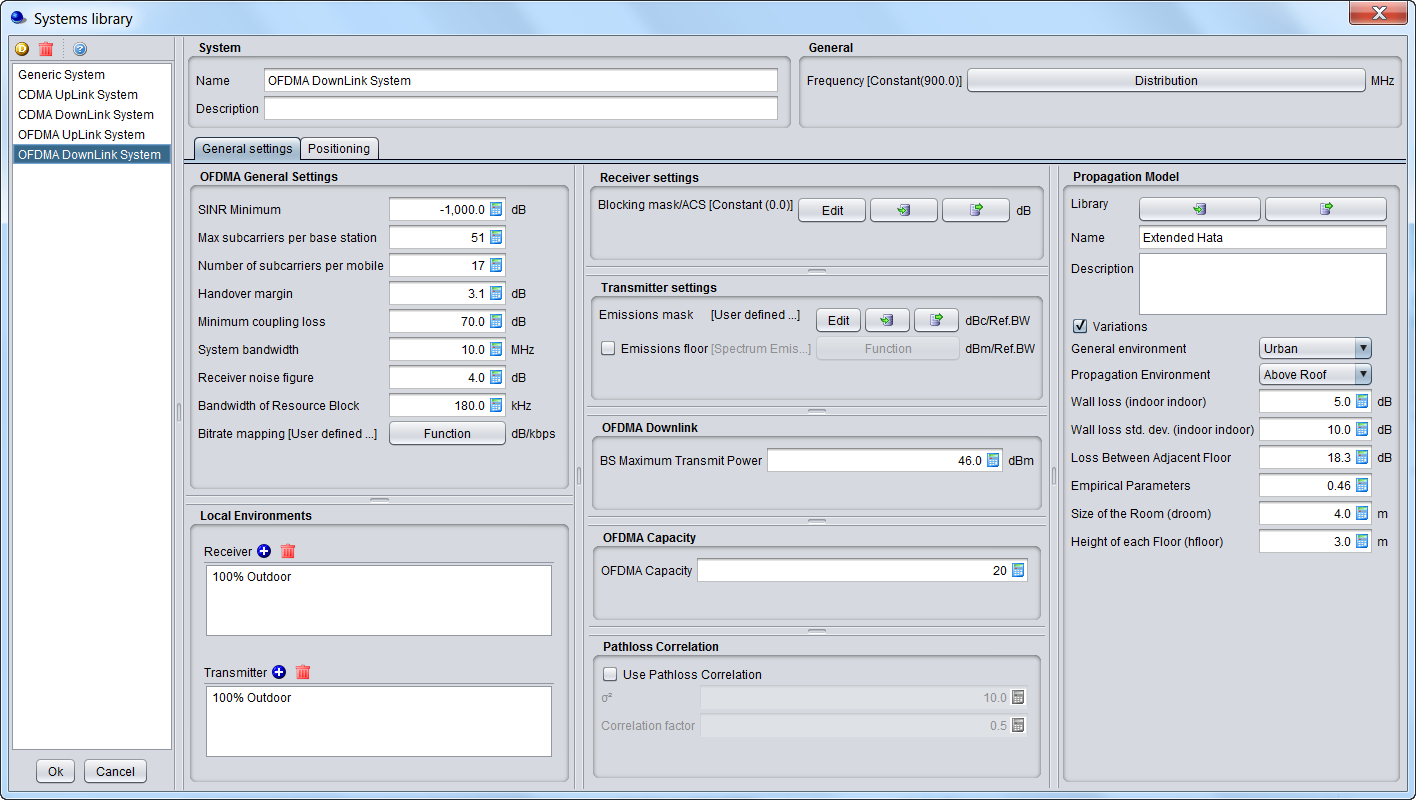
To create or modify a library element containing parameters of a particular system, i.e. generic, cellular network like CDMA or OFDMA, select the system library lements command from the **Library pull-down menu** or directly **CTRL+SHIFT+S**.

A list of existing pre-defined systems will be selectable as shown in Figure 282 for a generic system and Figure 283 for cellular systems (e.g. CDMA UL network).
![image.png](https://wiki.cept.org/uploads/images/gallery/2026-06/scaled-1680-/QfEnIgBAOeMb5rtR-image.png)

<div class="rich-media-item mediaSingleView-content-wrap image-align-start css-19sripf" data-layout="align-start" data-media-vc-wrapper="true" data-node-type="mediaSingle" data-renderer-start-pos="401" data-vc="media-single" data-width="708" data-width-type="pixel" id="bkmrk-figure-282%3A-example-"><div class="css-1szupxi"><div data-alt="" data-collection="contentId-493110" data-context-id="493110" data-file-mime-type="" data-file-name="file" data-file-size="1" data-height="723" data-id="497fe0ec-d4e8-48f0-9a08-bd77dd750b75" data-node-type="media" data-renderer-start-pos="402" data-type="file" data-width="1280"><div class="_2rko18qm _vchhusvi _kqswh2mm _ect4ttxp _p12f1osq _c71l1osq _1bsb1qmm _4t3ine4n _1hlmd0i9 _1rquusvi _eg541i5c _mts3kb7n _1ntskb7n _yfmhtlke _5sb1v00u new-file-experience-wrapper" data-media-vc-wrapper="true" data-testid="media-card-view" id="bkmrk-figure-282%3A-example--1" role="none"><div class="_1reo15vq _18m915vq _2rko18qm _1e0c1txw _kqswh2mm _p12f1osq _1bsb1osq _4t3i1osq _c71l1osq media-file-card-view" data-cursor="pointer" data-test-media-name="82.png" data-test-progress="1" data-test-source="remote" data-test-status="complete" data-testid="media-file-card-view"><div class="_kqswstnw _1bsb1osq _4t3i1osq _1e0c1txw _2lx21bp4 _1bah1h6o _4cvr1h6o align-center" data-testid="ImageRendererWrapper">![](blob:https://ecowiki.atlassian.net/6ad22819-8c81-44f3-a13c-dae48ae870e5#media-blob-url=true&id=497fe0ec-d4e8-48f0-9a08-bd77dd750b75&collection=contentId-493110&contextId=493110&width=1280&height=723&alt=&clientId=113268fe-fe5b-4bc3-8ff3-07965dbf1d18)**Figure 282: Example of generic System elements**</div><div class="_kqswstnw _1bsb1osq _4t3i1osq _1e0c1txw _2lx21bp4 _1bah1h6o _4cvr1h6o align-center" data-testid="ImageRendererWrapper"></div></div></div></div></div></div>![image.png](https://wiki.cept.org/uploads/images/gallery/2026-06/scaled-1680-/kpOTAuBu9CCT80cD-image.png)

<div class="rich-media-item mediaSingleView-content-wrap image-align-start css-19sripf" data-layout="align-start" data-media-vc-wrapper="true" data-node-type="mediaSingle" data-renderer-start-pos="453" data-vc="media-single" data-width="708" data-width-type="pixel" id="bkmrk-figure-283%3A-example-"><div class="css-1szupxi"><div data-alt="" data-collection="contentId-493110" data-context-id="493110" data-file-mime-type="" data-file-name="file" data-file-size="1" data-height="723" data-id="2d3bbfe4-e26d-4a8e-bbac-dfdaecbdd32d" data-node-type="media" data-renderer-start-pos="454" data-type="file" data-width="1280"><div class="_2rko18qm _vchhusvi _kqswh2mm _ect4ttxp _p12f1osq _c71l1osq _1bsb1qmm _4t3ine4n _1hlmd0i9 _1rquusvi _eg541i5c _mts3kb7n _1ntskb7n _yfmhtlke _5sb1v00u new-file-experience-wrapper" data-media-vc-wrapper="true" data-testid="media-card-view" id="bkmrk-figure-283%3A-example--1" role="none"><div class="_1reo15vq _18m915vq _2rko18qm _1e0c1txw _kqswh2mm _p12f1osq _1bsb1osq _4t3i1osq _c71l1osq media-file-card-view" data-cursor="pointer" data-test-media-name="83.png" data-test-progress="1" data-test-source="remote" data-test-status="complete" data-testid="media-file-card-view"><div class="_kqswstnw _1bsb1osq _4t3i1osq _1e0c1txw _2lx21bp4 _1bah1h6o _4cvr1h6o align-center" data-testid="ImageRendererWrapper">![](blob:https://ecowiki.atlassian.net/f06e5091-e70e-4a19-acfa-15e9cdb4ec15#media-blob-url=true&id=2d3bbfe4-e26d-4a8e-bbac-dfdaecbdd32d&collection=contentId-493110&contextId=493110&width=1280&height=723&alt=&clientId=113268fe-fe5b-4bc3-8ff3-07965dbf1d18)**Figure 283: Example of CDMA UL System elements**</div></div></div></div></div></div>When adding a new system, enter the name (unique identifier) and a description.

**Note:** It is also possible to create a system from the workspace and export it to a local library.

# 13.4.2 Spectrum emission mask elements

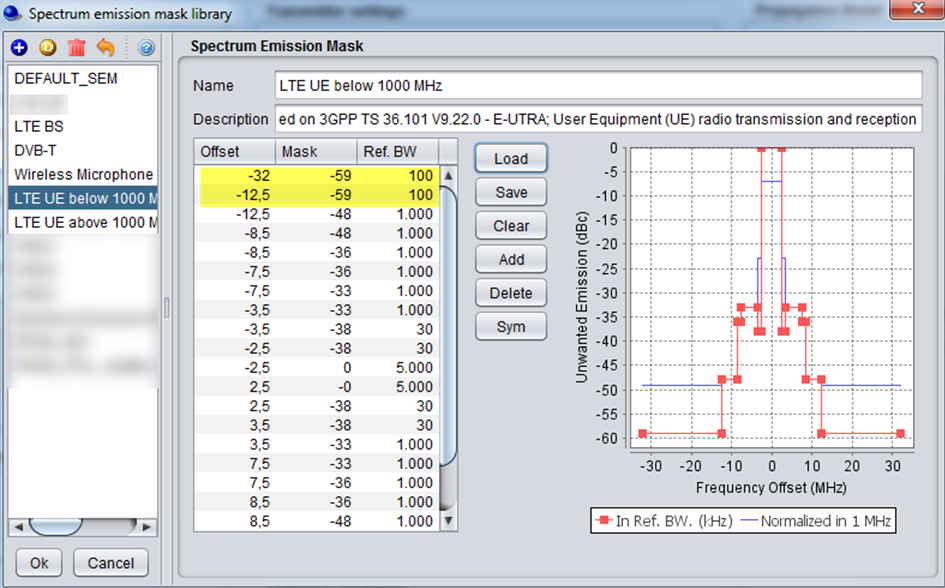
To create or modify a library element containing parameters of a particular spectrum mask, select the **Spectrum emission masks** command from the **Library pull-down menu** or directly with **CTRL+SHIFT+S**.

A list of existing pre-defined spectrum emission mask will be selectable as shown in the figure below. This is an example of a LTE UE (Table 6.6.3.1-2 of 3GPP TS 36.101) where the limit for the spurious emission domain (outside ± 12.5 MHz) applies to frequencies above 1000 MHz:
![image.png](https://wiki.cept.org/uploads/images/gallery/2026-06/scaled-1680-/iYSbuIc3AJjxA3E7-image.png)

<div class="rich-media-item mediaSingleView-content-wrap image-align-start css-rzxfa" data-layout="align-start" data-media-vc-wrapper="true" data-node-type="mediaSingle" data-renderer-start-pos="481" data-vc="media-single" data-width="642" data-width-type="pixel" id="bkmrk-figure-284%3A-spectrum"><div class="css-s79v8j"><div data-alt="" data-collection="contentId-493102" data-context-id="493102" data-file-mime-type="" data-file-name="file" data-file-size="1" data-height="588" data-id="c99b2997-23f0-4500-b32a-b5e614c67eb6" data-node-type="media" data-renderer-start-pos="482" data-type="file" data-width="945"><div class="_2rko18qm _vchhusvi _kqswh2mm _ect4ttxp _p12f1osq _c71l1osq _1bsb1qmm _4t3ine4n _1hlmd0i9 _1rquusvi _eg541i5c _mts3kb7n _1ntskb7n _yfmhtlke _5sb1v00u new-file-experience-wrapper" data-media-vc-wrapper="true" data-testid="media-card-view" id="bkmrk-figure-284%3A-spectrum-1" role="none"><div class="_1reo15vq _18m915vq _2rko18qm _1e0c1txw _kqswh2mm _p12f1osq _1bsb1osq _4t3i1osq _c71l1osq media-file-card-view" data-cursor="pointer" data-test-media-name="84.png" data-test-progress="1" data-test-source="remote" data-test-status="complete" data-testid="media-file-card-view"><div class="_kqswstnw _1bsb1osq _4t3i1osq _1e0c1txw _2lx21bp4 _1bah1h6o _4cvr1h6o align-center" data-testid="ImageRendererWrapper">![](blob:https://ecowiki.atlassian.net/536d96e9-1d49-41d5-9711-0cdcdfdbfc9f#media-blob-url=true&id=c99b2997-23f0-4500-b32a-b5e614c67eb6&collection=contentId-493102&contextId=493102&width=945&height=588&alt=&clientId=113268fe-fe5b-4bc3-8ff3-07965dbf1d18)**Figure 284: Spectrum emission mask library elements**</div></div></div></div></div></div>When adding a new spectrum emission mask, enter the name (unique identifier) and description of its technical parameters.

**<span class="fabric-text-color-mark" data-renderer-mark="true" data-text-custom-color="#000000">Note 1:</span>**<span class="fabric-text-color-mark" data-renderer-mark="true" data-text-custom-color="#000000"> It is possible to quickly scroll up and down and see the differences in the masks. </span>

**<span class="fabric-text-color-mark" data-renderer-mark="true" data-text-custom-color="#000000">Note 2:</span>**<span class="fabric-text-color-mark" data-renderer-mark="true" data-text-custom-color="#000000"> It is possible to create a mask from the workspace and export it to your library environment </span>
![image.png](https://wiki.cept.org/uploads/images/gallery/2026-06/scaled-1680-/3dRCl5yzSfJcloZB-image.png)

<div class="rich-media-item mediaSingleView-content-wrap image-align-start css-1cjzudg" data-layout="align-start" data-media-vc-wrapper="true" data-node-type="mediaSingle" data-renderer-start-pos="861" data-vc="media-single" data-width="465" data-width-type="pixel" id="bkmrk-figure-285%3A-example-"><div class="css-1426qqv"><div data-alt="" data-collection="contentId-493102" data-context-id="493102" data-file-mime-type="" data-file-name="file" data-file-size="1" data-height="108" data-id="70d48900-2a60-474c-b40f-7220c8978624" data-node-type="media" data-renderer-start-pos="862" data-type="file" data-width="465"><div class="_2rko18qm _vchhusvi _kqswh2mm _ect4ttxp _p12f1osq _c71l1osq _1bsb1qmm _4t3ine4n _1hlmd0i9 _1rquusvi _eg541i5c _mts3kb7n _1ntskb7n _yfmhtlke _5sb1v00u new-file-experience-wrapper" data-media-vc-wrapper="true" data-testid="media-card-view" id="bkmrk-figure-285%3A-example--1" role="none"><div class="_1reo15vq _18m915vq _2rko18qm _1e0c1txw _kqswh2mm _p12f1osq _1bsb1osq _4t3i1osq _c71l1osq media-file-card-view" data-cursor="pointer" data-test-media-name="85.gif" data-test-progress="1" data-test-source="remote" data-test-status="complete" data-testid="media-file-card-view"><div class="_kqswstnw _1bsb1osq _4t3i1osq _1e0c1txw _2lx21bp4 _1bah1h6o _4cvr1h6o align-center" data-testid="ImageRendererWrapper">![](blob:https://ecowiki.atlassian.net/23c64bfd-f0ce-442e-b46a-af312b565130#media-blob-url=true&id=70d48900-2a60-474c-b40f-7220c8978624&collection=contentId-493102&contextId=493102&width=465&height=108&alt=&clientId=113268fe-fe5b-4bc3-8ff3-07965dbf1d18)**Figure 285: Example on how to import/export to/from the workspace/library for the spectrum emission mask**</div></div></div></div></div></div>

# 13.4.3 Receiver blocking mask elements

To create or modify a library element containing parameters of a particular blocking mask, select the **Receiver blocking masks** command from the **Library pull-down menu** or directly with **CTRL+SHIFT+B**.

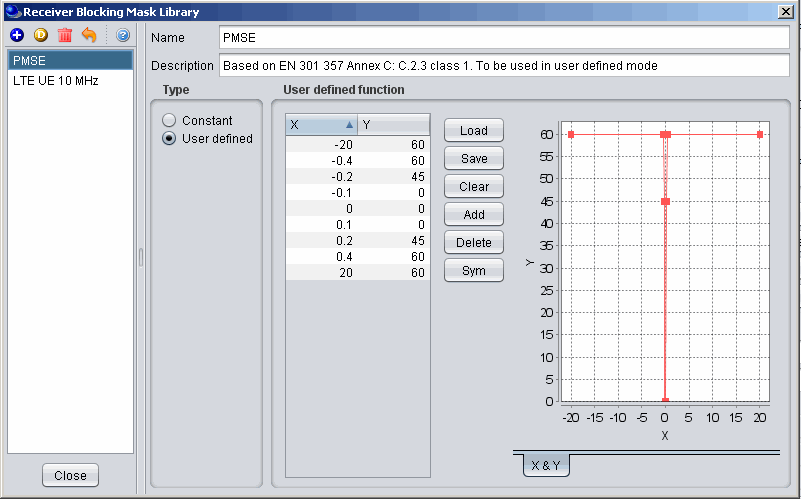
A list of existing pre-defined receiver blocking mask will be selectable as shown in the figure below:
![image.png](https://wiki.cept.org/uploads/images/gallery/2026-06/scaled-1680-/02j9KJDoqO09x4AN-image.png)

<div class="rich-media-item mediaSingleView-content-wrap image-align-start css-rzxfa" data-layout="align-start" data-media-vc-wrapper="true" data-node-type="mediaSingle" data-renderer-start-pos="307" data-vc="media-single" data-width="642" data-width-type="pixel" id="bkmrk-figure-286%3A-receiver"><div class="css-yzxvlq"><div data-alt="" data-collection="contentId-493106" data-context-id="493106" data-file-mime-type="" data-file-name="file" data-file-size="1" data-height="499" data-id="3ce76513-29a0-4bcb-9828-db776f13c12d" data-node-type="media" data-renderer-start-pos="308" data-type="file" data-width="801"><div class="_2rko18qm _vchhusvi _kqswh2mm _ect4ttxp _p12f1osq _c71l1osq _1bsb1qmm _4t3ine4n _1hlmd0i9 _1rquusvi _eg541i5c _mts3kb7n _1ntskb7n _yfmhtlke _5sb1v00u new-file-experience-wrapper" data-media-vc-wrapper="true" data-testid="media-card-view" id="bkmrk-figure-286%3A-receiver-1" role="none"><div class="_1reo15vq _18m915vq _2rko18qm _1e0c1txw _kqswh2mm _p12f1osq _1bsb1osq _4t3i1osq _c71l1osq media-file-card-view" data-cursor="pointer" data-test-media-name="86.gif" data-test-progress="1" data-test-source="remote" data-test-status="complete" data-testid="media-file-card-view"><div class="_kqswstnw _1bsb1osq _4t3i1osq _1e0c1txw _2lx21bp4 _1bah1h6o _4cvr1h6o align-center" data-testid="ImageRendererWrapper">![](blob:https://ecowiki.atlassian.net/fdfa661c-d29f-4d16-979b-b6c2fcd23cab#media-blob-url=true&id=3ce76513-29a0-4bcb-9828-db776f13c12d&collection=contentId-493106&contextId=493106&width=801&height=499&alt=&clientId=113268fe-fe5b-4bc3-8ff3-07965dbf1d18)**Figure 286: Receiver blocking mask library elements**</div><div class="_kqswstnw _1bsb1osq _4t3i1osq _1e0c1txw _2lx21bp4 _1bah1h6o _4cvr1h6o align-center" data-testid="ImageRendererWrapper"></div></div></div></div></div></div>When adding a new receiver blocking mask, you need to enter the name (unique identifier) and description of its technical parameters .

**Note 1:** It is possible to quickly scroll up and down and see the differences in the blocking masks.

**Note 2:** It is possible to create a blocking mask from the workspace and export it to your library environment.

[![image.png](https://wiki.cept.org/uploads/images/gallery/2026-06/scaled-1680-/A5Vu7khfPJoLZRAO-image.png)](https://wiki.cept.org/uploads/images/gallery/2026-06/A5Vu7khfPJoLZRAO-image.png)
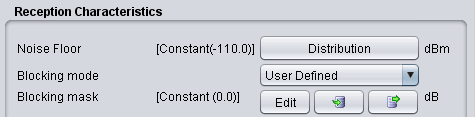
<div class="rich-media-item mediaSingleView-content-wrap image-align-start css-8fuvb8" data-layout="align-start" data-media-vc-wrapper="true" data-node-type="mediaSingle" data-renderer-start-pos="713" data-vc="media-single" data-width="475" data-width-type="pixel" id="bkmrk-figure-287%3A-example-"><div class="css-1lkepab"><div data-alt="" data-collection="contentId-493106" data-context-id="493106" data-file-mime-type="" data-file-name="file" data-file-size="1" data-height="117" data-id="87efcb94-4a91-4af5-acb0-245da6665dcd" data-node-type="media" data-renderer-start-pos="714" data-type="file" data-width="475"><div class="_2rko18qm _vchhusvi _kqswh2mm _ect4ttxp _p12f1osq _c71l1osq _1bsb1qmm _4t3ine4n _1hlmd0i9 _1rquusvi _eg541i5c _mts3kb7n _1ntskb7n _yfmhtlke _5sb1v00u new-file-experience-wrapper" data-media-vc-wrapper="true" data-testid="media-card-view" id="bkmrk-figure-287%3A-example--1" role="none"><div class="_1reo15vq _18m915vq _2rko18qm _1e0c1txw _kqswh2mm _p12f1osq _1bsb1osq _4t3i1osq _c71l1osq media-file-card-view" data-cursor="pointer" data-test-media-name="87.gif" data-test-progress="1" data-test-source="remote" data-test-status="complete" data-testid="media-file-card-view"><div class="_kqswstnw _1bsb1osq _4t3i1osq _1e0c1txw _2lx21bp4 _1bah1h6o _4cvr1h6o align-center" data-testid="ImageRendererWrapper">![](blob:https://ecowiki.atlassian.net/d5fcf662-3487-4e9a-b547-be236c4746b7#media-blob-url=true&id=87efcb94-4a91-4af5-acb0-245da6665dcd&collection=contentId-493106&contextId=493106&width=475&height=117&alt=&clientId=113268fe-fe5b-4bc3-8ff3-07965dbf1d18)**Figure 287: Example on how to import/export to/from the workspace/library for the receiver blocking mask**</div></div></div></div></div></div>

# 13.4.4 Receiver elements

To create or modify a library receiver element, select the **Receivers** command from the **Library pull-down menu** or directly with **CTRL+SHIFT+R**.

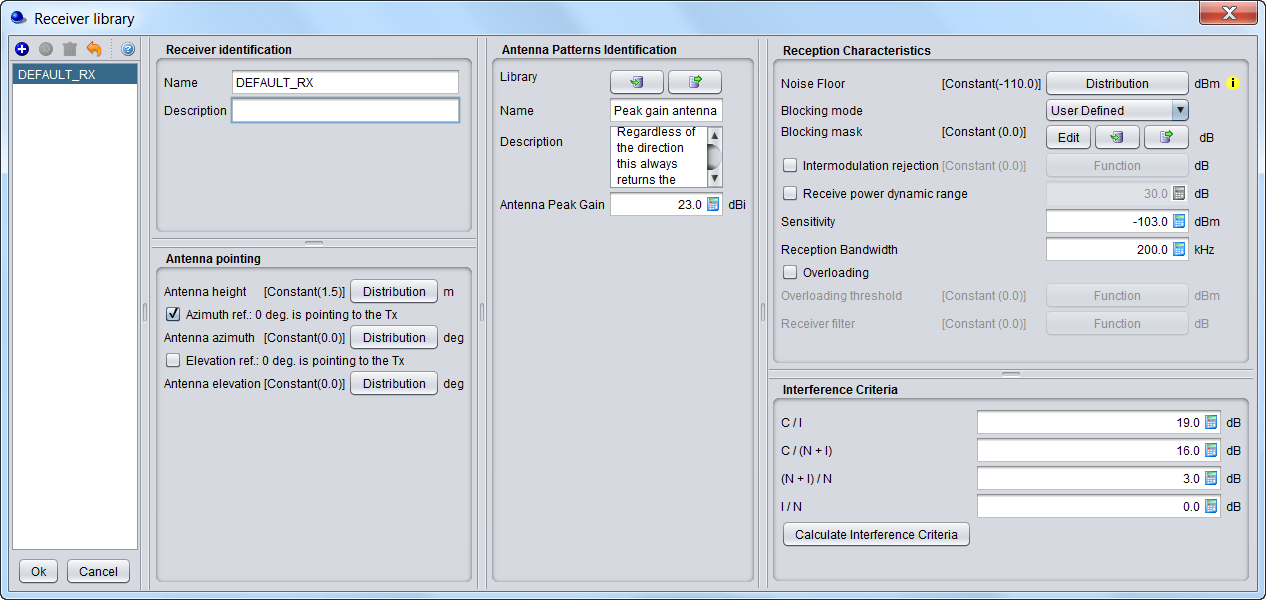
This activates the Receiver Library window which displays a list of existing receiver elements in the library. Please note that it is the same interface as in the workspace, so that it is easy to fill. If no receiver has been previously created , the list will contain only the DEFAULT receiver elements:
![image.png](https://wiki.cept.org/uploads/images/gallery/2026-06/scaled-1680-/USOeApjQIGLFa5WP-image.png)

<div class="rich-media-item mediaSingleView-content-wrap image-align-start css-g5bla6" data-layout="align-start" data-media-vc-wrapper="true" data-node-type="mediaSingle" data-renderer-start-pos="450" data-vc="media-single" data-width="844" data-width-type="pixel" id="bkmrk-figure-288%3A-receiver"><div class="css-13ztf7b"><div data-alt="" data-collection="contentId-493122" data-context-id="493122" data-file-mime-type="" data-file-name="file" data-file-size="1" data-height="600" data-id="22ed2414-1e65-4ca9-88fd-adca950f33b4" data-node-type="media" data-renderer-start-pos="451" data-type="file" data-width="1266"><div class="_2rko18qm _vchhusvi _kqswh2mm _ect4ttxp _p12f1osq _c71l1osq _1bsb1qmm _4t3ine4n _1hlmd0i9 _1rquusvi _eg541i5c _mts3kb7n _1ntskb7n _yfmhtlke _5sb1v00u new-file-experience-wrapper" data-media-vc-wrapper="true" data-testid="media-card-view" id="bkmrk-figure-288%3A-receiver-1" role="none"><div class="_1reo15vq _18m915vq _2rko18qm _1e0c1txw _kqswh2mm _p12f1osq _1bsb1osq _4t3i1osq _c71l1osq media-file-card-view" data-cursor="pointer" data-test-media-name="8.png" data-test-progress="1" data-test-source="remote" data-test-status="complete" data-testid="media-file-card-view"><div class="_kqswstnw _1bsb1osq _4t3i1osq _1e0c1txw _2lx21bp4 _1bah1h6o _4cvr1h6o align-center" data-testid="ImageRendererWrapper">![](blob:https://ecowiki.atlassian.net/e4bf2365-421c-43b1-b9ea-35e5a7e1a24c#media-blob-url=true&id=22ed2414-1e65-4ca9-88fd-adca950f33b4&collection=contentId-493122&contextId=493122&width=1266&height=600&alt=&clientId=113268fe-fe5b-4bc3-8ff3-07965dbf1d18)**Figure 288: Receiver library elements**</div></div></div></div></div></div>The parameters of receiver are grouped in 5 different panels:

- **Receiver identification**: to define receiver name (unique identifier), description;
- **Antenna pointing**: It contains all information relative to the antenna other than the radiation pattern (Please read here more about antenna azimuth/elevation settings);
- **Antenna patterns identification**: to define a specific antenna to be associated with that particular receiver. Note that is possible to select one of the existing antenna library elements or define completely new antenna parameters to be associated only with the given receiver;
- **Reception characteristics**: to define the basic receiver features, such as bandwidth, sensitivity, blocking (selectivity) function, etc.;
- **Interference criterion**: to define the required minimum C/I and/or other interference criterion, as appropriate.

**Note 1:** It is possible to scroll up and down and see the differences in the receivers.

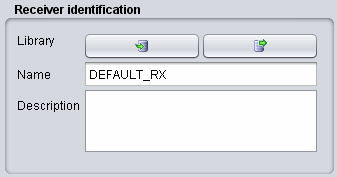
**Note 2:** It is possible to create a receiver from the workspace and export it to your library environment
![image.png](https://wiki.cept.org/uploads/images/gallery/2026-06/scaled-1680-/gn77mtHddUiuDkxf-image.png)

<div class="rich-media-item mediaSingleView-content-wrap image-align-start css-1tl8lct" data-layout="align-start" data-media-vc-wrapper="true" data-node-type="mediaSingle" data-renderer-start-pos="1549" data-vc="media-single" data-width="337" data-width-type="pixel" id="bkmrk-figure-289%3A-example-"><div class="css-jmc7sj"><div data-alt="" data-collection="contentId-493122" data-context-id="493122" data-file-mime-type="" data-file-name="file" data-file-size="1" data-height="177" data-id="d41f2d51-1764-4b99-aaad-f12e556f0ce2" data-node-type="media" data-renderer-start-pos="1550" data-type="file" data-width="337"><div class="_2rko18qm _vchhusvi _kqswh2mm _ect4ttxp _p12f1osq _c71l1osq _1bsb1qmm _4t3ine4n _1hlmd0i9 _1rquusvi _eg541i5c _mts3kb7n _1ntskb7n _yfmhtlke _5sb1v00u new-file-experience-wrapper" data-media-vc-wrapper="true" data-testid="media-card-view" id="bkmrk-figure-289%3A-example--1" role="none"><div class="_1reo15vq _18m915vq _2rko18qm _1e0c1txw _kqswh2mm _p12f1osq _1bsb1osq _4t3i1osq _c71l1osq media-file-card-view" data-cursor="pointer" data-test-media-name="9.gif" data-test-progress="1" data-test-source="remote" data-test-status="complete" data-testid="media-file-card-view"><div class="_kqswstnw _1bsb1osq _4t3i1osq _1e0c1txw _2lx21bp4 _1bah1h6o _4cvr1h6o align-center" data-testid="ImageRendererWrapper">![](blob:https://ecowiki.atlassian.net/421eb4ff-9ba1-4b2d-ad9f-0d4b873aa0a3#media-blob-url=true&id=d41f2d51-1764-4b99-aaad-f12e556f0ce2&collection=contentId-493122&contextId=493122&width=337&height=177&alt=&clientId=113268fe-fe5b-4bc3-8ff3-07965dbf1d18)**Figure 289: Example on how to import/export to/from the workspace/library for the receiver elements**</div></div></div></div></div></div>

# 13.4.5 Transmitter elements

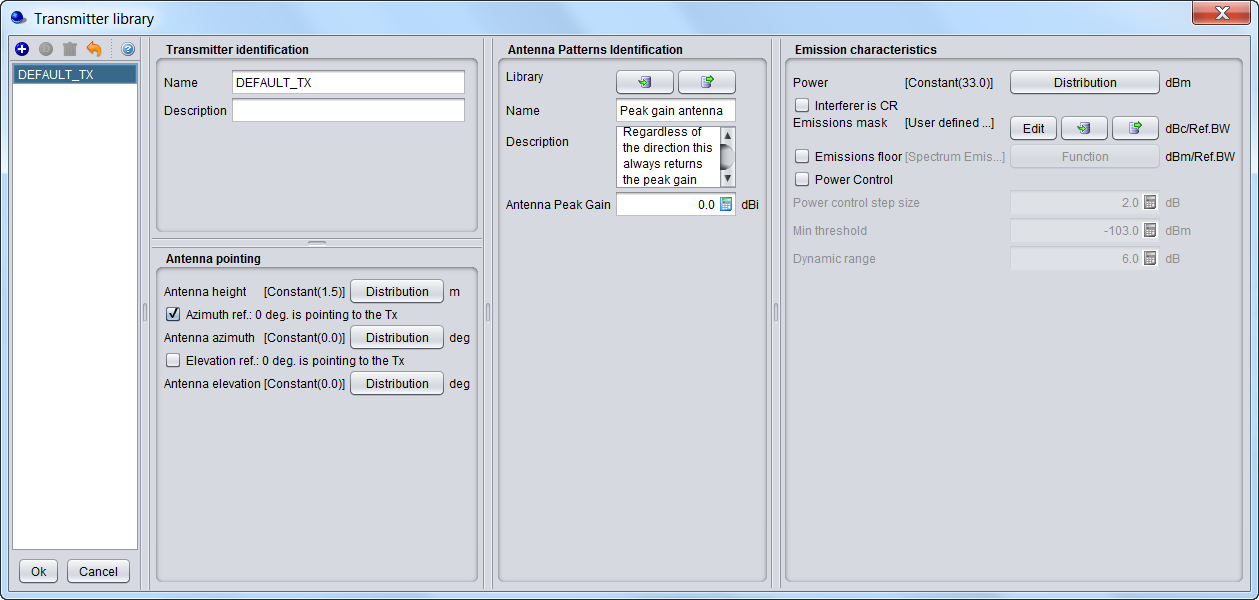
To create or modify a library transmitter element, select the **Transmitters** command from the **Library pull-down menu**or directly with **CTRL+SHIFT+T**.

This activates the Transmitter Library window which displays a list of existing transmitter elements in the library. Please note that it is the same interface as in the workspace so that it is easy to fill. If you no transmitter has been previously created the list will contain only the DEFAULT transmitter elements:
![image.png](https://wiki.cept.org/uploads/images/gallery/2026-06/scaled-1680-/Aly5qQfbTTULeky0-image.png)

<div class="rich-media-item mediaSingleView-content-wrap image-align-start css-18cs7ql" data-layout="align-start" data-media-vc-wrapper="true" data-node-type="mediaSingle" data-renderer-start-pos="467" data-vc="media-single" data-width="839" data-width-type="pixel" id="bkmrk-figure-290%3A-transmit"><div class="css-ti7e32"><div data-alt="" data-collection="contentId-493126" data-context-id="493126" data-file-mime-type="" data-file-name="file" data-file-size="1" data-height="600" data-id="eb318e23-cbb0-4d6b-b47a-e499e9619404" data-node-type="media" data-renderer-start-pos="468" data-type="file" data-width="1259"><div class="_2rko18qm _vchhusvi _kqswh2mm _ect4ttxp _p12f1osq _c71l1osq _1bsb1qmm _4t3ine4n _1hlmd0i9 _1rquusvi _eg541i5c _mts3kb7n _1ntskb7n _yfmhtlke _5sb1v00u new-file-experience-wrapper" data-media-vc-wrapper="true" data-testid="media-card-view" id="bkmrk-figure-290%3A-transmit-1" role="none"><div class="_1reo15vq _18m915vq _2rko18qm _1e0c1txw _kqswh2mm _p12f1osq _1bsb1osq _4t3i1osq _c71l1osq media-file-card-view" data-cursor="pointer" data-test-media-name="0.png" data-test-progress="1" data-test-source="remote" data-test-status="complete" data-testid="media-file-card-view"><div class="_kqswstnw _1bsb1osq _4t3i1osq _1e0c1txw _2lx21bp4 _1bah1h6o _4cvr1h6o align-center" data-testid="ImageRendererWrapper">![](blob:https://ecowiki.atlassian.net/feae21f7-cfaa-43c7-a008-49d091cfd58a#media-blob-url=true&id=eb318e23-cbb0-4d6b-b47a-e499e9619404&collection=contentId-493126&contextId=493126&width=1259&height=600&alt=&clientId=113268fe-fe5b-4bc3-8ff3-07965dbf1d18)**Figure 290: Transmitter library elements**</div></div></div></div></div></div>The parameters of transmitter are grouped in 4 different panels:

- **Transmitter identification**: to define name (unique identifier), description;
- **Antenna pointing**: It contains all information relative to the antenna other than the radiation pattern;
- **Antenna patterns identification**: to define a specific antenna to be associated with that particular receiver. Note that you can select one of the existing antenna library elements or define completely new antenna parameters to be associated only with the given receiver;
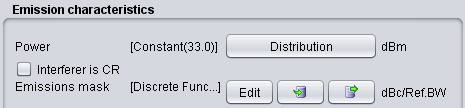
- **Emission characteristics**: to define the basic transmission features, such as power, spectrum emission mask function, etc..

**Note 1:** It is possible to quickly scroll up and down and see the differences in the transmitters.

**Note 2:** It is possible to create a transmitter from the workspace and export it to your library environment
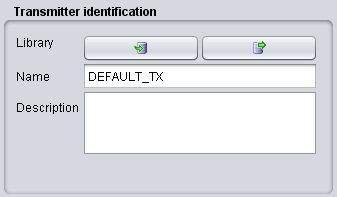
![image.png](https://wiki.cept.org/uploads/images/gallery/2026-06/scaled-1680-/y14WduAiv3rX3yBo-image.png)![](blob:https://ecowiki.atlassian.net/5a05917d-f845-487b-944b-0aafc74d822a#media-blob-url=true&id=cf93532c-bba2-4ded-92dc-2e2572655acb&collection=contentId-493126&contextId=493126&width=337&height=197&alt=&clientId=113268fe-fe5b-4bc3-8ff3-07965dbf1d18)**Figure 291: Example on how to import/export to/from the workspace/library for the transmitter elements**

# 13.4.6 CDMA Link level data

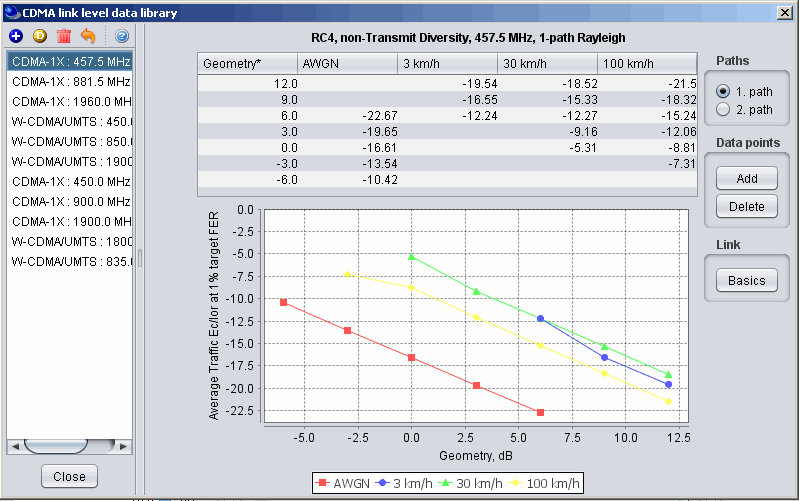
To create or modify CDMA Link level data set, select the **CDMA Link level data** command from the **Library pull-down menu** or directly **CTRL+SHIFT+L**. This activates the CDMA Link level data window which displays a list of existing CDMA Link level data:
![image.png](https://wiki.cept.org/uploads/images/gallery/2026-06/scaled-1680-/5ibyyppZqVafbgCg-image.png)

<div class="rich-media-item mediaSingleView-content-wrap image-align-start css-xcxwme" data-layout="align-start" data-media-vc-wrapper="true" data-node-type="mediaSingle" data-renderer-start-pos="250" data-vc="media-single" data-width="637" data-width-type="pixel" id="bkmrk-figure-292%3A-cdma-lin"><div class="css-1kzp9g0"><div data-alt="" data-collection="contentId-493114" data-context-id="493114" data-file-mime-type="" data-file-name="file" data-file-size="1" data-height="501" data-id="10ae4510-161c-463d-bab9-ae4848eb7d86" data-node-type="media" data-renderer-start-pos="251" data-type="file" data-width="799"><div class="_2rko18qm _vchhusvi _kqswh2mm _ect4ttxp _p12f1osq _c71l1osq _1bsb1qmm _4t3ine4n _1hlmd0i9 _1rquusvi _eg541i5c _mts3kb7n _1ntskb7n _yfmhtlke _5sb1v00u new-file-experience-wrapper" data-media-vc-wrapper="true" data-testid="media-card-view" id="bkmrk-figure-292%3A-cdma-lin-1" role="none"><div class="_1reo15vq _18m915vq _2rko18qm _1e0c1txw _kqswh2mm _p12f1osq _1bsb1osq _4t3i1osq _c71l1osq media-file-card-view" data-cursor="pointer" data-test-media-name="2.gif" data-test-progress="1" data-test-source="remote" data-test-status="complete" data-testid="media-file-card-view"><div class="_kqswstnw _1bsb1osq _4t3i1osq _1e0c1txw _2lx21bp4 _1bah1h6o _4cvr1h6o align-center" data-testid="ImageRendererWrapper">![](blob:https://ecowiki.atlassian.net/09a193a7-701c-4a06-a94d-90082d09fa8d#media-blob-url=true&id=10ae4510-161c-463d-bab9-ae4848eb7d86&collection=contentId-493114&contextId=493114&width=799&height=501&alt=&clientId=113268fe-fe5b-4bc3-8ff3-07965dbf1d18)**Figure 292: CDMA Link level data library elements**</div></div></div></div></div></div>Regarding the library sets of CDMA Link level data, the default sets distributed within SEAMCAT library are understood to be sufficient to cover typical CDMA systems expected to be deployed in Europe and their respective frequency bands. Any additional link level data may be defined to cover other types of CDMA systems. However, it is recommended that only users with advanced knowledge of CDMA systems develop the new CDMA Link level data for SEAMCAT simulations as several considerations should be kept in mind before creating new Link level data:

<div class="ak-renderer-extension   " data-layout="default" data-node-type="extension" data-testid="extension--wrapper" data-top-level="true" id="bkmrk-the-seamcat-cdma-lin"><div class="ak-renderer-extension-inner-wrapper ak-renderer-extension-overflow-container css-v54qrt"><div class="_1t4wglyw _1syfglyw _1pnoidpf _1gocidpf"><div class="ak-renderer-wrapper is-max css-pw7jst"><div>  
</div><div class="css-1cmhusk" role="none"><div class="ak-renderer-document">- - The SEAMCAT CDMA Link level data have different formats for uplink and downlink sections of CDMA link. In particular, the Link level data for **uplink** provides **Eb / No requirements**, whereas **downlink** data define the **Ec / Ior requirements**;
    - Check carefully that the newly created CDMA link level data is appropriate for the SEAMCAT's CDMA simulation methodology for the respective section of the link (uplink/downlink).

</div></div></div></div></div></div>From the worskpace, select the relevant library item as shown below:

![image.png](https://wiki.cept.org/uploads/images/gallery/2026-06/scaled-1680-/MwVbTbv0pChXDCIV-image.png)

<div class="rich-media-item mediaSingleView-content-wrap image-align-start css-er4axk" data-layout="align-start" data-media-vc-wrapper="true" data-node-type="mediaSingle" data-renderer-start-pos="933" data-vc="media-single" data-width="665" data-width-type="pixel" id="bkmrk-figure-293%3A-example-"><div class="css-1te9y74"><div data-alt="" data-collection="contentId-493114" data-context-id="493114" data-file-mime-type="" data-file-name="file" data-file-size="1" data-height="371" data-id="73956a4c-6bac-4033-a49f-54efe44448bf" data-node-type="media" data-renderer-start-pos="934" data-type="file" data-width="617"><div class="_2rko18qm _vchhusvi _kqswh2mm _ect4ttxp _p12f1osq _c71l1osq _1bsb1qmm _4t3ine4n _1hlmd0i9 _1rquusvi _eg541i5c _mts3kb7n _1ntskb7n _yfmhtlke _5sb1v00u new-file-experience-wrapper" data-media-vc-wrapper="true" data-testid="media-card-view" id="bkmrk-figure-293%3A-example--1" role="none"><div class="_1reo15vq _18m915vq _2rko18qm _1e0c1txw _kqswh2mm _p12f1osq _1bsb1osq _4t3i1osq _c71l1osq media-file-card-view" data-cursor="pointer" data-test-media-name="3.png" data-test-progress="1" data-test-source="remote" data-test-status="complete" data-testid="media-file-card-view"><div class="_kqswstnw _1bsb1osq _4t3i1osq _1e0c1txw _2lx21bp4 _1bah1h6o _4cvr1h6o align-center" data-testid="ImageRendererWrapper">![](blob:https://ecowiki.atlassian.net/2d74126f-a697-4deb-979c-415804508211#media-blob-url=true&id=73956a4c-6bac-4033-a49f-54efe44448bf&collection=contentId-493114&contextId=493114&width=617&height=371&alt=&clientId=113268fe-fe5b-4bc3-8ff3-07965dbf1d18)**Figure 293: Example on how to import/export to/from the workspace/library for the CDMA Link Level data library elements**</div></div></div></div></div></div>When adding or editing a data set, a table with data points is displayed and new data points entered will appear on the graph (for Downlink sets). For Downlink sets, every data point must as a minimum contain a geometry value, otherwise it is invalid and it will not be possible to leave the editing dialog.

Basic information about the link-level data set can be viewed and amended in by clicking **Basics** button in the sidebar of the edit window. This will display a new dialog.

***Note:** When **Ok** is clicked in the basics dialog any information changed in this dialog will be saved immediately even if **Cancel** is subsequently pressed in the overlying data point window.*

![image.png](https://wiki.cept.org/uploads/images/gallery/2026-06/scaled-1680-/vwzzWRh1HT5Lu983-image.png)

<div class="rich-media-item mediaSingleView-content-wrap image-align-start css-ss2ic" data-layout="align-start" data-media-vc-wrapper="true" data-node-type="mediaSingle" data-renderer-start-pos="1727" data-vc="media-single" data-width="533" data-width-type="pixel" id="bkmrk-figure-294%3A-example-"><div class="css-1a59ukh"><div data-alt="" data-collection="contentId-493114" data-context-id="493114" data-file-mime-type="" data-file-name="file" data-file-size="1" data-height="600" data-id="743ddade-a6f0-483d-8bd2-e792be1989f1" data-node-type="media" data-renderer-start-pos="1728" data-type="file" data-width="800"><div class="_2rko18qm _vchhusvi _kqswh2mm _ect4ttxp _p12f1osq _c71l1osq _1bsb1qmm _4t3ine4n _1hlmd0i9 _1rquusvi _eg541i5c _mts3kb7n _1ntskb7n _yfmhtlke _5sb1v00u new-file-experience-wrapper" data-media-vc-wrapper="true" data-testid="media-card-view" id="bkmrk-figure-294%3A-example--1" role="none"><div class="_1reo15vq _18m915vq _2rko18qm _1e0c1txw _kqswh2mm _p12f1osq _1bsb1osq _4t3i1osq _c71l1osq media-file-card-view" data-cursor="pointer" data-test-media-name="4.png" data-test-progress="1" data-test-source="remote" data-test-status="complete" data-testid="media-file-card-view"><div class="_kqswstnw _1bsb1osq _4t3i1osq _1e0c1txw _2lx21bp4 _1bah1h6o _4cvr1h6o align-center" data-testid="ImageRendererWrapper">![](blob:https://ecowiki.atlassian.net/a4259f39-bfa0-440a-b2da-7db0946a8646#media-blob-url=true&id=743ddade-a6f0-483d-8bd2-e792be1989f1&collection=contentId-493114&contextId=493114&width=800&height=600&alt=&clientId=113268fe-fe5b-4bc3-8ff3-07965dbf1d18)**Figure 294: Example on how to edit a CDMA Link Level data element**</div></div></div></div></div></div>

# 13.5 Plugins Library

# 13.5.1 Antenna plugin elements

To create or modify a library element containing parameters of a particular antenna, select the **<span class="fabric-text-color-mark" data-renderer-mark="true" data-text-custom-color="#000000">Antennas</span>** command from the **<span class="fabric-text-color-mark" data-renderer-mark="true" data-text-custom-color="#000000">Library pull-down menu</span>** or directly with **<span class="fabric-text-color-mark" data-renderer-mark="true" data-text-custom-color="#000000">CTRL+SHIFT+A</span>**.

Since the antenna is implemented as a plugin, it is possible to include a new antenna plugin using the .jar installer and to add it to the list of existing pre-defined antennas. Any of the antenna elements is then selectable as shown in the picture below:

![image.png](https://wiki.cept.org/uploads/images/gallery/2026-06/scaled-1680-/GX7QWYOTl2BVNhsS-image.png)

<div class="rich-media-item mediaSingleView-content-wrap image-align-start css-1membn" data-layout="align-start" data-media-vc-wrapper="true" data-node-type="mediaSingle" data-renderer-start-pos="439" data-vc="media-single" data-width="599" data-width-type="pixel" id="bkmrk-figure-295%3A-example-"><div class="css-1e8r1hg"><div data-alt="" data-collection="contentId-493080" data-context-id="493080" data-file-mime-type="image/gif" data-file-name="5.gif" data-file-size="14402" data-height="333" data-id="ed1b4f4d-cc3e-48d4-8a28-c0f3b178e5b6" data-node-type="media" data-renderer-start-pos="440" data-type="file" data-width="798"><div class="_2rko18qm _vchhusvi _kqswh2mm _ect4ttxp _p12f1osq _c71l1osq _1bsb1qmm _4t3ine4n _1hlmd0i9 _1rquusvi _eg541i5c _mts3kb7n _1ntskb7n _yfmhtlke _5sb1v00u new-file-experience-wrapper" data-media-vc-wrapper="true" data-testid="media-card-view" id="bkmrk-figure-295%3A-example--1" role="none"><div class="_1reo15vq _18m915vq _2rko18qm _1e0c1txw _kqswh2mm _p12f1osq _1bsb1osq _4t3i1osq _c71l1osq media-file-card-view" data-cursor="pointer" data-test-media-name="5.gif" data-test-progress="1" data-test-source="remote" data-test-status="complete" data-testid="media-file-card-view"><div class="_kqswstnw _1bsb1osq _4t3i1osq _1e0c1txw _2lx21bp4 _1bah1h6o _4cvr1h6o align-center" data-testid="ImageRendererWrapper">![](blob:https://ecowiki.atlassian.net/8526f42e-b49c-48a4-a3eb-5ca2e627dcd0#media-blob-url=true&id=ed1b4f4d-cc3e-48d4-8a28-c0f3b178e5b6&collection=contentId-493080&contextId=493080&width=798&height=333&alt=&clientId=113268fe-fe5b-4bc3-8ff3-07965dbf1d18)**Figure 295: Example of the antenna library**</div></div></div></div></div></div><span class="fabric-text-color-mark" data-renderer-mark="true" data-text-custom-color="#000000"> </span><span class="fabric-text-color-mark" data-renderer-mark="true" data-text-custom-color="#000000"> </span>

When adding a new antenna, enter the name (unique identifier) and description of the antenna as well as its technical parameters - peak gain and one or more radiation patterns, as necessary. See Annex A11.6 for further details.

**Note 1:** It is possible to quickly see the antenna pattern with mouse-over capability on top of the pattern button.

[![image.png](https://wiki.cept.org/uploads/images/gallery/2026-06/scaled-1680-/3xJkwCd3Boeo1uDF-image.png)](https://wiki.cept.org/uploads/images/gallery/2026-06/3xJkwCd3Boeo1uDF-image.png)

<div class="rich-media-item mediaSingleView-content-wrap image-align-start css-13mmns4" data-layout="align-start" data-media-vc-wrapper="true" data-node-type="mediaSingle" data-renderer-start-pos="841" data-vc="media-single" data-width="425" data-width-type="pixel" id="bkmrk-figure-296%3A-quick-ov"><div class="css-rviv5i"><div data-alt="" data-collection="contentId-493080" data-context-id="493080" data-file-mime-type="image/gif" data-file-name="6.gif" data-file-size="14276" data-height="389" data-id="56dc358a-0c71-4a15-b640-4844a5f61ae3" data-node-type="media" data-renderer-start-pos="842" data-type="file" data-width="662"><div class="_2rko18qm _vchhusvi _kqswh2mm _ect4ttxp _p12f1osq _c71l1osq _1bsb1qmm _4t3ine4n _1hlmd0i9 _1rquusvi _eg541i5c _mts3kb7n _1ntskb7n _yfmhtlke _5sb1v00u new-file-experience-wrapper" data-media-vc-wrapper="true" data-testid="media-card-view" id="bkmrk-figure-296%3A-quick-ov-1" role="none"><div class="_1reo15vq _18m915vq _2rko18qm _1e0c1txw _kqswh2mm _p12f1osq _1bsb1osq _4t3i1osq _c71l1osq media-file-card-view" data-cursor="pointer" data-test-media-name="6.gif" data-test-progress="1" data-test-source="remote" data-test-status="complete" data-testid="media-file-card-view"><div class="_kqswstnw _1bsb1osq _4t3i1osq _1e0c1txw _2lx21bp4 _1bah1h6o _4cvr1h6o align-center" data-testid="ImageRendererWrapper">![](blob:https://ecowiki.atlassian.net/23a762e2-dce5-4989-ba72-e492a04addf4#media-blob-url=true&id=56dc358a-0c71-4a15-b640-4844a5f61ae3&collection=contentId-493080&contextId=493080&width=662&height=389&alt=&clientId=113268fe-fe5b-4bc3-8ff3-07965dbf1d18)**Figure 296: Quick over mouse preview of the pattern**</div></div></div></div></div></div><span class="fabric-text-color-mark" data-renderer-mark="true" data-text-custom-color="#000000"> </span>

**Note 2:** If none of the radiation patterns is checked, SEAMCAT will assume this being an omni-directional antenna.

**<span class="fabric-text-color-mark" data-renderer-mark="true" data-text-custom-color="#000000">Note 3:</span>**<span class="fabric-text-color-mark" data-renderer-mark="true" data-text-custom-color="#000000"> It is possible to create an antenna from the workspace and export it to your library environment. </span>

# 13.5.2 Coverage radius plugin elements

To create or modify a coverage radius element, select the **Coverage radius library** command from the **Library pull-down menu** or directly **CTRL+SHIFT+C**. This activates the Coverage radius library window which displays a list of existing Coverage radius options:

![image.png](https://wiki.cept.org/uploads/images/gallery/2026-06/scaled-1680-/rZfpWQRxFI6FKfaB-image.png)

<div class="fabric-editor-block-mark fabric-editor-alignment align-center" data-align="center" id="bkmrk-figure-297%3A-example-"><div class="inline-extension-renderer css-e2q2ep"><span class="css-6k4g17">  
</span></div>**Figure 297: Example of the coverage radius plugin library**</div>

# 13.5.3 Propagation model plugin

To create or modify a library element containing parameters of a particular propagation model, select the **<span class="fabric-text-color-mark" data-renderer-mark="true" data-text-custom-color="#000000">Propagation model</span>** command from the **<span class="fabric-text-color-mark" data-renderer-mark="true" data-text-custom-color="#000000">Library pull-down menu</span>** or directly with **<span class="fabric-text-color-mark" data-renderer-mark="true" data-text-custom-color="#000000">CTRL+SHIFT+P</span>**.

Since the propagation models are implemented as plugin, it is possible to include a new propagation model using the .jar installer and to add it to the list of existing pre-defined models. Any of the propagation models is then selectable as shown in the picture below:

![image.png](https://wiki.cept.org/uploads/images/gallery/2026-06/scaled-1680-/qnwFTcvbvnR5teB4-image.png)

<div class="rich-media-item mediaSingleView-content-wrap image-align-start css-1xiw3k3" data-layout="align-start" data-media-vc-wrapper="true" data-node-type="mediaSingle" data-renderer-start-pos="469" data-vc="media-single" data-width="343" data-width-type="pixel" id="bkmrk--1"><div class="css-puub9j"><div data-alt="" data-collection="contentId-493072" data-context-id="493072" data-file-mime-type="" data-file-name="file" data-file-size="1" data-height="445" data-id="8dd5746e-8039-47aa-8119-2e66e1def96a" data-node-type="media" data-renderer-start-pos="470" data-type="file" data-width="611"><div class="_2rko18qm _vchhusvi _kqswh2mm _ect4ttxp _p12f1osq _c71l1osq _1bsb1qmm _4t3ine4n _1hlmd0i9 _1rquusvi _eg541i5c _mts3kb7n _1ntskb7n _yfmhtlke _5sb1v00u new-file-experience-wrapper" data-media-vc-wrapper="true" data-testid="media-card-view" id="bkmrk--2" role="none"><div class="_1reo15vq _18m915vq _2rko18qm _1e0c1txw _kqswh2mm _p12f1osq _1bsb1osq _4t3i1osq _c71l1osq media-file-card-view" data-cursor="pointer" data-test-media-name="8.png" data-test-progress="1" data-test-source="remote" data-test-status="complete" data-testid="media-file-card-view"><div class="_kqswstnw _1bsb1osq _4t3i1osq _1e0c1txw _2lx21bp4 _1bah1h6o _4cvr1h6o" data-testid="ImageRendererWrapper">![](blob:https://ecowiki.atlassian.net/12ad722e-f87f-4b62-ba14-f0120219ae5c#media-blob-url=true&id=8dd5746e-8039-47aa-8119-2e66e1def96a&collection=contentId-493072&contextId=493072&width=611&height=445&alt=&clientId=113268fe-fe5b-4bc3-8ff3-07965dbf1d18)</div></div></div></div></div></div><div class="fabric-editor-block-mark fabric-editor-alignment align-center" data-align="center" id="bkmrk-figure-298%3A-example-">**Figure 298: Example of the propagation model plugin library**</div>More detailed information on specific propagation models is available in ‎ANNEX 17:

# 13.5.4 Event Processing Plugin

To create or modify a library element containing parameters of a particular event processing plugin, select the **event processing plugin** command from the **Library pull-down menu** or directly with **CTRL+SHIFT+E**. A list of available built-in event processing plugin is available in Figure 240.