# 13.5 Plugins Library

# 13.5.1 Antenna plugin elements

To create or modify a library element containing parameters of a particular antenna, select the **<span class="fabric-text-color-mark" data-renderer-mark="true" data-text-custom-color="#000000">Antennas</span>** command from the **<span class="fabric-text-color-mark" data-renderer-mark="true" data-text-custom-color="#000000">Library pull-down menu</span>** or directly with **<span class="fabric-text-color-mark" data-renderer-mark="true" data-text-custom-color="#000000">CTRL+SHIFT+A</span>**.

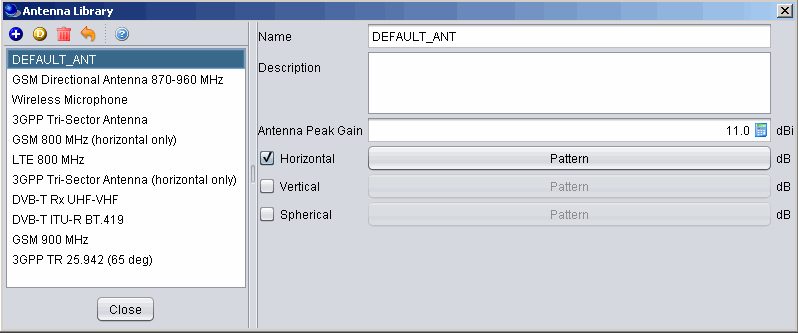
Since the antenna is implemented as a plugin, it is possible to include a new antenna plugin using the .jar installer and to add it to the list of existing pre-defined antennas. Any of the antenna elements is then selectable as shown in the picture below:
![image.png](https://wiki.cept.org/uploads/images/gallery/2026-06/scaled-1680-/GX7QWYOTl2BVNhsS-image.png)

<div class="rich-media-item mediaSingleView-content-wrap image-align-start css-1membn" data-layout="align-start" data-media-vc-wrapper="true" data-node-type="mediaSingle" data-renderer-start-pos="439" data-vc="media-single" data-width="599" data-width-type="pixel" id="bkmrk-figure-295%3A-example-"><div class="css-1e8r1hg"><div data-alt="" data-collection="contentId-493080" data-context-id="493080" data-file-mime-type="image/gif" data-file-name="5.gif" data-file-size="14402" data-height="333" data-id="ed1b4f4d-cc3e-48d4-8a28-c0f3b178e5b6" data-node-type="media" data-renderer-start-pos="440" data-type="file" data-width="798"><div class="_2rko18qm _vchhusvi _kqswh2mm _ect4ttxp _p12f1osq _c71l1osq _1bsb1qmm _4t3ine4n _1hlmd0i9 _1rquusvi _eg541i5c _mts3kb7n _1ntskb7n _yfmhtlke _5sb1v00u new-file-experience-wrapper" data-media-vc-wrapper="true" data-testid="media-card-view" id="bkmrk-figure-295%3A-example--1" role="none"><div class="_1reo15vq _18m915vq _2rko18qm _1e0c1txw _kqswh2mm _p12f1osq _1bsb1osq _4t3i1osq _c71l1osq media-file-card-view" data-cursor="pointer" data-test-media-name="5.gif" data-test-progress="1" data-test-source="remote" data-test-status="complete" data-testid="media-file-card-view"><div class="_kqswstnw _1bsb1osq _4t3i1osq _1e0c1txw _2lx21bp4 _1bah1h6o _4cvr1h6o align-center" data-testid="ImageRendererWrapper">![](blob:https://ecowiki.atlassian.net/8526f42e-b49c-48a4-a3eb-5ca2e627dcd0#media-blob-url=true&id=ed1b4f4d-cc3e-48d4-8a28-c0f3b178e5b6&collection=contentId-493080&contextId=493080&width=798&height=333&alt=&clientId=113268fe-fe5b-4bc3-8ff3-07965dbf1d18)**Figure 295: Example of the antenna library**</div></div></div></div></div></div><span class="fabric-text-color-mark" data-renderer-mark="true" data-text-custom-color="#000000"> </span><span class="fabric-text-color-mark" data-renderer-mark="true" data-text-custom-color="#000000"> </span>

When adding a new antenna, enter the name (unique identifier) and description of the antenna as well as its technical parameters - peak gain and one or more radiation patterns, as necessary. See Annex A11.6 for further details.

**Note 1:** It is possible to quickly see the antenna pattern with mouse-over capability on top of the pattern button.

[![image.png](https://wiki.cept.org/uploads/images/gallery/2026-06/scaled-1680-/3xJkwCd3Boeo1uDF-image.png)](https://wiki.cept.org/uploads/images/gallery/2026-06/3xJkwCd3Boeo1uDF-image.png)
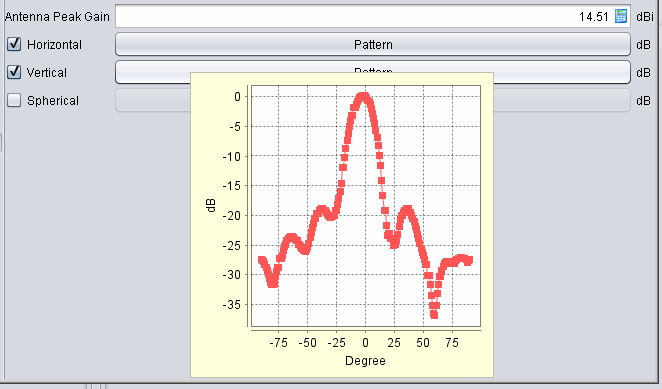
<div class="rich-media-item mediaSingleView-content-wrap image-align-start css-13mmns4" data-layout="align-start" data-media-vc-wrapper="true" data-node-type="mediaSingle" data-renderer-start-pos="841" data-vc="media-single" data-width="425" data-width-type="pixel" id="bkmrk-figure-296%3A-quick-ov"><div class="css-rviv5i"><div data-alt="" data-collection="contentId-493080" data-context-id="493080" data-file-mime-type="image/gif" data-file-name="6.gif" data-file-size="14276" data-height="389" data-id="56dc358a-0c71-4a15-b640-4844a5f61ae3" data-node-type="media" data-renderer-start-pos="842" data-type="file" data-width="662"><div class="_2rko18qm _vchhusvi _kqswh2mm _ect4ttxp _p12f1osq _c71l1osq _1bsb1qmm _4t3ine4n _1hlmd0i9 _1rquusvi _eg541i5c _mts3kb7n _1ntskb7n _yfmhtlke _5sb1v00u new-file-experience-wrapper" data-media-vc-wrapper="true" data-testid="media-card-view" id="bkmrk-figure-296%3A-quick-ov-1" role="none"><div class="_1reo15vq _18m915vq _2rko18qm _1e0c1txw _kqswh2mm _p12f1osq _1bsb1osq _4t3i1osq _c71l1osq media-file-card-view" data-cursor="pointer" data-test-media-name="6.gif" data-test-progress="1" data-test-source="remote" data-test-status="complete" data-testid="media-file-card-view"><div class="_kqswstnw _1bsb1osq _4t3i1osq _1e0c1txw _2lx21bp4 _1bah1h6o _4cvr1h6o align-center" data-testid="ImageRendererWrapper">![](blob:https://ecowiki.atlassian.net/23a762e2-dce5-4989-ba72-e492a04addf4#media-blob-url=true&id=56dc358a-0c71-4a15-b640-4844a5f61ae3&collection=contentId-493080&contextId=493080&width=662&height=389&alt=&clientId=113268fe-fe5b-4bc3-8ff3-07965dbf1d18)**Figure 296: Quick over mouse preview of the pattern**</div></div></div></div></div></div><span class="fabric-text-color-mark" data-renderer-mark="true" data-text-custom-color="#000000"> </span>

**Note 2:** If none of the radiation patterns is checked, SEAMCAT will assume this being an omni-directional antenna.

**<span class="fabric-text-color-mark" data-renderer-mark="true" data-text-custom-color="#000000">Note 3:</span>**<span class="fabric-text-color-mark" data-renderer-mark="true" data-text-custom-color="#000000"> It is possible to create an antenna from the workspace and export it to your library environment. </span>

# 13.5.2 Coverage radius plugin elements

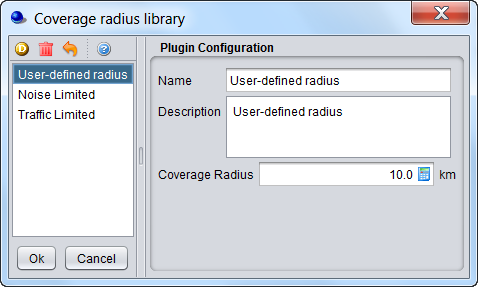
To create or modify a coverage radius element, select the **Coverage radius library** command from the **Library pull-down menu** or directly **CTRL+SHIFT+C**. This activates the Coverage radius library window which displays a list of existing Coverage radius options:
![image.png](https://wiki.cept.org/uploads/images/gallery/2026-06/scaled-1680-/rZfpWQRxFI6FKfaB-image.png)

<div class="fabric-editor-block-mark fabric-editor-alignment align-center" data-align="center" id="bkmrk-figure-297%3A-example-"><div class="inline-extension-renderer css-e2q2ep"><span class="css-6k4g17">  
</span></div>**Figure 297: Example of the coverage radius plugin library**</div>

# 13.5.3 Propagation model plugin

To create or modify a library element containing parameters of a particular propagation model, select the **<span class="fabric-text-color-mark" data-renderer-mark="true" data-text-custom-color="#000000">Propagation model</span>** command from the **<span class="fabric-text-color-mark" data-renderer-mark="true" data-text-custom-color="#000000">Library pull-down menu</span>** or directly with **<span class="fabric-text-color-mark" data-renderer-mark="true" data-text-custom-color="#000000">CTRL+SHIFT+P</span>**.

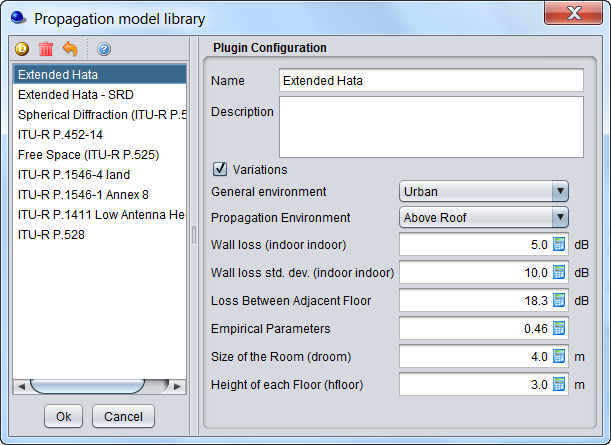
Since the propagation models are implemented as plugin, it is possible to include a new propagation model using the .jar installer and to add it to the list of existing pre-defined models. Any of the propagation models is then selectable as shown in the picture below:
![image.png](https://wiki.cept.org/uploads/images/gallery/2026-06/scaled-1680-/qnwFTcvbvnR5teB4-image.png)

<div class="rich-media-item mediaSingleView-content-wrap image-align-start css-1xiw3k3" data-layout="align-start" data-media-vc-wrapper="true" data-node-type="mediaSingle" data-renderer-start-pos="469" data-vc="media-single" data-width="343" data-width-type="pixel" id="bkmrk--1"><div class="css-puub9j"><div data-alt="" data-collection="contentId-493072" data-context-id="493072" data-file-mime-type="" data-file-name="file" data-file-size="1" data-height="445" data-id="8dd5746e-8039-47aa-8119-2e66e1def96a" data-node-type="media" data-renderer-start-pos="470" data-type="file" data-width="611"><div class="_2rko18qm _vchhusvi _kqswh2mm _ect4ttxp _p12f1osq _c71l1osq _1bsb1qmm _4t3ine4n _1hlmd0i9 _1rquusvi _eg541i5c _mts3kb7n _1ntskb7n _yfmhtlke _5sb1v00u new-file-experience-wrapper" data-media-vc-wrapper="true" data-testid="media-card-view" id="bkmrk--2" role="none"><div class="_1reo15vq _18m915vq _2rko18qm _1e0c1txw _kqswh2mm _p12f1osq _1bsb1osq _4t3i1osq _c71l1osq media-file-card-view" data-cursor="pointer" data-test-media-name="8.png" data-test-progress="1" data-test-source="remote" data-test-status="complete" data-testid="media-file-card-view"><div class="_kqswstnw _1bsb1osq _4t3i1osq _1e0c1txw _2lx21bp4 _1bah1h6o _4cvr1h6o" data-testid="ImageRendererWrapper">![](blob:https://ecowiki.atlassian.net/12ad722e-f87f-4b62-ba14-f0120219ae5c#media-blob-url=true&id=8dd5746e-8039-47aa-8119-2e66e1def96a&collection=contentId-493072&contextId=493072&width=611&height=445&alt=&clientId=113268fe-fe5b-4bc3-8ff3-07965dbf1d18)</div></div></div></div></div></div><div class="fabric-editor-block-mark fabric-editor-alignment align-center" data-align="center" id="bkmrk-figure-298%3A-example-">**Figure 298: Example of the propagation model plugin library**</div>More detailed information on specific propagation models is available in ‎ANNEX 17:

# 13.5.4 Event Processing Plugin

To create or modify a library element containing parameters of a particular event processing plugin, select the **event processing plugin** command from the **Library pull-down menu** or directly with **CTRL+SHIFT+E**. A list of available built-in event processing plugin is available in Figure 240.