# 11.4 Configuring an EPP

The <span data-highlighted="true" data-vc="highlighted-text"><span class="_kqswh2mm"><span class="_5pioz8co _189e1dm9 _1il9buyh _19lc184f _d0altlke" data-testid="definition-highlighter">EPP</span></span></span> can be configured as wanted for this particular simulations soon as it is loaded to the simulation workspace. In this example the <span data-highlighted="true" data-vc="highlighted-text">EPP</span> called “Demo 1: Collect intermediary results” is loaded. With this <span data-highlighted="true" data-vc="highlighted-text">EPP</span>, you can select the intermediary vector results that you want to display after simulation.

[![image.png](https://wiki.cept.org/uploads/images/gallery/2026-04/scaled-1680-/EeKsWBqFKFFykRYY-image.png)](https://wiki.cept.org/uploads/images/gallery/2026-04/EeKsWBqFKFFykRYY-image.png)
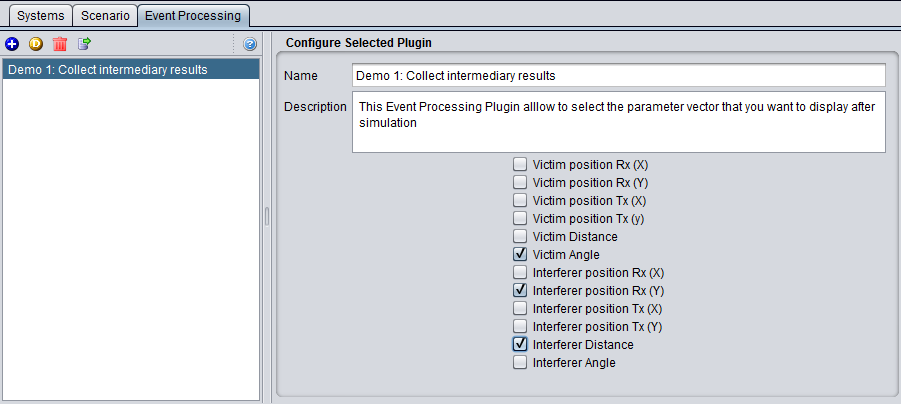
<div class="rich-media-item mediaSingleView-content-wrap image-align-start css-f99s35" data-layout="align-start" data-media-vc-wrapper="true" data-node-type="mediaSingle" data-renderer-start-pos="307" data-vc="media-single" data-width="557" data-width-type="pixel" id="bkmrk-figure-241%3A-configur"><div class="css-17h3awh"><div data-alt="" data-collection="contentId-492930" data-context-id="492930" data-file-mime-type="" data-file-name="file" data-file-size="1" data-height="404" data-id="60c0252d-d964-4371-8f84-d5ce34f8a969" data-node-type="media" data-renderer-start-pos="308" data-type="file" data-width="901"><div class="_2rko18qm _vchhusvi _kqswh2mm _ect4ttxp _p12f1osq _c71l1osq _1bsb1qmm _4t3ine4n _1hlmd0i9 _1rquusvi _eg541i5c _mts3kb7n _1ntskb7n _yfmhtlke _5sb1v00u new-file-experience-wrapper" data-media-vc-wrapper="true" data-testid="media-card-view" id="bkmrk-figure-241%3A-configur-1"><div class="_1reo15vq _18m915vq _2rko18qm _1e0c1txw _kqswh2mm _p12f1osq _1bsb1osq _4t3i1osq _c71l1osq media-file-card-view" data-cursor="pointer" data-test-media-name="1.png" data-test-progress="1" data-test-source="remote" data-test-status="complete" data-testid="media-file-card-view"><div class="_kqswstnw _1bsb1osq _4t3i1osq _1e0c1txw _2lx21bp4 _1bah1h6o _4cvr1h6o align-center" data-testid="ImageRendererWrapper">![](blob:https://ecowiki.atlassian.net/ba24e018-a33d-4cf0-8dfb-c8ef1e00f8f3#media-blob-url=true&id=60c0252d-d964-4371-8f84-d5ce34f8a969&collection=contentId-492930&contextId=492930&width=901&height=404&alt=&clientId=113268fe-fe5b-4bc3-8ff3-07965dbf1d18)F**igure 241: Configuring an <span data-highlighted="true" data-vc="highlighted-text">EPP</span>**</div><div class="_kqswstnw _1bsb1osq _4t3i1osq _1e0c1txw _2lx21bp4 _1bah1h6o _4cvr1h6o" data-testid="ImageRendererWrapper"></div></div></div></div></div></div>In case an <span data-highlighted="true" data-vc="highlighted-text">EPP</span> is used in a simulation, it can return a set of result. The <span data-highlighted="true" data-vc="highlighted-text">EPP</span> results are described in Section ‎12.7.