# 11 Event processing

# 11.1 Event processing concept

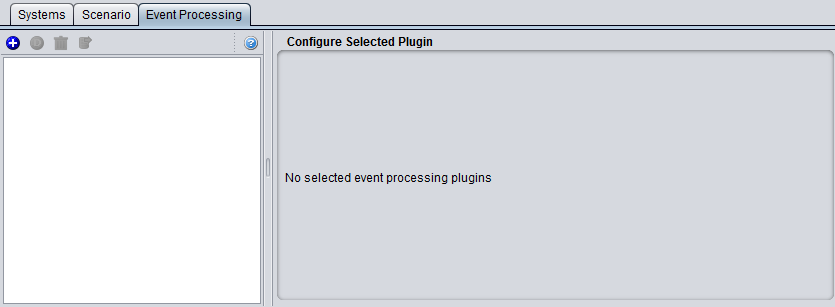
The Event Processing tab is the place in SEAMCAT where you can set the Event Processing Plugin (EPP). The EPP is a plugin that is given access to the EventResults, one by one, as they are produced by the simulation - an EPP can be viewed as an adjacent simulation. An EPP is allowed to inspect the scenario and the EventResult and based on this observation it can produce its own results. Once an EPP is installed in SEAMCAT it can be configured for any scenario possible.

Figure 236 depicts the basic flow of SEAMCAT for a single thread example i.e. One event result (Ri) is calculated at a time in sequence.

[![image.png](https://wiki.cept.org/uploads/images/gallery/2026-04/scaled-1680-/kb2I6OjHnGRwQUIT-image.png)](https://wiki.cept.org/uploads/images/gallery/2026-04/kb2I6OjHnGRwQUIT-image.png)

<div class="rich-media-item mediaSingleView-content-wrap image-align-start css-13moijr" id="bkmrk-figure-236%3A-flow-of-"><div class="css-70tz9e"><div><div class="_2rko18qm _vchhusvi _kqswh2mm _ect4ttxp _p12f1osq _c71l1osq _1bsb1qmm _4t3ine4n _1hlmd0i9 _1rquusvi _eg541i5c _mts3kb7n _1ntskb7n _yfmhtlke _5sb1v00u new-file-experience-wrapper" id="bkmrk-figure-236%3A-flow-of--1"><div class="_1reo15vq _18m915vq _2rko18qm _1e0c1txw _kqswh2mm _p12f1osq _1bsb1osq _4t3i1osq _c71l1osq media-file-card-view"><div class="_kqswstnw _1bsb1osq _4t3i1osq _1e0c1txw _2lx21bp4 _1bah1h6o _4cvr1h6o align-center">**Figure 236: Flow of SEAMCAT**</div><div class="_kqswstnw _1bsb1osq _4t3i1osq _1e0c1txw _2lx21bp4 _1bah1h6o _4cvr1h6o align-center"></div></div></div></div></div></div>Each of the produced event results can be ‘processed’ by a plugin in the sense that it can make additional computation based on the event result and scenario settings. This has huge potential. Basically, there is no limits to how this can be used!

[![image.png](https://wiki.cept.org/uploads/images/gallery/2026-04/scaled-1680-/Hfe95MjLyhvVIqTv-image.png)](https://wiki.cept.org/uploads/images/gallery/2026-04/Hfe95MjLyhvVIqTv-image.png)
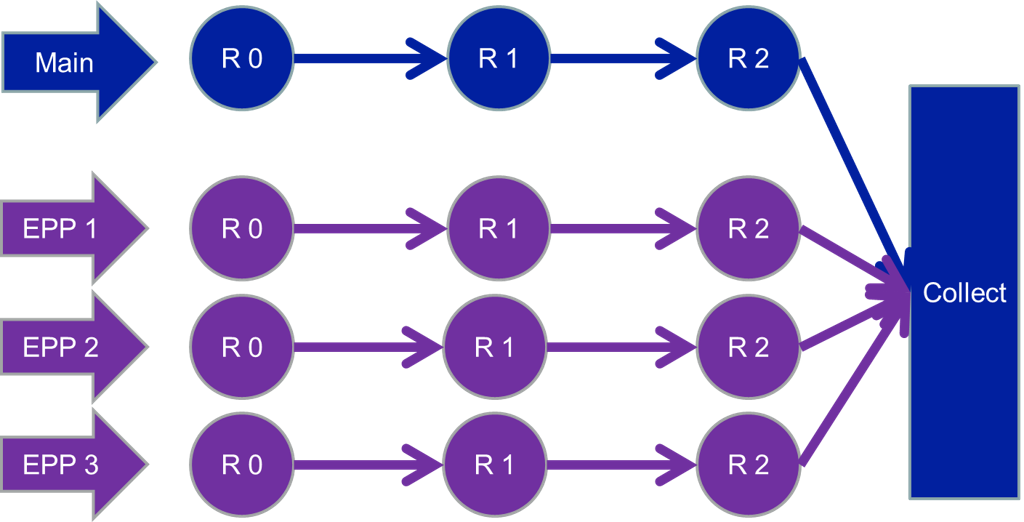
<div class="rich-media-item mediaSingleView-content-wrap image-align-start css-14c6218" id="bkmrk--2"><div class="css-1yott1c"><div><div class="_2rko18qm _vchhusvi _kqswh2mm _ect4ttxp _p12f1osq _c71l1osq _1bsb1qmm _4t3ine4n _1hlmd0i9 _1rquusvi _eg541i5c _mts3kb7n _1ntskb7n _yfmhtlke _5sb1v00u new-file-experience-wrapper" id="bkmrk--3"><div class="_1reo15vq _18m915vq _2rko18qm _1e0c1txw _kqswh2mm _p12f1osq _1bsb1osq _4t3i1osq _c71l1osq media-file-card-view"><div class="_kqswstnw _1bsb1osq _4t3i1osq _1e0c1txw _2lx21bp4 _1bah1h6o _4cvr1h6o"></div></div></div></div></div></div>**Figure 237: EPP Flow in SEAMCAT**

EPPs have a dedicated thread to run in, and therefore run at the same time as the simulation runs as depicted in Figure 237. EPP inputs are exactly the same for other plugin inputs, but the EPP results are very different. The EPP can produce results like Single values, Vectors, Vector groups, Scatter diagrams, Barcharts.

# 11.2 Event processing GUI

The Event processing GUI consists of 2 main parts as shown in Figure 238. On the left hand side you can add ( [![image.png](https://wiki.cept.org/uploads/images/gallery/2026-04/scaled-1680-/Qhz8jX1IluHnZRWX-image.png)](https://wiki.cept.org/uploads/images/gallery/2026-04/Qhz8jX1IluHnZRWX-image.png) ) or duplicate ( [![image.png](https://wiki.cept.org/uploads/images/gallery/2026-04/scaled-1680-/8thVfzgM8JQg8sht-image.png)](https://wiki.cept.org/uploads/images/gallery/2026-04/8thVfzgM8JQg8sht-image.png) ) an <span><span class="_kqswh2mm"><span class="_5pioz8co _189e1dm9 _1il9buyh _19lc184f _d0altlke">EPP</span></span></span> to the simulation, duplicate an <span>EPP</span>, remove ( [![image.png](https://wiki.cept.org/uploads/images/gallery/2026-04/scaled-1680-/nT5J9ywsIVI4HLBG-image.png)](https://wiki.cept.org/uploads/images/gallery/2026-04/nT5J9ywsIVI4HLBG-image.png) ) an <span>EPP</span> from the simulation and export ( [![image.png](https://wiki.cept.org/uploads/images/gallery/2026-04/scaled-1680-/G7FVCfde7UQGt9SS-image.png)](https://wiki.cept.org/uploads/images/gallery/2026-04/G7FVCfde7UQGt9SS-image.png) ) an <span>EPP</span>.

There exist some predefined EPPs builtin stored in the library environment (Section ‎13.5.4) but you can also install your own <span>EPP</span> into SEAMCAT by loading your own .jar file (Section ‎2.23). The list of builtin EPPs is not exhaustive and will increase with time and needs of SEAMCAT community.

A dedicated section on how to develop your own <span>EPP</span> is given in Section ‎14.

![image.png](https://wiki.cept.org/uploads/images/gallery/2026-04/scaled-1680-/xAT1mOcIHYQOLiao-image.png)

<div class="rich-media-item mediaSingleView-content-wrap image-align-start css-1w7dzvq" id="bkmrk-figure-238%3A-event-pr"><div class="css-1maflv4"><div><div class="_2rko18qm _vchhusvi _kqswh2mm _ect4ttxp _p12f1osq _c71l1osq _1bsb1qmm _4t3ine4n _1hlmd0i9 _1rquusvi _eg541i5c _mts3kb7n _1ntskb7n _yfmhtlke _5sb1v00u new-file-experience-wrapper" id="bkmrk-figure-238%3A-event-pr-1"><div class="_1reo15vq _18m915vq _2rko18qm _1e0c1txw _kqswh2mm _p12f1osq _1bsb1osq _4t3i1osq _c71l1osq media-file-card-view"><div class="_kqswstnw _1bsb1osq _4t3i1osq _1e0c1txw _2lx21bp4 _1bah1h6o _4cvr1h6o align-center">**Figure 238: Event processing GUI**</div></div></div></div></div></div>

# 11.3 Loading an EPP to a simulation

To use <span><span class="_kqswh2mm"><span class="_5pioz8co _189e1dm9 _1il9buyh _19lc184f _d0altlke">EPP</span></span></span> in a simulation go to the event processing tab and click the plus sign (Figure 239).

[![image.png](https://wiki.cept.org/uploads/images/gallery/2026-04/scaled-1680-/jsH0hUD6sRmdTLFy-image.png)](https://wiki.cept.org/uploads/images/gallery/2026-04/jsH0hUD6sRmdTLFy-image.png)
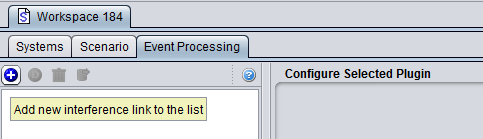
<div class="rich-media-item mediaSingleView-content-wrap image-align-start css-1ic6lqc" id="bkmrk-figure-239%3A-using%C2%A0ep"><div class="css-17u0n3q"><div><div class="_2rko18qm _vchhusvi _kqswh2mm _ect4ttxp _p12f1osq _c71l1osq _1bsb1qmm _4t3ine4n _1hlmd0i9 _1rquusvi _eg541i5c _mts3kb7n _1ntskb7n _yfmhtlke _5sb1v00u new-file-experience-wrapper" id="bkmrk-figure-239%3A-using%C2%A0ep-1"><div class="_1reo15vq _18m915vq _2rko18qm _1e0c1txw _kqswh2mm _p12f1osq _1bsb1osq _4t3i1osq _c71l1osq media-file-card-view"><div class="_kqswstnw _1bsb1osq _4t3i1osq _1e0c1txw _2lx21bp4 _1bah1h6o _4cvr1h6o align-center">**Figure 239: Using <span>EPP</span> in a workspace**</div></div><div class="_kqswstnw _1bsb1osq _4t3i1osq _1e0c1txw _2lx21bp4 _1bah1h6o _4cvr1h6o align-center"></div></div></div></div></div>You will be prompted with a list of available EPPs and their preview as shown in Figure 240.

[![image.png](https://wiki.cept.org/uploads/images/gallery/2026-04/scaled-1680-/QcDisujJcE3tSm8M-image.png)](https://wiki.cept.org/uploads/images/gallery/2026-04/QcDisujJcE3tSm8M-image.png)
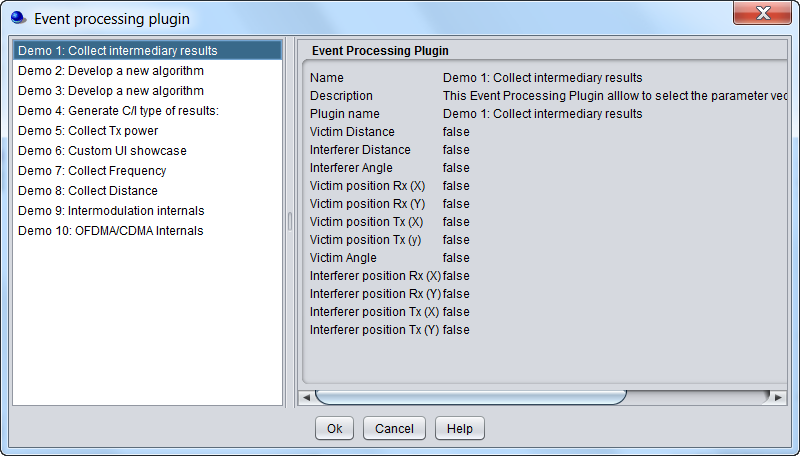
<div class="rich-media-item mediaSingleView-content-wrap image-align-start css-2xfehy" id="bkmrk-figure-240%3A-list-of-"><div class="css-j7bw5f"><div><div class="_2rko18qm _vchhusvi _kqswh2mm _ect4ttxp _p12f1osq _c71l1osq _1bsb1qmm _4t3ine4n _1hlmd0i9 _1rquusvi _eg541i5c _mts3kb7n _1ntskb7n _yfmhtlke _5sb1v00u new-file-experience-wrapper" id="bkmrk-figure-240%3A-list-of--1"><div class="_1reo15vq _18m915vq _2rko18qm _1e0c1txw _kqswh2mm _p12f1osq _1bsb1osq _4t3i1osq _c71l1osq media-file-card-view"><div class="_kqswstnw _1bsb1osq _4t3i1osq _1e0c1txw _2lx21bp4 _1bah1h6o _4cvr1h6o align-center">**Figure 240: List of available EPPs**</div><div class="_kqswstnw _1bsb1osq _4t3i1osq _1e0c1txw _2lx21bp4 _1bah1h6o _4cvr1h6o align-center"></div></div></div></div></div></div>You can add as many EPPs as you want to your simulation.

# 11.4 Configuring an EPP

The <span><span class="_kqswh2mm"><span class="_5pioz8co _189e1dm9 _1il9buyh _19lc184f _d0altlke">EPP</span></span></span> can be configured as wanted for this particular simulations soon as it is loaded to the simulation workspace. In this example the <span>EPP</span> called “Demo 1: Collect intermediary results” is loaded. With this <span>EPP</span>, you can select the intermediary vector results that you want to display after simulation.

[![image.png](https://wiki.cept.org/uploads/images/gallery/2026-04/scaled-1680-/EeKsWBqFKFFykRYY-image.png)](https://wiki.cept.org/uploads/images/gallery/2026-04/EeKsWBqFKFFykRYY-image.png)
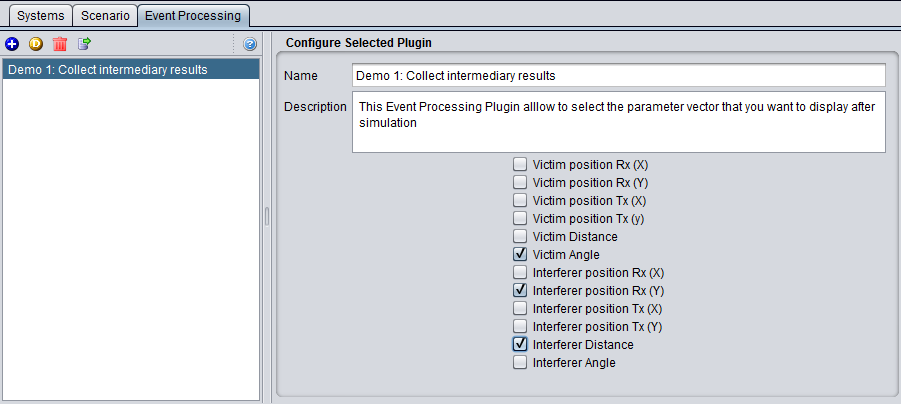
<div class="rich-media-item mediaSingleView-content-wrap image-align-start css-f99s35" id="bkmrk-figure-241%3A-configur"><div class="css-17h3awh"><div><div class="_2rko18qm _vchhusvi _kqswh2mm _ect4ttxp _p12f1osq _c71l1osq _1bsb1qmm _4t3ine4n _1hlmd0i9 _1rquusvi _eg541i5c _mts3kb7n _1ntskb7n _yfmhtlke _5sb1v00u new-file-experience-wrapper" id="bkmrk-figure-241%3A-configur-1"><div class="_1reo15vq _18m915vq _2rko18qm _1e0c1txw _kqswh2mm _p12f1osq _1bsb1osq _4t3i1osq _c71l1osq media-file-card-view"><div class="_kqswstnw _1bsb1osq _4t3i1osq _1e0c1txw _2lx21bp4 _1bah1h6o _4cvr1h6o align-center">F**igure 241: Configuring an <span>EPP</span>**</div><div class="_kqswstnw _1bsb1osq _4t3i1osq _1e0c1txw _2lx21bp4 _1bah1h6o _4cvr1h6o"></div></div></div></div></div></div>In case an <span>EPP</span> is used in a simulation, it can return a set of result. The <span>EPP</span> results are described in Section ‎12.7.